You pressed the set button and reinserted the battery, but your Defiant deadbolt remains silent. The keypad stays dark, the bolt will not move, and you are left wondering why the standard reset steps failed you. This frustrating scenario often stems from weak power sources or slight timing errors during the reset sequence.
This guide solves the defiant lock reset not working issue by detailing exact troubleshooting steps. You will learn how to verify battery voltage, execute the precise reset timing, and complete the critical door handing procedure. We also cover hardware checks to ensure your lock functions perfectly again.
Verify Battery Power and Connections

Power issues cause most reset failures. A battery might show enough charge to light the keypad but lack the voltage needed to run the internal motor or reset circuit.
Test Battery Voltage Levels
Use a multimeter to check your 9V battery. The reading must be at least 7 volts for the lock to function correctly. If the voltage is lower, replace the battery immediately even if it seems new.
Inspect Battery Terminals
Examine the metal contacts inside the battery compartment. Look for white corrosion, bent terminals, or debris. Clean any corrosion gently with a cotton swab and rubbing alcohol to ensure a solid connection.
Install a Fresh Alkaline Battery
Insert a brand new alkaline 9V battery. Avoid using rechargeable batteries as they often have lower voltage output. Ensure the battery snaps firmly into place so the terminals make full contact.
Pro Tip: Do not trust the keypad light alone. A dim light can indicate insufficient power for a full system reset.
Execute the Precise Reset Sequence
Timing is everything when resetting electronic locks. Many users fail because they release the button too early or insert the battery before holding the button.
Locate and Hold the Set Button
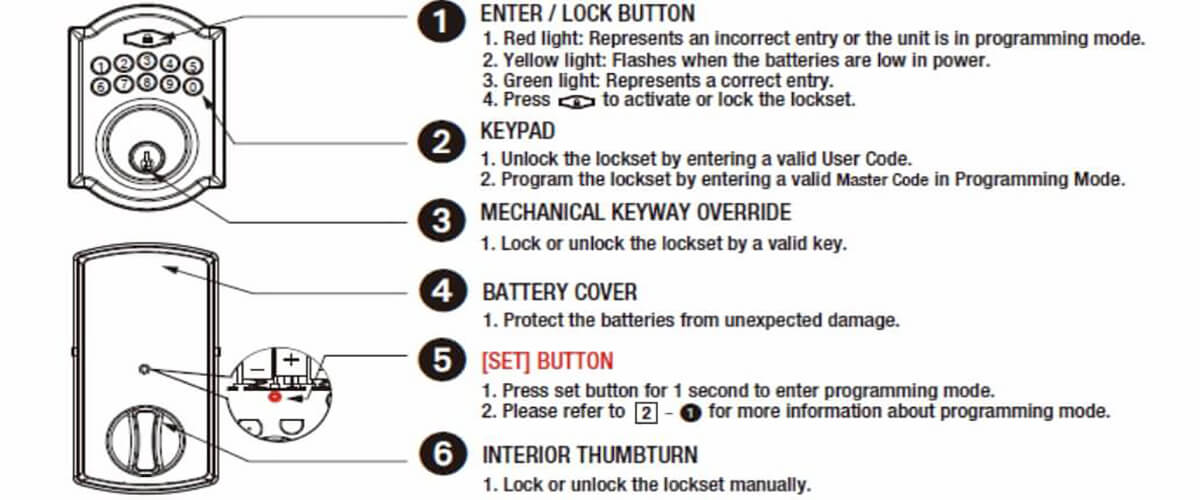
Find the Set button inside the battery compartment. Remove the battery completely. Press and hold the Set button firmly with your finger before doing anything else.
Reinsert Battery While Maintaining Pressure
While keeping the Set button depressed, slide the battery back into the compartment. You must maintain steady pressure on the button throughout this entire process. Do not tap the button.
Listen for Confirmation Beeps
Hold the button for at least 10 seconds after reinserting the battery. Wait for a specific sound pattern: one long beep followed immediately by one short beep. This sound confirms the factory reset is complete.
Note: If you do not hear the beeps, remove the battery, wait 20 seconds, and repeat the entire sequence.
Confirm Successful Factory Reset
Never assume the reset worked without verification. The lock provides specific audio and visual cues to tell you it has returned to factory defaults.
Identify the Correct Beep Pattern
The only sign of a successful reset is the long beep then short beep sequence. If you hear nothing or just a single beep, the reset did not register.
Watch for Green Keypad Flashes
After the beeps, the keypad backlight may flash green once. This indicates the lock is awake and ready to accept the default master code for programming.
Test with Default Master Code
Enter the default code 1-2-3-4-5-6. If the deadbolt retracts, the reset was successful. If the lock ignores the code, repeat the reset procedure from the beginning.
Common Mistake: Assuming silence means success. Without the distinct double beep, the lock retains its old settings.
Complete the Door Handing Procedure
A reset Defiant lock will not operate correctly until it learns your door orientation. Skipping this step makes it seem like the defiant lock reset not working problem persists.
Enter the Default Master Code
Type 1-2-3-4-5-6 on the keypad to wake the lock. Ensure you enter the digits clearly and wait for the green light indication.
Wait for the Automatic Cycle
Do not touch the lock for exactly 10 seconds after entering the code. The internal motor will activate automatically. You will hear the deadbolt extend and then retract on its own.
Verify Bolt Movement Direction
Watch the bolt move in and out. This action tells the lock which way your door swings. If the bolt does not move, the battery may be weak or the reset incomplete.
Warning: Failure to complete door handing causes the lock to push against the door frame instead of unlocking smoothly.
Reprogram Your Master Code
Once the lock resets and learns the door handing, you must set a new master code. Relying on the default code is a security risk.
Access Programming Mode
Press the Set button once while the lock is active. The green light will flash, indicating the lock is ready to record a new code.
Create a Secure Six-Digit Code
Enter your chosen 6-digit code. Avoid simple patterns like 111111 or 123456. Choose a number that is easy for you to remember but hard for others to guess.
Confirm and Test New Code
Re-enter the same code to confirm it. The lock will beep once to save it. Test the new code by locking and unlocking the deadbolt to ensure it works reliably.
Pro Tip: Write your new code down and store it in a secure location immediately. Forgetting it requires another full reset.
Troubleshoot Silent or Unresponsive Units
If the lock remains dead after following all steps, you may face a deeper hardware or firmware issue.
Check Keypad Responsiveness
Press random keys on the keypad. If the lights never turn on, the issue is likely power related. If lights appear but no beeps occur, the circuit board may be stuck.
Use the Mechanical Key Bypass
If electronics fail completely, use your physical key to unlock the door. This ensures you are not locked out while you continue troubleshooting the electronic components.
Perform a Hard Power Cycle
Remove the battery for 60 seconds to drain all residual power. Insert a fresh battery and immediately attempt the reset sequence again. This clears temporary firmware glitches.
Replace Faulty Hardware Components
Sometimes the issue lies with physical parts rather than the procedure. Damaged components can prevent the reset signal from reaching the processor.
Inspect the Battery Cover
A cracked or warped battery cover can prevent the Set button from being pressed fully. Check if the cover aligns correctly with the button mechanism.
Test Set Button Mechanics
Press the Set button with a small tool. It should click smoothly. If it feels sticky or stuck, apply a tiny amount of electrical contact cleaner and press repeatedly.
Evaluate Motor and Bolt Alignment
Listen for grinding noises or repeated beeping. These sounds suggest the motor is struggling or the bolt is misaligned with the strike plate. Adjust the door strike plate if necessary.
Prevent Future Reset Failures
Regular maintenance prevents the defiant lock reset not working issue from returning. Simple habits keep your electronic deadbolt reliable.
Clean Keypad Surfaces Monthly
Wipe the keypad with a slightly damp cloth to remove dirt and grime. Buildup can interfere with touch sensitivity and button response over time.
Replace Batteries Annually
Change the battery every 12 months regardless of performance. Old batteries leak and lose voltage, causing unpredictable lock behavior.
Test Reset Function Biannually
Every six months, perform a test reset to ensure the mechanism works. This practice keeps you familiar with the steps before an emergency occurs.
Secure Your Master Code
Store your master code in a password manager or safe. Losing this code forces you to rely on the reset process more often than necessary.
Frequently Asked Questions About Defiant Lock Resets
Why won’t my Defiant lock beep during reset?
The most common cause is low battery voltage. Even if the keypad lights up, the battery may lack the power to drive the speaker and motor. Replace the battery with a fresh alkaline 9V unit and ensure you hold the Set button before reinserting the battery.
What is the default master code for Defiant deadbolts?
The factory default master code is 1-2-3-4-5-6. You use this code immediately after a successful reset to enter programming mode and set your own custom code.
How do I know if the door handing procedure worked?
You will know it worked if the deadbolt automatically extends and retracts after you enter the default code and wait 10 seconds. If the bolt does not move, the procedure was not completed successfully.
Can I use a rechargeable battery in my Defiant lock?
It is not recommended. Rechargeable batteries often output lower voltage than standard alkaline batteries. This lower voltage can cause the lock to malfunction or fail to complete the reset sequence.
What should I do if the Set button feels stuck?
If the button does not click, try cleaning around it with compressed air or electrical contact cleaner. If the button remains unresponsive, the battery cover might be misaligned, or the internal switch may need replacement.
How often should I reset my electronic deadbolt?
You only need to reset the lock if you forget your code or experience technical glitches. Regular resetting is not necessary for maintenance, though testing the procedure twice a year is helpful.
Key Takeaways for Fixing Your Defiant Lock

The defiant lock reset not working problem usually comes down to three factors: weak batteries, incorrect timing, or skipped steps. Always start with a fresh 9V alkaline battery and verify the voltage is above 7 volts. Timing is critical, so hold the Set button before inserting the battery and wait for the distinct long and short beep.
Never skip the door handing procedure after a reset. Entering the default code 1-2-3-4-5-6 and waiting for the bolt to cycle automatically ensures your lock knows how to operate your specific door. If these steps fail, inspect the physical condition of the Set button and battery contacts.
Take action now by checking your current battery voltage and attempting the precise reset sequence again. With fresh power and correct timing, your Defiant deadbolt should return to full functionality immediately.