You just installed a Schlage FE595 Flex Lock and want to customize access for your household. The good news is that this lock comes pre-programmed and works right out of the box. To truly take control of your home’s security, you need to know how to program Schlage lock features like adding user codes, changing the master programming code, or disabling access during vacations.
This guide walks you through every step of programming the Schlage FE595 Flex Lock, from locating your unique programming code to performing a full factory reset. You will learn how to manage user codes, silence beeps, and troubleshoot common issues, all without needing tools or an app.
Find Your Schlage Programming Code
Locate the 6-Digit Master Code
Every Schlage FE595 Flex Lock comes with a unique six-digit programming code required for all setup tasks. This is not a user code. It cannot unlock the door. It is used only for programming functions.
Where to find it:
• On the front of the printed user guide
• On a label on the back of the keypad assembly
Keep it secure: Store this code in a password manager or locked drawer. Never leave it taped to the door or saved in your phone notes.
This code lets you:
• Add or delete user codes
• Change the programming code
• Disable all access
• Reset the lock
If lost and no codes work, a factory reset will restore access using the default code on the label.
Change the Programming Code
Secure Your Master Access
Using the default programming code is not unsafe, but changing it adds a layer of protection. This is especially helpful if someone had temporary access to your home.
Steps to change programming code:
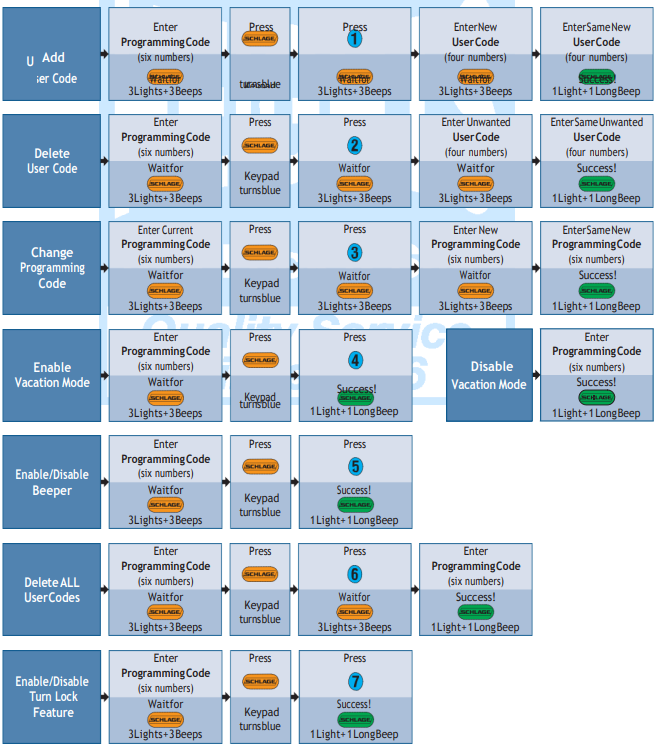
- Enter the current six-digit programming code
- Wait for three beeps and the Schlage button to turn orange
- Press Schlage, then 3
- Wait for three flashes and beeps
- Enter your new six-digit code
- Re-enter the same code to confirm
Success: One long beep and green light
Failure: Red flash. Try again
Critical rule: Your new programming code cannot start with the same four digits as any active user code. For example, if a user code is 1234, avoid 1234xx as your programming code.
After success, use the new code for all future programming tasks.
Add a User Code to Your Schlage Lock
Grant Access to Family or Guests
The lock supports up to 19 unique four-digit user codes. This is perfect for family members, dog walkers, or Airbnb guests.
How to add a code:
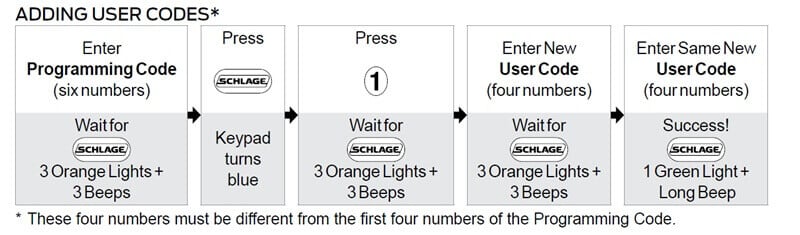
- Enter your six-digit programming code
- Wait for orange light and three beeps
- Press Schlage, then 1
- Enter a new four-digit code, such as 5555
- Wait for three flashes and beeps
- Re-enter the same code to confirm
Success: Green light and long beep
The lock exits programming mode automatically
Pro tip: Use memorable but non-obvious codes. Avoid 1111, 1234, or birthdays.
Each code works immediately after setup. No syncing or apps needed.
Delete a User Code
Revoke Access Instantly
Need to remove access for a former roommate or contractor? Delete their code in seconds.
How to delete a code:
- Enter your programming code
- Wait for orange backlight
- Press Schlage, then 2
- Enter the four-digit code you want to delete
- Re-enter the same code
Success: Green light and long beep
Time required: Less than 30 seconds
Security benefit: No trace of old codes remains
You can delete one code at a time. Repeat to remove multiple users.
Clear All User Codes
Start Fresh with One Command
Want to wipe all user access at once? Use this function after moving in or suspecting a security breach.
How to erase all codes:
- Enter your programming code
- Wait for orange backlight
- Press Schlage, then 6
- Backlight flashes three times
- Re-enter your programming code to confirm
Success: Flashing stops and lock exits mode
Warning: After this, no user codes will work, even previously saved ones. You must re-add each user manually.
Ideal for:
• New home purchases
• Rental property turnover
• Security resets
Disable All User Codes (Vacation Mode)
Lock Down Access Temporarily
Going on vacation? Use Disable All User Codes to block access while keeping your programming code active.
How to enable vacation mode:
- Enter your programming code
- When the Schlage button turns orange, press 4
- Light turns green. Done
Result:
• Entering any user code triggers red and green flashing light
• A high-low beep will sound
• The lever turns, but the bolt stays locked
No reprogramming needed. All codes are preserved.
How to re-enable access:
Simply enter your programming code again.
Access is instantly restored to all previous users.
Best use case: Long trips, house sitters, or when you are unsure who might have your code.
Turn Beepers On or Off
Silence the Audible Feedback
The lock beeps by default with every press. This is helpful but sometimes noisy at night.
How to disable beepers:
- Enter your programming code
- Press Schlage, then 5
- Green light confirms the change
Success: No more beeps during normal operation
Exception: The lock still beeps when the battery is low, even if beepers are off. This safety feature cannot be disabled.
To re-enable beeps, repeat the same steps.
Note: Disabling beeps does not affect visual feedback (light colors).
Factory Reset the Schlage FE595 Lock
Recover Access When Codes Are Lost
Locked out because no one remembers the programming code? A factory reset restores default settings.
How to reset to factory defaults:
- Remove the battery pack
- Press and release the Schlage button
- Reinsert the battery pack
- Immediately press and hold the Schlage button
- Hold until the backlight turns green and you hear a beep
Success: Lock resets to factory state
Now use the default six-digit programming code from the label to add new user codes.
Security note: Physical access to the battery compartment is required. This prevents remote resets.
After reset, you must reprogram all user codes from scratch.
Understand Light and Sound Signals

Decode What the Lock Is Telling You
The FE595 uses color and sound cues to guide you. Learn them to troubleshoot faster.
Programming Mode Indicators
| Light | Sound | Meaning |
|---|---|---|
| Orange | Three beeps | Programming mode active |
| Three flashes | Three beeps | Awaiting code entry |
| Green | Long beep | Operation succeeded |
| Red flash | Silent | Failed, lock exits programming mode |
User Access Feedback
| Light | Sound | Meaning |
|---|---|---|
| Red + green flash | High-low beep | User codes disabled, lock will not open |
| Red flash | None | Invalid code entered |
| Green light | Beep | Valid code, door unlocked |
Expert tip: Flashing patterns help diagnose issues even in silent mode.
Key Limits and Rules
Know What the Lock Cannot Do
Avoid frustration by understanding built-in limitations.
• Max user codes: 19
• User code length: Exactly 4 digits
• Programming code length: Exactly 6 digits
• No alpha characters: Codes are numbers only
• Programming code conflict rule: Cannot start with the same 4 digits as any active user code
• Beeper override: Cannot disable low-battery warning beeps
Example of invalid programming code:
If a user code is 2277, then 227711 is not allowed as the programming code.
Plan codes carefully to avoid conflicts.
Best Practices for Schlage Lock Security
Keep Your Lock Smart and Safe
A programmable lock is only as secure as your habits.
1. Use Unique Codes
Avoid repeating digits or simple sequences. Choose codes that are not easily guessed.
2. Change Programming Code After Tenants Leave
Even if you delete their user code, someone might know the master code.
3. Store Codes Securely
Use a password manager or physical lockbox. Never a sticky note on the door.
4. Enable Vacation Mode
Instead of deleting all codes, disable them temporarily. Re-enable with one code entry.
5. Monitor Battery Warnings
When you hear the low-battery beep every 30 seconds, replace batteries soon. The lock runs on 4 AA batteries.
6. Test Codes Regularly
Ensure family members’ codes still work, especially after resets or updates.
Quick Reference: Programming Commands
| Action | Keypad Sequence |
|---|---|
| Add user code | Prog Code, then Schlage + 1, then Enter 4-digit code twice |
| Delete user code | Prog Code, then Schlage + 2, then Enter code twice |
| Change programming code | Prog Code, then Schlage + 3, then Enter new 6-digit code twice |
| Disable all user codes | Prog Code, then 4 |
| Clear all user codes | Prog Code, then Schlage + 6, then Confirm with Prog Code |
| Turn off beeper | Prog Code, then Schlage + 5 |
| Factory reset | Remove battery, then Press Schlage, then Reconnect, then Hold Schlage until green |
Print tip: Save this list as a cheat sheet near your lock for quick access.
Frequently Asked Questions About Programming Schlage Locks
How do I find my Schlage programming code?
Your six-digit programming code is located on the front of the printed user guide that came with your lock. You can also find it on a label on the back of the keypad assembly. This code is required for all programming tasks and cannot open the lock itself.
How many user codes can the Schlage FE595 hold?
The Schlage FE595 Flex Lock supports up to 19 unique user codes. Each code must be exactly four digits long and contain numbers only. This allows you to assign individual codes to family members, guests, cleaners, or contractors.
How do I reset my Schlage FE595 to factory settings?
To perform a factory reset, first remove the battery pack. Press and release the Schlage button, then reconnect the battery. Immediately press and hold the Schlage button until the backlight turns green and you hear a beep. After reset, use the default programming code from your label.
Can I disable user codes without deleting them?
Yes. The Schlage FE595 has a vacation mode that temporarily disables all user codes while preserving them. Press your programming code, then press 4 when the Schlage button turns orange. The light will turn green, confirming all user codes are disabled until you re-enable them with your programming code.
Why will my Schlage lock not accept a new programming code?
Your new programming code cannot start with the same four digits as any active user code. For example, if you have a user code set to 1234, you cannot use 1234xx as your programming code. Choose a new six-digit code that does not share the first four digits with any user code.
How do I silence the beeping on my Schlage lock?
Enter your programming code, press Schlage, then press 5. A green light confirms the beeper is now disabled. Note that the lock will still beep when the battery is low, as this safety feature cannot be turned off.
Key Takeaways for Programming Your Schlage FE595 Lock
You now know how to program Schlage lock features on the FE595 Flex Lock with full control over access, sound, and security. From adding a babysitter’s code to enabling vacation mode or recovering access through a factory reset, these steps put you in charge of your home’s digital security.
Remember that the six-digit programming code is your master key to control. Protect it, change it when needed, and use features like temporary disable to enhance home security during extended absences.
For other Schlage models like Sense, Encode, or Connect, always refer to the model-specific Digital User Guide, as programming steps may vary. Bookmark this guide now so you have a reliable reference the next time you need to update codes, troubleshoot issues, or secure your home before a trip.