Buying a home with an existing smart lock can feel exciting until you realize you cannot access it. Performing an August lock reset is the only way to erase old codes and claim full ownership of the device. Without this step, the previous owner retains digital control over your front door.
This guide explains exactly how to disconnect keypads, run factory resets via the app, and handle situations where the seller is unresponsive. You will learn specific troubleshooting steps to ensure your new smart home security works perfectly from day one.
Disconnect Your August Keypad Before Resetting
You must remove any paired keypad before attempting a full system reset. Leaving the keypad connected often causes synchronization errors that prevent the main lock from clearing its memory properly.
Locate Keypad Settings in the App
Open the August app on your phone while standing within 30 feet of the door. Tap your specific lock name on the home screen to access its menu. Navigate to Settings and select Keypad Settings to find the disconnect option. Choose Disconnect Keypad to begin the removal process.
Enter Scent Code to Confirm Removal
The app will prompt you for the scent code, which is a factory-set 4-digit number. This code is not your personal entry PIN but a hardware identifier found on the original packaging.
- Input the correct 4-digit scent code when prompted.
- Press and hold the August logo on the physical keypad until it vibrates.
- Wait for the mobile app to display a confirmation message.
- Remove the batteries from the keypad temporarily to stop interference.
Pro Tip: If you cannot find the scent code, check the back of the keypad unit or the original box. You cannot complete this step without it.
Execute Factory Reset Through August App
The official method for an August lock reset requires the mobile application. This process is secure, permanent, and ensures all previous user data is wiped clean from the device memory.
Navigate to Advanced Settings Menu
Ensure your phone remains within 30 feet of the lock throughout this process. Open the August app and select your lock from the device list. Tap Settings followed by Advanced Settings. Scroll down the menu until you see the Factory Reset option.
A warning message will appear stating that this action erases all access codes. It also removes the lock from the current account entirely. Confirm you are ready to lose all current permissions before proceeding.
Approve Reset and Watch Indicators
Tap Reset Lock to start the sequence. The physical lock will emit a beep while its status light flashes red and green simultaneously. Wait approximately 10 to 15 seconds for the internal process to finish.
- Look for a solid green light to indicate success.
- Ensure the lock no longer responds to old access codes.
- Verify the keypad shows no activity or pairing prompts.
Warning: This action is irreversible. All schedules, guest permissions, and automation rules are permanently deleted.
Steps When Seller Won’t Reset the Lock
Buyers often face issues if the previous owner refuses or forgets to reset the device. You cannot force an August lock reset without the original account holder initiating it through their app.
Request Transfer Via Customer Support
Contact August Customer Support directly if the seller is uncooperative. You must submit legal proof of ownership such as a deed, bill of sale, or closing documents. Request a manual lock transfer or approval for a reset.
August may take up to 30 days to verify your documents and process the request. During this waiting period, the seller technically retains digital access unless they act first.
Accelerate the Ownership Transfer
To avoid long delays, ask the seller to open their August app immediately. Provide them with simple instructions so they can complete the reset in under two minutes. Suggest they delete the lock from their device list once the factory reset confirms.
Key Fact: Deleting the app does not remove ownership. Only a confirmed factory reset severs the cloud link and transfers control.
Verify Success After August Lock Reset
A successful August lock reset clears all data and prepares the hardware for a fresh configuration. You must verify specific visual cues to ensure the process completed correctly.
Check Visual Reset Indicators
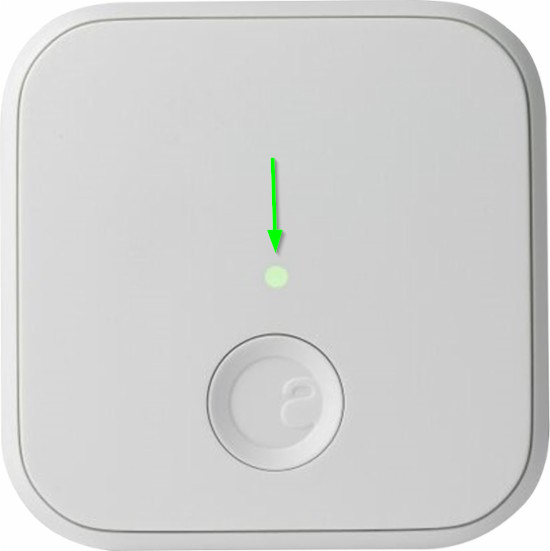
Look for a flashing red and green light sequence followed by a solid green light. Try using old access codes to confirm the lock rejects them. The keypad should show no activity or prompt for pairing mode if reconnected.
If lights remain red or blink irregularly, the reset likely failed. Check your battery levels and retry the steps if necessary.
Prepare Device for New Setup
Install fresh batteries in both the main lock and the keypad after a successful reset. Download the August app if you have not already done so. Follow the in-app prompts to pair the lock to your Wi-Fi and personal account.
- Reconnect the keypad using the current scent code.
- Set up your primary access PIN.
- Configure any desired auto-lock schedules.
Time Estimate: Full reconfiguration takes about 8–10 minutes with a strong signal.
Avoid These Common Reset Mistakes
Even simple procedures can fail if you overlook critical details. Avoid these frequent errors to ensure your August lock reset works on the first try.
Attempting Reset Outside Bluetooth Range
The August app communicates directly with the lock via Bluetooth. Standing too far away causes timeout failures during the reset command.
Fix: Stand within 10–15 feet of the door. Disable Wi-Fi on your phone temporarily to prioritize the Bluetooth connection. Close other background apps to prevent interference.
Confusing Scent Code With Access Code
Many users mistake their personal PIN for the scent code. The scent code is a static 4-digit number printed on the keypad back panel or original box.
Tip: Write this code down and store it securely after setup. It is essential for any future resets or keypad re-pairing.
Skipping Keypad Disconnection Step
Leaving the keypad connected during the main lock reset causes pairing conflicts. The system may think the keypad is still authorized.
Best Practice: Always disconnect the keypad before resetting the main lock unit.
Troubleshoot Failed Reset Attempts
Sometimes the lock does not respond as expected. Use these solutions if your August lock reset command fails.
No Response After Reset Command
If the lock does not flash or beep after you tap reset:
- Replace the batteries immediately since low power prevents execution.
- Restart your smartphone and relaunch the August app.
- Force-close the app completely and log back in.
Retry the reset from Advanced Settings after performing these checks.
Lock Remains Paired to Old Account
If the lock still accepts old codes or appears in the seller’s app, the reset did not complete. Have the seller check their device list to ensure the lock is gone. Repeat the entire reset process, confirming each step carefully.
Note: A true factory reset severs all cloud links. If access persists, contact August support immediately for assistance.
Keypad Refuses to Re-Pair
After resetting, the keypad might refuse to reconnect to the main unit.
Re-Pair Keypad Successfully
- Open the August app on your phone.
- Go to Lock Settings and select Keypad.
- Choose Pair New Keypad from the menu.
- Enter the scent code when the app prompts you.
- Press the August logo on the physical keypad.
Wait for a confirmation vibration and a green light on the device. Ensure keypad batteries are new and aligned correctly if errors persist.
Physical Reset Options Without the App

Many users ask if they can perform an August lock reset without the app or seller access.
No Direct Hardware Reset Exists
Unlike some other brands, August models do not support pinhole resets or button combinations. There is no physical way to trigger a factory reset on these devices.
Reality Check: Your only options are getting the seller to reset it remotely or waiting for August support to verify ownership. No third-party tool or hack bypasses this security feature.
Prevent Future Access Issues
Protect your investment after completing your August lock reset by following smart security practices.
Enable Auto-Reset When Selling
When you eventually sell your home, reset the lock before closing day. Document the reset with a timestamped video and share the confirmation with your real estate agent. This avoids last-minute delays and liability issues for everyone involved.
Store Scent Code Securely
Keep the scent code in a password manager or a safe physical location. Never tape it to the lock or leave it with house cleaners.
Never share it publicly or post photos of the keypad back online.
Use Temporary Access Codes
Instead of giving permanent access, use the August app to generate one-time or scheduled codes. These codes expire automatically for guests or service workers. You will not need to reset the lock again just to remove their access.
Frequently Asked Questions About August Lock Reset
Can I reset an August lock without the original owner?
No, you cannot force a reset without the original owner initiating it via their app. You must contact August Support with proof of ownership to request a manual transfer, which can take up to 30 days.
What is the scent code on an August keypad?
The scent code is a default 4-digit factory code used to pair or disconnect the keypad. It is located on the back of the keypad or the original packaging and is different from your personal entry PIN.
How do I know if the August lock reset was successful?
A successful reset shows a flashing red and green light followed by a solid green light. The lock will also reject all previous access codes and appear as unpaired in the app.
Does deleting the August app remove my lock access?
No, deleting the app does not reset the lock or remove your ownership. You must perform a factory reset within the app settings to sever the connection and clear all data.
Can I factory reset August lock using a physical button?
No, August locks do not have a physical pinhole or button combination for factory resets. The entire process must be completed through the official August mobile application.
Key Takeaways for a Successful August Lock Reset
Performing an August lock reset is essential for securing your new home and removing previous owner access. Always disconnect the keypad first, use the app within Bluetooth range, and verify the solid green light indicator. If the seller is unresponsive, contact August Support immediately with your proof of ownership.
Take action today by checking your lock status and ensuring no old codes remain active. Follow these steps carefully to guarantee your smart home security is fully under your control.