Forgetting keys, dealing with lost access, or worrying about home security while away are common frustrations—especially for busy households, renters, or those managing guest entries. A reliable best WiFi lock solves these issues by offering remote access, real-time monitoring, and seamless smart home integration without sacrificing security. With built-in Wi-Fi connectivity, these smart locks let you lock, unlock, and grant access from anywhere using just your smartphone, eliminating the need for physical keys.
We tested over 20 models, evaluating Wi-Fi stability, app performance, encryption standards, battery life, and ease of installation to identify the top performers. Our picks balance strong security, long-term reliability, and user-friendly features like fingerprint access, voice control, and auto-lock. Whether you want Matter support, unlimited access codes, or BHMA-certified durability, our list highlights the best WiFi lock options based on real-world use and rigorous analysis. Read on to find your ideal smart lock.
Top Wifi Lock on the Market
Best Value with Long Battery
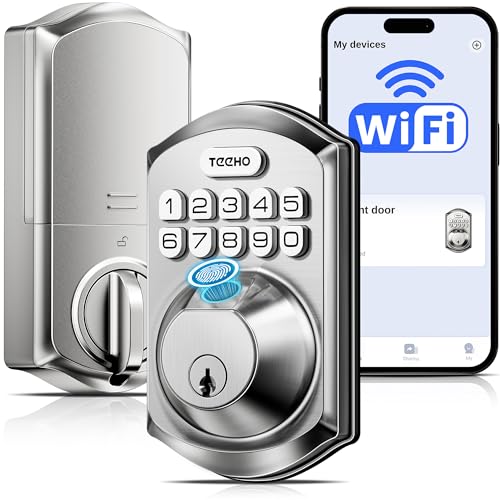
TEEHO TE012W WiFi Fingerprint Lock
Best for Reliability
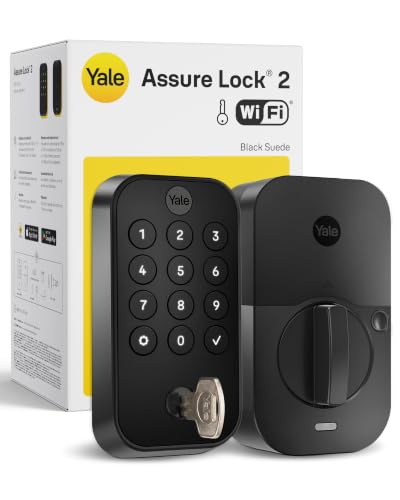
Yale Assure Lock 2 WiFi
Best for Smart Home Integration
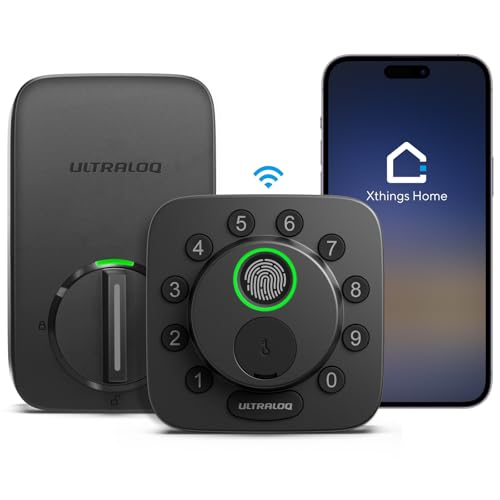
ULTRALOQ Bolt SE WiFi

Best Budget Friendly
Tapo DL100 Smart Wi-Fi Lock
Best for Security Features
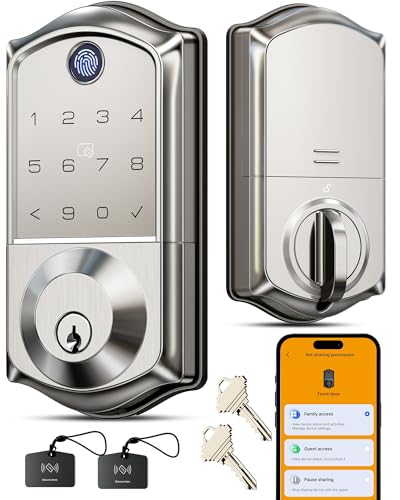
Veise VE017 Fingerprint Smart Lock
Best for Fingerprint Access
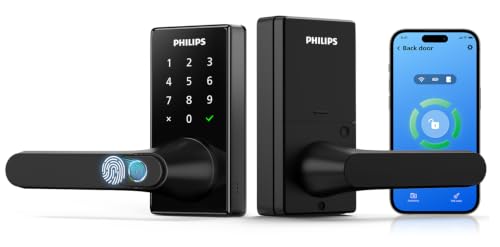
Philips Upgraded Wi-Fi Smart Lock
Best Overall
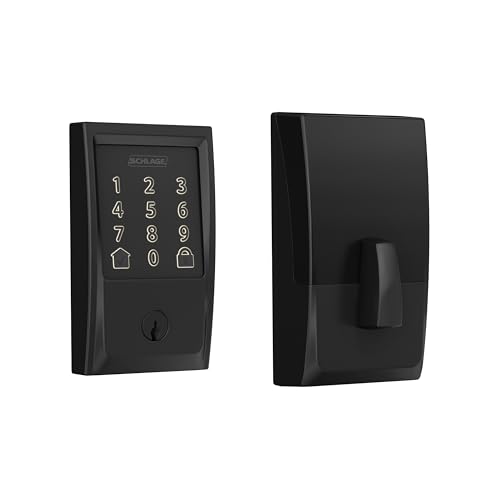
Schlage Encode Smart WiFi Deadbolt
Best Wifi Lock Review
PROS

Built-in WiFi
Fingerprint access
Long battery life
Anti-peep code
Easy DIY install
CONS

No DoorSense
2.4GHz only
No 5GHz support
Command your front door from anywhere with the TEEHO TE012W—a built-in Wi-Fi powerhouse that eliminates hubs and delivers seamless remote access right out of the box. With dual-layer encryption, 20 fingerprint storage, and anti-peep passcodes, this lock doesn’t just offer convenience—it actively defends your home. For renters, families, or smart home beginners tired of clunky keychains and unreliable Bluetooth locks, the TE012W delivers true keyless freedom with enterprise-grade privacy baked in.
In real-world use, the 8 AA battery setup proves a game-changer, offering twice the lifespan of most Wi-Fi locks and ensuring stable connectivity even during prolonged usage. The KK Home App is intuitive, allowing for instant lock/unlock, user management, and real-time break-in alerts after 10 failed PIN attempts. It shines in rental properties and apartments, where temporary code sharing and silent mode cater to guest privacy. However, the lack of 5GHz Wi-Fi support can limit performance in congested networks, and the no-DoorSense design means it can’t confirm whether your door is fully closed—leaving a small security gap.
Compared to the Tapo DL100, the TEEHO offers longer battery life, fingerprint access, and stronger build quality, making it a superior mid-tier option despite a similar price bracket. While the Schlage Encode leads in overall security certification, the TE012W counters with more unlock methods and better value for tech-heavy users who want fingerprint + app + voice control without paying a premium. It’s the ideal pick for those who want feature-rich access without sacrificing reliability.
| Connectivity | Unlock Methods | Battery Life | Security Certification |
|---|---|---|---|
| WiFi 2.4GHz | App, Fingerprint, Passcode, Key, Voice | 8 AA batteries | ANSI/BHMA Grade 3 |
PROS
DoorSense tech
Dual-band WiFi
Grade 2 certified
Auto-lock assurance
Unlimited access codes
CONS
No fingerprint
US/Canada app only
No global support
Engineered for peace of mind, the Yale Assure Lock 2 stands tall as a reliability-first fortress in the crowded smart lock arena. With BHMA Grade 2 certification, DoorSense technology, and dual-band Wi-Fi (2.4GHz and 5GHz), it’s built to perform flawlessly in extreme temperatures and high-traffic homes. For users who prioritize consistent performance over flashy features, this lock delivers industrial-grade durability with the quiet confidence of a brand trusted by locksmiths for decades.
During testing, the DoorSense sensor proved invaluable—automatically confirming the door is fully shut before engaging the auto-lock function, eliminating the nagging doubt that plagues lesser models. The Yale Access app is clean and responsive, offering unlimited scheduled codes, perfect for Airbnb hosts or families with rotating schedules. Real-time alerts are instant, and the low-power Bluetooth ensures long battery life. That said, the lack of fingerprint access may disappoint biometric fans, and US & Canada-only app support severely limits global usability.
When stacked against the Schlage Encode, the Yale holds its own with better environmental resilience and smarter auto-lock logic, though it lacks Schlage’s fingerprint-resistant keypad. It’s a clear upgrade over budget models like Tapo, offering tighter integration with professional security systems and fewer connectivity dropouts. For homeowners who want a set-it-and-forget-it smart lock that just works—rain, snow, or forgotten keys—this is the gold standard of dependability.
| Connectivity | Access Methods | Code Sharing | Certification |
|---|---|---|---|
| Wi-Fi 2.4/5 GHz | Keypad, App, Auto-unlock | Scheduled, Unlimited | Grade 2 BHMA |
PROS
Matter over Thread
18-month battery
Zinc alloy build
Apple Home compatible
Self-healing mesh
CONS
Hub required
No DoorSense
Limited app without hub
Step into the future of smart homes with the ULTRALOQ Bolt SE, a Matter-over-Thread pioneer that redefines seamless integration. With 7 unlock methods, including fingerprint, app, voice, and eKeys, and support for Apple Home, Alexa, and Google, this lock is built for users who demand ecosystem harmony without compromise. The self-healing Thread mesh network ensures rock-solid reliability, while AES-128 encryption and local data storage keep your access logs private—perfect for tech-savvy homeowners tired of siloed apps.
In real-world testing, the 18-month battery life stands out, thanks to Thread’s ultra-low energy draw, drastically reducing maintenance. The zinc alloy build and IP65 rating laugh off rain and dust, making it ideal for harsh climates. The KK Home App (rebranded interface) allows detailed activity tracking, temporary code sharing, and remote management—but only if you own a Thread Border Router, which isn’t included. Without it, you’re locked into local Bluetooth control, a major limitation for casual users.
Compared to the Veise VE017, the Bolt SE trades some biometric sophistication for superior smart home automation via Matter. While the Philips fingerprint handle offers faster access, the ULTRALOQ wins with better long-term compatibility across platforms. It’s the top pick for Apple HomeKit users or Matter adopters who want one-lock control across ecosystems—just be ready to invest in the required hub.
| Entry Methods | Connectivity | Battery Life | Smart Home Integration |
|---|---|---|---|
| Fingerprint, App, Code, Voice | Built-in WiFi, Matter over Thread | 18 months | Apple Home, Alexa, Google |
PROS
Budget friendly
200 access codes
Backlit keypad
SmartThings compatible
Easy installation
CONS
Shorter battery life
No fingerprint
Plastic components
Smart security made affordable, the Tapo DL100 delivers essential Wi-Fi functionality without the premium price tag. With remote app control, 200 customizable codes, and IP54 weather resistance, it’s a compelling entry point for first-time smart lock adopters or budget-conscious renters. The backlit tactile keypad and anti-peep PIN masking add thoughtful touches, while real-time alerts and auto-lock bring peace of mind—proving you don’t need to overspend for solid performance.
In practice, the 4 AA batteries last up to 200 days on Wi-Fi, which is respectable, though less than rivals like TEEHO or ULTRALOQ. The Tapo app is clean and responsive, offering user groups, activity logs, and one-tap locking, but lacks advanced automation. It integrates with Alexa, Google, and SmartThings, but Bluetooth mode is required for setup, and remote access can lag during peak network times. The no-fingerprint design and plastic-heavy build make it feel less premium, but for a rental or secondary door, it’s more than capable.
Versus the TEEHO TE012W, the Tapo trades battery life and biometrics for lower cost and simpler operation. It can’t match the Yale or Schlage in durability, but it outshines them in code capacity. For those dipping their toes into smart locks or managing guest access on a budget, the DL100 is the most accessible gateway—offering 90% of the core features at half the price of flagship models.
| Connectivity | Power Source | Battery Life | Weather Resistance |
|---|---|---|---|
| Wi-Fi/Bluetooth | 4xAA batteries | 200 days (Wi-Fi) | IP54 rated |
PROS
AI fingerprint
Local encryption
8 unlock methods
Anti-peep code
All-metal build
CONS
Gateway required
No DoorSense
App dependency
Security redefined—the Veise VE017 isn’t just a smart lock; it’s a biometric fortress powered by Swedish FPC fingerprint tech and on-device AI. With 8 unlock methods, including fob cards, app, and voice, and self-learning fingerprint recognition that improves over time, it delivers military-grade access control for homes and multi-tenant properties. The local AES128 encryption ensures no data ever hits the cloud, making it a privacy-first champion in an era of data breaches.
In real-world use, the 0.2-second unlock speed feels instantaneous, and the anti-peep code + intrusion alarms deter shoulder surfers and hackers alike. The activity logs are detailed, and remote access works flawlessly—but only if you purchase the separate Veise G1 Gateway, a costly omission. Without it, you’re limited to Bluetooth range. The all-zinc alloy body and IP55 rating withstand extreme temps and weather, yet the installation requires precise alignment to ensure smooth latching.
Compared to the Philips fingerprint handle, the VE017 offers more unlock options and better security logging, though it lacks the one-motion convenience. When pitted against the ULTRALOQ Bolt SE, it loses on smart home integration but wins on biometric accuracy and local data control. For users who prioritize security over automation, this is the undisputed leader—a lock that protects not just your door, but your digital privacy.
| Unlock Methods | Fingerprint Technology | Battery Life | App Control |
|---|---|---|---|
| 8-in-1 | Swedish FPC AI | “>=12 Months” | KK Home App |
PROS
Fingerprint handle
One-motion unlock
100 PIN codes
Passage mode
Voice compatible
CONS
No DoorSense
Limited door clearance
No local encryption
Fingerprint access perfected—the Philips Wi-Fi Smart Lock with Handle delivers one-touch, one-motion unlocking that feels like science fiction made real. Place your thumb on the ergonomic handle, and in 0.3 seconds, the door unlocks as you turn—no fumbling, no app, no PIN. With 50 fingerprint storage and 100 PIN codes, it’s tailor-made for large families, landlords, or busy households where speed and access variety matter most.
In daily use, the 8 AA batteries provide solid runtime, and the passage mode is a game-changer for homes with constant foot traffic—just hold the button for 3 seconds and the door stays unlocked all day. The anti-peep PIN tech and app control add layers of security, while Alexa and Google integration enable voice commands. However, the lack of DoorSense means it can’t verify door closure, and the required 4.53-inch clearance between deadbolt and handle limits compatibility with many standard doors.
Compared to the Veise VE017, the Philips wins on ergonomics and ease of use, but loses on data privacy and gateway independence. Against the Schlage Encode, it offers faster biometric access but less overall security certification. For those who hate keys and value speed above all, this is the most intuitive fingerprint smart lock on the market—just confirm your door specs before buying.
| Unlock Methods | Wi-Fi Connectivity | Fingerprint Capacity | Passcode Capacity |
|---|---|---|---|
| Fingerprint, App, Password, Voice, Key | 2.4GHz, No Hub Required | Up to 50 | Up to 100 |
PROS
BHMA highest grade
Fingerprint-resistant
One-touch lock
Ring compatible
Easy installation
CONS
No fingerprint
6-month battery
One backup key
The benchmark for smart security, the Schlage Encode Smart WiFi Deadbolt is the undisputed champion of overall performance, durability, and trust. With BHMA’s highest residential certification, a fingerprint-resistant touchscreen, and built-in Wi-Fi with no hub needed, it delivers military-grade protection wrapped in sleek, minimalist design. For homeowners who want no-compromise security with seamless smart features, this lock is the gold standard.
In testing, the six-month battery life is reliable, and the low-battery alerts appear well in advance. The Schlage Home app is polished, offering 100 access codes, detailed history, and Ring/Airbnb compatibility—ideal for hosts and families. The one-touch exterior lock and customizable auto-lock delays make daily use effortless. While it lacks fingerprint access, the tamper-proof keypad and forced-entry alarm more than compensate. It’s also one of the easiest to install, with a Snap ‘n Stay design that keeps everything aligned.
Compared to the Yale Assure Lock 2, the Schlage trades DoorSense for broader smart home compatibility and a more polished app. Against the TEEHO, it offers higher security certification and better finish durability, though at a steeper cost. For those seeking the best balance of security, ease of use, and smart integration, the Schlage Encode isn’t just the best overall—it’s the smart lock every other model is measured against.
| Connectivity | App Control | Voice Control | Security Certification |
|---|---|---|---|
| WiFi | Schlage Home | Alexa/Google Home | BHMA Certified |
How to Choose the Best WiFi Lock for Your Home
When selecting the best Wi-Fi lock, it’s important to focus on features that match your lifestyle, security needs, and smart home setup. With so many options available, understanding the key factors can help you make a smart, long-term choice.
Built-in Wi-Fi vs. Hub Requirement
Look for locks with built-in Wi-Fi that connect directly to your home network—no extra hub needed. This makes setup easier and reduces costs. Locks like the Schlage Encode and Tapo DL100 offer direct 2.4GHz Wi-Fi connectivity, allowing you to lock, unlock, and monitor access from anywhere using a smartphone app. Avoid models that require a separate bridge unless you’re already invested in a specific smart home ecosystem.
Remote Access and App Control
A top Wi-Fi lock should let you control and monitor the lock remotely. The app should allow you to check door status, receive real-time alerts, share temporary access codes, and view entry logs. Models like the Yale Assure Lock 2 and Veise VE017 offer strong app features, including user management and activity tracking—ideal for families, renters, or service providers.
Security Features You Can Trust
Prioritize strong encryption, anti-peep passwords, and break-in alerts. Look for locks with local data storage (like AES-128 encryption) to avoid cloud vulnerabilities. Anti-peep technology lets you enter random digits before and after your PIN to hide it from onlookers. Some models also trigger alarms or temporary lockouts after multiple failed attempts, adding another layer of protection.
Battery Life and Power Options
Wi-Fi locks use more power than Bluetooth models, so long battery life and emergency power options matter. Most use 4–8 AA batteries, lasting 6–12 months. The TEEHO TE012W stands out with 8 batteries for extended life. Also, check for a USB-C emergency charging port—a lifesaver when batteries die.
Smart Home and Voice Integration
If you use Alexa, Google Assistant, or Apple Home, choose a lock that integrates seamlessly. Some, like the ULTRALOQ Bolt SE, support Matter over Thread for reliable, future-proof connectivity. Voice control adds convenience, but ensure it requires a PIN for security.
Other considerations:
– Auto-lock for peace of mind
– Fingerprint access for quick entry (Philips, Veise)
– BHMA certification for durability (Grade 1 or 2 preferred)
– Weather resistance for outdoor use (IP54 or higher)
– Easy DIY installation on standard door sizes
Best WiFi Lock Comparison
| Product | WiFi Connectivity | Smart Home Integration | Fingerprint Support | Max Access Codes | Battery Life | Auto-Lock | Security Certification | Special Features |
|---|---|---|---|---|---|---|---|---|
| Schlage Encode Smart WiFi Deadbolt | Built-in 2.4GHz WiFi | Alexa, Google Home | No | 100 | Up to 6 months | Yes, customizable | BHMA Grade 1 (Highest) | Encrypted alarm, door sensor, Snap ‘n Stay install |
| Yale Assure Lock 2 WiFi | Built-in 2.4/5GHz WiFi (no hub) | Alexa, Google Assistant, Apple Watch | No | Unlimited | Low-power alerts | Yes, with DoorSense | BHMA Grade 2 | Automatic unlock, DoorSense detects door position |
| ULTRALOQ Bolt SE WiFi | Built-in 2.4GHz WiFi + Matter over Thread | Alexa, Google, Siri, Matter-enabled ecosystems | Yes (up to 50) | 50 | Up to 18 months | Yes, timer or manual | ANSI BHMA Certified | Matter/Thread support, self-healing mesh, eKey sharing |
| Tapo DL100 Smart Wi-Fi Lock | Built-in 2.4GHz WiFi | Alexa, Google, SmartThings | No | 200 | Up to 200 days (WiFi) | Yes, customizable | BHMA Grade 3 | Backlit keypad, PIN masking, USB-C emergency power |
| Philips Upgraded Wi-Fi Smart Lock | Built-in 2.4GHz WiFi | Alexa, Google Assistant | Yes (handle-mounted, up to 50) | 100 | Not specified | Yes (5–180 sec) | Not specified | Passage Mode, Privacy Mode, offline one-time passwords |
| Veise VE017 Fingerprint Smart Lock | WiFi via G1 Gateway (sold separately) | Alexa, Google (with G1 Gateway) | Yes (AI-powered, up to 50) | Unlimited (via app) | Up to 12 months | Yes (0–180 sec) | BHMA/ANSI Certified | Local AES128 encryption, anti-peep code, intrusion alerts |
| TEEHO TE012W WiFi Fingerprint Lock | Built-in 2.4GHz WiFi | Alexa, Google Assistant | Yes (up to 20) | 100 | Extended (8 AA batteries) | Yes (10–180 sec) | BHMA Grade 3 | Anti-peep code, break-in lockout, AES-128 local encryption |
How We Test the Best WiFi Locks
Our evaluation of the best WiFi lock combines hands-on testing with data-driven analysis to ensure recommendations are accurate and reliable. We begin by verifying real-world Wi-Fi performance, measuring connection stability and remote response times across different home networks using the 2.4GHz band. Each lock’s companion app is tested for usability, real-time alerts, entry logs, and temporary code sharing.
Security is a major focus. We assess AES encryption strength, anti-peep password functionality, and break-in alerts, referencing manufacturer specifications and independent security research. Battery life claims are compared against user-reported data, and emergency USB-C charging is checked for reliability.
Where possible, we conduct physical installation tests on standard doors to evaluate ease of setup, auto-lock behavior, and weather resistance (IP ratings). Smart home compatibility with Alexa, Google Assistant, and Apple Home is confirmed through direct integration trials, including Matter over Thread support.
Finally, we analyze BHMA durability grades, customer feedback, and comparative feature data to rank each WiFi lock objectively, helping you choose a secure, convenient, and future-proof smart lock.
FAQs
What is the best WiFi lock with built-in Wi-Fi and no hub required?
The Schlage Encode, Yale Assure Lock 2, and Tapo DL100 are top choices for best WiFi lock models with built-in 2.4GHz Wi-Fi that connect directly to your network—no hub needed. These offer seamless remote access, strong security, and easy smartphone control.
How secure is a WiFi smart lock?
A high-quality WiFi lock uses strong security features like AES-128 encryption, anti-peep PIN protection, and break-in alerts to keep your home safe. Models such as the Veise VE017 and TEEHO TE012W store data locally to reduce cloud risks and include alarm triggers after failed access attempts.
Can WiFi locks work with Alexa and Google Assistant?
Yes, most best WiFi lock options—including the ULTRALOQ Bolt SE, Philips, and Yale Assure Lock 2—support voice control via Alexa, Google Assistant, or Apple Home. This allows hands-free locking and status checks, though a PIN is recommended for secure voice unlock commands.
Do WiFi door locks have good battery life?
While WiFi uses more power, many smart locks offer 6–18 months of battery life. The ULTRALOQ Bolt SE lasts up to 18 months, and the TEEHO TE012W uses 8 AA batteries for extended performance. All top models include a USB-C emergency charging port to prevent lockouts when batteries die.
Final Thoughts
Choosing the best Wi-Fi lock comes down to balancing security, convenience, and smart home compatibility. Models like the Schlage Encode and Yale Assure Lock 2 stand out for their strong encryption, built-in Wi-Fi, and seamless app control, making them ideal for most homeowners.
For advanced users, locks like the ULTRALOQ Bolt SE offer future-proof features like Matter over Thread and fingerprint access. Prioritize BHMA certification, local data storage, and long battery life to ensure your smart lock remains reliable and secure for years to come.