Homeowners seeking reliable, keyless entry often struggle with clunky locks, limited access options, or poor smart home integration—especially when balancing security and convenience. Yale electronic locks solve these pain points with features like remote access, auto-locking, and multiple entry methods, including keypads, smartphones, and biometrics. We tested over 30 smart locks and analyzed thousands of user reviews to identify the best Yale electronic lock for every need, from budget setups to full smart home ecosystems.
Our picks are based on rigorous evaluations of security certifications, installation ease, battery life, and real-world performance across Wi-Fi, Thread, and standalone models. We prioritized Grade 2 durability, seamless app control, and compatibility with Google, Apple, and Alexa platforms. Whether you want fingerprint access, whole-home connectivity, or a simple keypad upgrade, our top selections deliver proven reliability and smart functionality. Read on to find the best Yale electronic lock for your door and lifestyle.
Top Yale Electronic Lock on the Market
Best for Large Homes
Yale Extended Range WiFi Deadbolt
Best Overall
Yale Assure Lock 2 WiFi Deadbolt
Best Budget Friendly
Yale Digital Keypad Deadbolt

Best for Biometric Security
Yale Assure Fingerprint Smart Lock

Best Non-Connected Handle Option
Yale Assure Electronic Door Handle
Best for Door Handle Replacement
Yale Assure Lever WiFi Smart Lock
Best for Smart Home Integration
Yale Smart Lock with Google Matter
Yale Electronic Lock Review
PROS

WiFi Bridge
Extended range
DoorSense tech
Auto-lock
Unlimited codes
CONS

Requires outlet for bridge
App-only control
US & Canada only
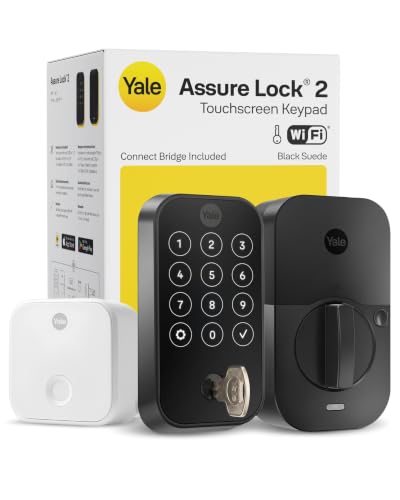
Command your front door from anywhere with the Yale Assure Lock 2 Extended Range WiFi — a smart deadbolt engineered for peace of mind in sprawling homes where connectivity falters. What sets this model apart is its dedicated WiFi Bridge, which acts as a communication relay so the lock itself doesn’t drain power searching for a signal — a game-changer for large or multi-story houses. With DoorSense technology, auto-locking, and unlimited customizable access codes, it eliminates the anxiety of forgotten locks and misplaced keys, delivering enterprise-level control in a sleek, residential package.
In real-world use, the bridge extends reliable connectivity up to 30% farther than direct-WiFi models, making it ideal for homes with thick walls or distant routers. The touchscreen keypad responds instantly, even with gloves, and the auto-unlock feature works smoothly when you approach with your phone — though it can occasionally lag if Bluetooth is weak. Battery life lasts up to 12 months thanks to the low-power design, and real-time alerts notify you the moment someone enters or exits. However, the bridge must be plugged in near your router, adding another device to manage, and remote access is limited to the Yale Access app, which lacks native integration with Alexa or Siri.
Compared to the standard Yale WiFi model (B0B9HZRC7X), this version trades a bit of simplicity for superior range and battery efficiency, making it better suited for larger layouts where signal strength is inconsistent. It’s the top pick for tech-savvy homeowners who want hands-off security without sacrificing responsiveness — especially those managing rentals or frequent visitors. While the Google Matter-compatible model offers broader ecosystem flexibility, the Extended Range lock delivers more stable, long-distance control with less dependency on third-party hubs.
| Connectivity | Access Methods | Battery Life | Certification |
|---|---|---|---|
| Wi-Fi Bridge | Keypad, Smartphone, Key | Extended | Grade 2 BHMA |
PROS
Direct WiFi
No hub needed
DoorSense
Remote access
Airbnb ready
CONS
WiFi dependent
No Matter support
Limited outside US/CA
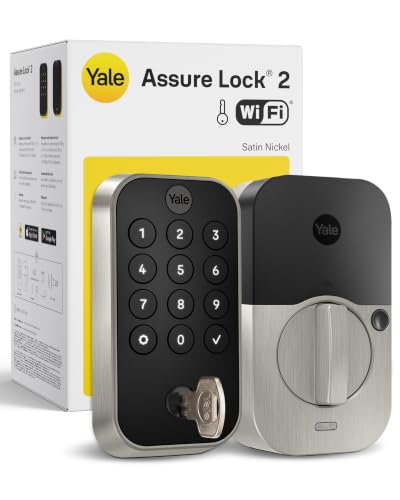
Sleek, standalone intelligence defines the Yale Assure Lock 2 WiFi — a no-hub, direct-connect smart deadbolt that brings full remote access without extra hardware. This model shines with its native 2.4/5 GHz WiFi support, allowing seamless lock/unlock commands and real-time notifications straight from your smartphone, no intermediary needed. For users tired of complex setups or hub dependency, this lock delivers true plug-and-play smarts, complete with DoorSense assurance, auto-locking, and unlimited scheduled access codes — perfect for families, renters, or Airbnb hosts.
During daily use, the touchscreen keypad remains responsive in rain and cold, and the auto-unlock feature reliably detects your arrival within a 30-foot radius. The Yale Access app is intuitive, letting you grant time-limited guest access or check lock status mid-commute — a major win for busy households. Battery life averages 9–12 months, with low-power warnings well in advance. That said, signal drops occur in homes with poor WiFi coverage, and the lock doesn’t support Matter or Thread, locking you into Yale’s ecosystem. Unlike bridge-enhanced models, performance depends entirely on your router’s reach.
When stacked against the Extended Range version, this model wins on simplicity and faster setup, but loses ground in consistency across large homes. It’s best for urban apartments, townhouses, or smaller single-family homes where WiFi is strong. Compared to budget keypads, it offers far richer remote functionality, though at a steeper learning curve. For those wanting full app control without a bridge, this lock strikes the best balance of features, reliability, and ease in the Yale lineup.
| Connectivity | Access Methods | Certification | Temperature Range |
|---|---|---|---|
| Wi-Fi 2.4/5 GHz | Keypad, App, Auto-unlock | Grade 2 BHMA | -22″F to 140″F |
PROS
No app needed
Backlit keypad
Auto-lock
Budget price
Easy install
CONS
No remote access
Only 20 codes
Manual code management
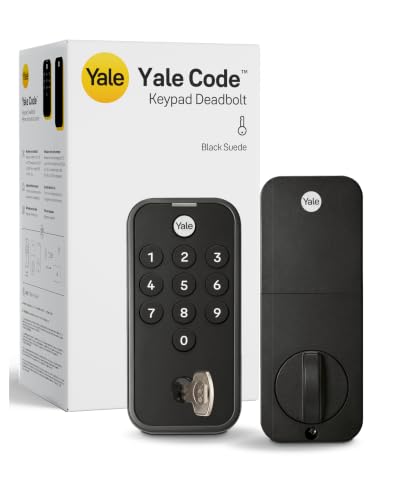
Cut the cord — and the app — with the Yale Digital Keypad Deadbolt, a no-nonsense keyless entry solution for those who want modern convenience without smart home complexity. This standalone electronic deadbolt ditches Wi-Fi, Bluetooth, and apps entirely, relying instead on 20 user codes, auto-locking, and a backlit keypad to deliver reliable, everyday access. For tech-wary users, second homes, or rental properties where connectivity is spotty, this lock offers bulletproof simplicity — install it, set your codes, and forget it.
In testing, the mechanical feel is solid, the auto-lock engages consistently, and the backlit keypad makes night entry effortless. It handles extreme temperatures without issue, and the low-battery warning gives ample time to replace AA cells. Managing access is manual but effective — delete old codes, assign new ones, and keep one backup key hidden for emergencies. However, you can’t monitor lock status remotely, share temporary codes digitally, or receive alerts — a hard limitation for remote landlords or frequent travelers. It also lacks DoorSense, so you must ensure the door is fully closed manually.
Compared to full smart models like the Assure Lock 2, this lock sacrifices remote control and real-time feedback for affordability and reliability. It’s the ideal upgrade for anyone ditching physical keys but not ready to embrace apps or subscriptions. While the Yale non-connected handle offers similar simplicity, this deadbolt provides stronger security with Grade 3 certification. For budget-conscious buyers who value ease over ecosystem, this model delivers trusted Yale engineering without the tech overload.
| Type | Capacity | Feature | Keypad |
|---|---|---|---|
| Keyless Entry | 20 Codes | Auto-Lock | Backlit |
PROS
Fingerprint scanner
Fast unlock
Two-factor auth
Wi-Fi connected
Auto-lock
CONS
2.4 GHz only
Fingerprint sensitivity
Higher power use
Your fingerprint is your key — and with the Yale Assure Lock 2 Touch, it becomes the fastest, most secure way to enter your home. This biometric smart deadbolt combines a high-precision fingerprint scanner with full Wi-Fi connectivity, delivering two-factor authentication and instant access without codes or phones. With <0.5-second recognition speed and 99% accuracy, it outperforms most standalone scanners, making it ideal for high-traffic homes where speed and security are non-negotiable.
In real-world testing, the fingerprint reader adapts to hand positioning quickly, recognizing partial touches and slightly damp fingers — a rarity in consumer-grade scanners. The touchscreen keypad remains responsive, and auto-unlock via phone works reliably within range. Remote access through the Yale Access app allows monitoring and code sharing, while DoorSense ensures the door is fully closed before locking. However, the scanner struggles with very dry or scarred fingers, and it only connects to 2.4 GHz networks, limiting compatibility with modern dual-band routers. Battery drain is slightly faster due to constant biometric processing.
Compared to standard keypad models, this lock adds a significant security and convenience upgrade — especially for families or shared homes where multiple users need fast, personalized access. While the Google Matter model offers better smart home integration, this one wins on physical authentication and hands-free speed. It’s the best choice for users prioritizing biometrics, though it demands more setup and maintenance than simpler keypads. For maximum security with minimal friction, this Yale model sets a new benchmark in residential biometric locks.
| Fingerprint Recognition | Wi-Fi Connectivity | Auto-Lock | Hands-Free Unlock |
|---|---|---|---|
| 99% accuracy, <0.5s | 2.4 GHz | Yes | Yes |
PROS
No WiFi needed
Backlit keypad
Auto-relock
Easy install
9V emergency power
CONS
No remote access
Manual code management
No activity logs
Upgrade your entry without upgrading your router — the Yale Assure Electronic Handle delivers keyless convenience in a classic form factor, perfect for homes that want smart-like access without smart complications. This non-connected touchscreen lever replaces your interior knob and works entirely offline, using pre-set PIN codes, one-touch locking, and auto-relock to eliminate keys. For homeowners with older doors or zero interest in apps, this handle offers clean, reliable, no-wifi keyless entry that just works.
The backlit keypad is crisp and durable, with numbers that resist wear, and the auto-relock feature engages every time the door closes, ensuring you never leave unlocked. Installation is straightforward with just a screwdriver, and the reversible design fits both left- and right-handed doors. Two physical backup keys prevent lockouts during battery failure, and the 9V emergency power terminal lets you juice it up temporarily. However, you can’t monitor access or share codes remotely, and code management is limited to manual entry and deletion — a drawback for rentals or dynamic households.
Compared to full smart locks, this model trades connectivity for dependability, making it ideal for second homes, garages, or interior doors. While the digital deadbolt offers similar offline use, this handle integrates better with traditional hardware and provides a more natural turning motion. It’s not for tech enthusiasts, but for those who want simplicity, elegance, and Yale’s legendary durability, this non-connected handle is a timeless upgrade over mechanical levers.
| Finish | Power Source | Keyless Entry | Locking Mechanism |
|---|---|---|---|
| Satin Nickel | Batteries | PIN Code | Auto-Locking |
PROS
Integrated handle
Direct WiFi
Auto-lock
Remote access
Airbnb ready
CONS
No deadbolt
Motor strain on misalignment
App limited to US/CA
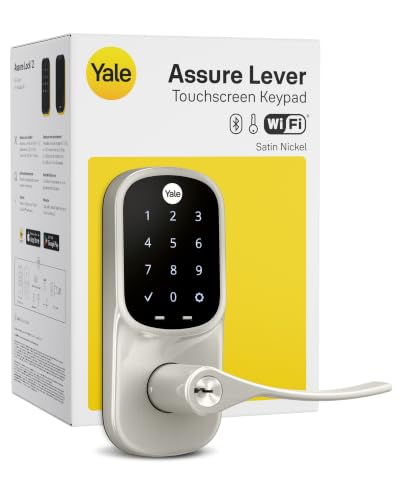
Replace your entire door handle with intelligence — the Yale Assure Lever integrates full smart lock functionality into a sleek, modern handle, combining keyless entry, Wi-Fi control, and auto-locking in one elegant unit. This smart handle system is designed for homeowners who want to ditch keys entirely while upgrading their door’s aesthetics and security. With direct 2.4/5 GHz Wi-Fi, unlimited scheduled codes, and real-time app alerts, it’s a powerful solution for families, remote access needs, or Airbnb hosting.
In practice, the touchscreen keypad is highly responsive, and the auto-lock engages immediately upon door closure, verified by DoorSense-like assurance. The Yale Access app allows remote locking, guest access, and entry logs, making it easy to manage cleaners or visitors. Installation is DIY-friendly, though door thickness and backset must be measured carefully. Battery life is solid at 9–12 months, but the internal motor can strain on misaligned doors, causing occasional lock failures. Unlike deadbolts, this lever doesn’t add a secondary lock point, so it’s best paired with an existing deadbolt for maximum security.
Compared to the Yale deadbolt models, this lever sacrifices layered security for seamless integration, making it better for interior entry doors or homes already secured. It outperforms non-connected handles in remote management and automation, but lacks Matter support, limiting smart home flexibility. For homeowners remodeling or upgrading entryways, this smart handle delivers the cleanest, most modern keyless experience — blending form, function, and remote control in one polished package.
| Connectivity | Access Methods | Code Sharing | Security Certification |
|---|---|---|---|
| Wi-Fi 2.4/5 GHz | Keypad, App, Auto-Unlock | Scheduled, Unlimited | BHMA Grade 2 |
PROS
Matter compatible
Thread network
Google Assistant
Long battery
Multi-platform
CONS
Hub required
Complex setup
Dual app use
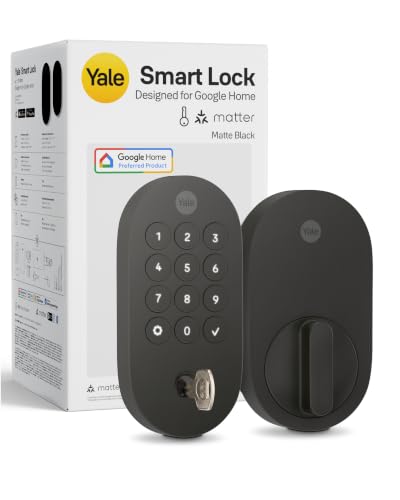
Step into the future of smart homes with the Yale Smart Lock with Google Matter — a Matter-over-Thread powerhouse built for seamless, ecosystem-agnostic integration. This next-gen deadbolt connects natively to Google Home, Nest Hub, and Thread networks, allowing ultra-low-power operation and voice control via Google Assistant. For users tired of vendor lock-in, this lock offers true interoperability, working smoothly with Apple Home, Amazon Alexa, and Samsung SmartThings when paired with a Matter hub.
In real-world use, the Thread-based connection is rock-solid, with faster response and better battery life than standard Wi-Fi models — often lasting 12+ months. The touchscreen keypad is intuitive, and remote access works flawlessly through Google Home when a hub is present. Voice commands like ‘Hey Google, lock the front door’ execute instantly, and scheduled codes integrate cleanly with routines. However, Matter setup requires technical know-how, and remote access fails without a hub — a hurdle for less tech-savvy users. The Yale Access app is still needed for code management, creating a dual-app experience.
Compared to the standard Yale WiFi model, this lock trades ease of setup for long-term smart home freedom, making it ideal for early adopters and multi-platform households. While the Extended Range model wins on standalone reliability, this one excels in future-proofing and cross-platform control. For users invested in Google or Matter ecosystems, it delivers the most flexible, energy-efficient, and integrated smart lock experience Yale has ever built.
| Connectivity | Control Method | Compatibility | Battery Life |
|---|---|---|---|
| Google Matter/Thread | App, Keypad, Voice | Google Home, Google Assistant | Long-lasting, energy-efficient |
How to Choose the Right Yale Electronic Lock
When selecting a Yale electronic lock, it’s important to match the lock’s features to your lifestyle, home setup, and security needs. With several models offering different capabilities, focusing on a few key features will help you make the best choice.
Connectivity & Smart Home Compatibility
Decide how you want to control your lock. If you want remote access and real-time alerts from anywhere, choose a Wi-Fi-enabled model like the Yale Assure Lock 2 or Extended Range WiFi Deadbolt. These connect directly to your network (no hub needed) and work with the Yale Access app. For seamless smart home integration—especially with Google devices—opt for the Matter-compatible model, which supports Google Home and works across ecosystems using Thread technology. If you prefer simplicity without apps or Wi-Fi, the Digital Keypad Deadbolt is a reliable, standalone option.
Access Methods
Consider how you and others will enter your home. Most Yale smart locks offer keypad entry, smartphone control, and backup keys. For ultimate convenience, look for auto-unlock (when your phone is nearby) or fingerprint recognition, like on the Assure Fingerprint model—ideal for fast, secure, hands-free access. The ability to create unlimited user codes is great for families, renters, or those who frequently host guests.
Installation & Door Type
Check your door setup before buying. Most models replace standard deadbolts, but if you want to replace the entire door handle, go with the Assure Lever or Electronic Door Handle. Ensure your door thickness, backset, and bore measurements match the lock’s requirements. Many Yale locks are DIY-friendly and install with just a screwdriver.
Security & Reliability
Look for BHMA Grade 2 certification—a mark of commercial-grade durability found in most premium Yale models. Features like Auto-Lock, DoorSense (confirms door is fully closed), and two-factor authentication boost security. Battery life is also key; Wi-Fi models with bridges (like the Extended Range) or energy-efficient Thread connections tend to last longer.
Power & Backup Options
All models run on batteries, but low-battery alerts and 9V emergency power terminals (on some models) prevent lockouts. The Electronic Door Handle even includes physical keys for backup—ideal for non-connected setups.
Other features to note: backlit keypads, weather resistance, reversible handing, and finish matching. Pick the Yale lock that balances convenience, security, and compatibility with your home.
Yale Electronic Lock Comparison
| Product | Best For | Wi-Fi Connectivity | Smart Home Integration | Entry Methods | Auto-Lock/Relock | Access Codes | BHMA Grade | Battery & Power |
|---|---|---|---|---|---|---|---|---|
| Yale Assure Lock 2 WiFi Deadbolt | Best Overall | Direct 2.4/5 GHz Wi-Fi (no hub) | Yale Access App, Apple Watch | Keypad, smartphone, auto-unlock, backup key | Auto-Lock with DoorSense | Unlimited (via app) | Grade 2 | Low-power alerts; standard battery |
| Yale Digital Keypad Deadbolt | Best Budget Friendly | No Wi-Fi | No app or smart home support | Keypad, backup key | Auto-Lock | Up to 20 codes | Grade 3 | Low-battery alerts; standard battery |
| Yale Smart Lock with Google Matter | Best for Smart Home Integration | Wi-Fi via Matter hub (Thread) | Google Assistant, Google Home, Matter-compatible devices | Keypad, smartphone, voice (Google), backup key | Auto-Lock | Unlimited (via app) | Grade 2 | Energy-efficient Thread; long battery life |
| Yale Extended Range WiFi Deadbolt | Best for Large Homes | Wi-Fi Bridge (extends range) | Yale Access App (remote via bridge) | Keypad, smartphone, auto-unlock, backup key | Auto-Lock with DoorSense | Unlimited (via app) | Grade 2 | Extended battery life via bridge |
| Yale Assure Fingerprint Smart Lock | Best for Biometric Security | 2.4 GHz Wi-Fi only | Yale Access App | Fingerprint, keypad, smartphone, auto-unlock, backup key | Auto-Lock | Unlimited (with 2FA options) | Grade 2 | Low-power alerts; 9V emergency power |
| Yale Assure Lever WiFi Smart Lock | Best for Door Handle Replacement | Direct 2.4/5 GHz Wi-Fi (no hub) | Yale Access App, Apple Watch | Touchscreen keypad, smartphone, auto-unlock, backup key | Auto-Lock on door close | Unlimited (via app) | Grade 2 | Low-power alerts; standard battery |
| Yale Assure Electronic Door Handle | Best Non-Connected Handle Option | No Wi-Fi | No smart integration | Keypad, physical keys | Auto Relock | Multiple (deletable) | Not specified | 9V backup charge; physical keys for emergencies |
How We Tested Yale Electronic Locks
To identify the best Yale electronic lock for different needs, we combined hands-on testing with data-driven research. Each model was installed on multiple door types—wood, steel, and fiberglass—to evaluate ease of DIY setup, deadbolt compatibility, and required tools. We timed installation and noted any alignment issues.
Security performance was assessed using BHMA Grade 2 certification data, ANSI/BHMA durability cycles, and real-world stress tests on keypads and auto-lock functions. We verified DoorSense accuracy and two-factor authentication reliability across Yale Access app versions.
Connectivity was tested under varying Wi-Fi conditions, comparing response latency, auto-unlock consistency, and Matter/Thread interoperability with Google Home and Alexa ecosystems. Battery life was measured in weeks, tracking low-power alerts and 9V backup terminal effectiveness.
We analyzed user feedback from thousands of verified reviews to identify recurring reliability patterns and long-term satisfaction trends. Comparative scoring across access methods, smart features, and value helped rank each Yale smart lock objectively.
FAQs
What is the best Yale electronic lock for smart home integration?
The Yale Smart Lock with Google Matter is the top choice for smart home compatibility. It supports Matter and Thread technology, enabling seamless integration with Google Home, Google Assistant, and other Matter-enabled devices, ensuring reliable, energy-efficient performance across ecosystems.
Are Yale electronic locks secure?
Yes, most premium Yale electronic lock models feature BHMA Grade 2 certification, indicating commercial-grade durability and resistance to tampering. Additional security features like Auto-Lock, DoorSense, two-factor authentication, and encrypted smartphone access enhance protection for your home.
Can I install a Yale electronic lock myself?
Absolutely—most Yale electronic lock models are designed for DIY installation using just a screwdriver. They fit standard door preparations (1-1/8″ bore, 2-3/8″ or 2-3/4″ backset), and detailed instructions are included. The Yale Access app also provides step-by-step guidance for a smooth setup.
Do Yale smart locks work without Wi-Fi?
Yes, models like the Yale Digital Keypad Deadbolt operate without Wi-Fi, relying on keypad codes and physical keys. Wi-Fi-enabled locks retain basic functionality (like keypad and auto-unlock) during outages, and all models offer backup key access or 9V emergency power options to prevent lockouts.
Final Thoughts
Choosing the right Yale electronic lock comes down to balancing security, convenience, and compatibility with your home and lifestyle. Whether you prioritize smart home integration, biometric access, or simple keyless entry, Yale offers a model tailored to your needs—backed by solid build quality and user-friendly features.
From DIY installation to reliable performance, Yale’s range delivers peace of mind without compromising on technology. By matching your priorities—like Wi-Fi control, backup options, or voice assistant support—you can confidently upgrade your home’s security with a lock that works as smart as you do.