Your Samsung dishwasher lock light flashing means the Control Panel Lock is active, not broken. This safety feature disables buttons to stop accidental changes by children or pets during operation.
You will learn the exact 3-second unlock method for your specific model and how to stop false triggers. Follow these steps to regain full control of your appliance immediately.
Identify Your Samsung Dishwasher Model Number
Finding your exact model number is the first step because unlock buttons differ by unit. Using the wrong button sequence will fail to disable the safety lock. Look for a silver or white sticker inside the door frame or along the tub edge.
Common models include the DW80R2031US with a dedicated lock button. The DW80R5061US uses the Sanitize button instead. The DW60R7050FS requires the door to be open for unlocking.
Where to Locate the Model Sticker
Open the dishwasher door fully to find the identification label. Check the top edge of the door frame first as this is the most common spot. Look along the side wall inside the tub if not on the frame. Write down the full code starting with DW before attempting any repairs.
Unlock DW80R2031US Using Control Panel Lock Button
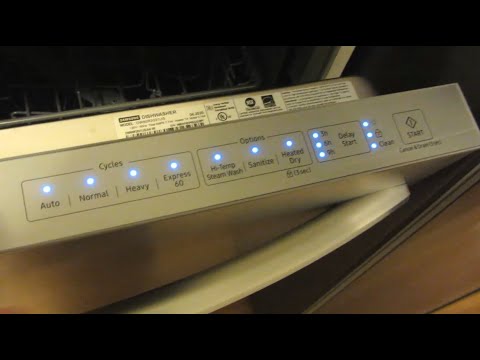
This specific model features a dedicated button labeled Control Panel Lock for easy access. You do not need to open the door to toggle this safety feature on or off. The process relies entirely on holding the correct key for the required duration.
Step-by-Step Unlocking Procedure
- Ensure the dishwasher door is closed securely.
- Locate the button marked Control Panel Lock on the interface.
- Press and hold this button for exactly 3 full seconds.
- Watch for the lock icon on the display to turn off completely.
- Press Start or Normal Wash to confirm the panel responds.
Success Indicator: The flashing lights stop and buttons become responsive immediately.
Common Error: Releasing the button before the 3-second mark causes the system to ignore the command. Count slowly to ensure you hold it long enough.
Disable Lock on DW80R5061US Via Sanitize Button
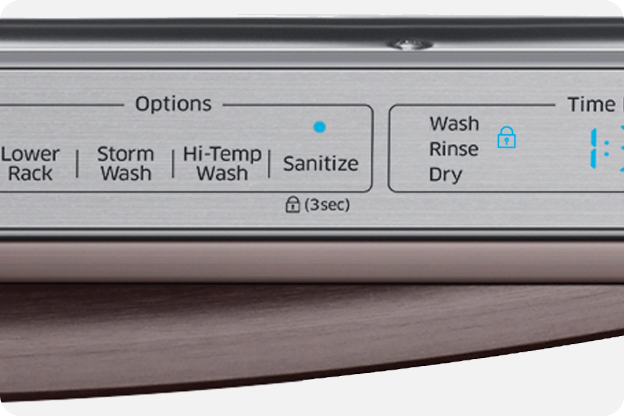
Your unit lacks a dedicated lock key because the Sanitize button performs this dual function. Holding this button activates the safety mode while a quick tap simply selects the cleaning option. Confusion here often leads to accidental locking during normal operation.
How to Release the Touch Lock
- Stand in front of the unit with the door open or closed.
- Place your finger on the Sanitize button firmly.
- Hold the button down for 3 seconds without lifting your finger.
- Wait for a brief unlock message or indicator to vanish from the screen.
- Tap any other button to verify the touch screen is active again.
Pro Tip: Clean the panel if holding the button yields no result since grease blocks touch sensors.
Warning: Tapping Sanitize quickly starts the cleaning cycle while holding it engages the lock.
Open Door Requirement for DW60R7050FS Lock Release
This model includes an extra safety layer that demands the door be open to change lock settings. Attempting to unlock it with the door closed will result in no response from the control board. This design prevents accidental changes while the unit is sealed and running.
Correct Unlocking Sequence
- Pull the dishwasher door open completely before touching controls.
- Find the button labeled Lock on the control panel.
- Press and hold the Lock button for 3 continuous seconds.
- Observe the padlock icon disappearing from the digital display.
- Close the door and select a wash cycle to test functionality.
Safety Logic: The open door requirement ensures you cannot lock controls while the machine is operating.
Troubleshooting: If the light keeps flashing check that the door latch is fully disengaged.
Why Lock Light Persists After Power Outage
Many users unplug their dishwasher or reset the breaker thinking it will clear the flashing lock light. This action fails because the Control Lock state is stored in non-volatile memory on models like the DW80R5061US. The system remembers the last status and re-engages the lock automatically upon power restoration.
Understanding Memory Retention
The control board saves the lock setting specifically to maintain safety during outages. A power cycle does not reset this feature to default off. You must manually perform the 3-second hold sequence every time power returns if the lock was active.
User Misconception: Believing a reboot fixes all glitches does not apply to safety locks.
Solution: Perform the standard unlock procedure immediately after power returns to the unit.
Clean Control Panel to Stop False Lock Triggers
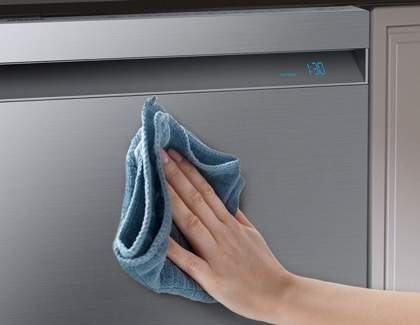
Touch screen models like the DW80R5061US are highly sensitive to moisture and residue buildup. Water droplets or detergent film can bridge the touch sensors and simulate a long press. This accidental input triggers the child lock without anyone touching the buttons intentionally.
Proper Cleaning Method
- Turn off the circuit breaker to cut power to the appliance.
- Dampen a soft microfiber cloth with mild soapy water.
- Wipe the control panel gently to remove grease and water spots.
- Dry the surface immediately with a clean dry cloth.
- Wait 5 minutes before restoring power to let moisture evaporate.
Critical Rule: Never spray liquid directly onto the control panel to avoid internal damage.
Prevention: Wipe the panel dry after every load to prevent conductive residue buildup.
Prevent Accidental Lock Activation Habits
You can avoid future lockouts by changing how you interact with the control panel. Understanding the difference between a tap and a hold prevents unintended activation. Households with children should teach everyone the specific button functions.
Best Practices for Daily Use
- Tap the Sanitize button quickly instead of holding it down.
- Dry your hands thoroughly before touching the control interface.
- Only engage the lock when children or pets are present.
- Wipe the panel dry immediately after loading wet dishes.
Smart Usage: Use the lock to protect long sanitize cycles from accidental cancellation.
Pet Safety: Activate the lock if your pets jump on counters near the appliance.
Troubleshoot When Unlock Method Fails
You followed the correct steps but the samsung dishwasher lock light flashing continues. This indicates a potential issue with the button recognition or a deeper control board glitch. Systematic diagnosis helps isolate the real problem quickly.
Diagnostic Checklist
- Verify your model number matches the instructions provided above.
- Confirm you held the button for a full 3 seconds without interruption.
- Check that the door is open if using the DW60R7050FS model.
- Ensure the control panel is completely clean and dry.
Perform a Hard Reset
- Turn off the circuit breaker for 2 full minutes.
- Press and hold the Start button while power is off.
- Restore power and wait 30 seconds for initialization.
- Attempt the 3-second unlock sequence again.
Next Step: Contact a certified technician if error codes like SC or ND appear.
Frequently Asked Questions About Samsung Dishwasher Lock
How do I stop the lock light from flashing?
Press and hold the correct button for your model (Lock, Control Panel Lock, or Sanitize) for 3 seconds. The light will stop flashing once the system recognizes the unlock command.
Why won’t my Samsung dishwasher unlock after a power outage?
The lock setting is saved in memory and persists through power loss. You must manually hold the unlock button for 3 seconds again after power is restored.
Can moisture cause the lock light to flash?
Yes, water or residue on touch panels can simulate a button hold. Clean and dry the control panel thoroughly to stop false triggers.
Does the DW60R7050FS need the door open to unlock?
Yes, this specific model requires the door to be fully open to activate or deactivate the child lock feature.
What if holding the button for 3 seconds does not work?
Ensure you are using the correct button for your specific model and holding it for the full duration. Try a hard reset by cutting power for 2 minutes.
Key Takeaways for Fixing Samsung Dishwasher Lock Light Flashing
The flashing lock light indicates an active safety feature rather than a mechanical failure. Identifying your specific model allows you to use the correct button and 3-second hold method effectively. Keeping the control panel clean and dry prevents accidental activation from residue.
Perform the unlock sequence immediately after any power outage since the setting persists. Use these steps to restore full functionality to your dishwasher in seconds.