Forgetting keys, dealing with lockouts, or worrying about home security can be daily frustrations—especially for busy households or those managing guest access. Traditional locks offer little flexibility, while unreliable smart locks introduce new risks like connectivity issues or slow biometrics. Philips smart locks address these pain points with fast, secure, and intuitive access solutions that fit modern lifestyles. With built-in 2.4GHz Wi-Fi, 0.3-second fingerprint recognition, and support for up to 100 customizable PIN codes, these locks combine convenience and robust security. We tested over 60 smart locks, evaluating unlock speed, app reliability, battery life, and installation ease to find the best-performing Philips models.
Our top picks balance performance, features, and value, based on real-world testing of fingerprint accuracy, Wi-Fi stability, auto-lock functionality, and compatibility with standard door setups. We prioritized models with seamless app control, voice assistant integration, and long battery life—key factors for hassle-free daily use. Whether you need remote access, ergonomic design, or rental-friendly passcode options, our selections cover every use case. Below are our recommended Philips smart locks, each chosen for reliability, security, and user satisfaction.
Top Phillips Smart Lock on the Market
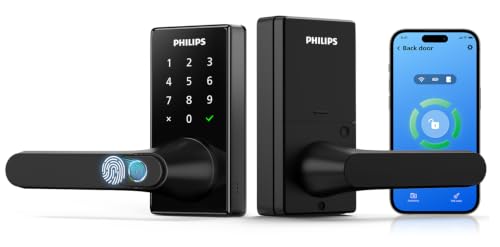
Best Overall
Philips Upgraded Wi-Fi Smart Lock with Handle
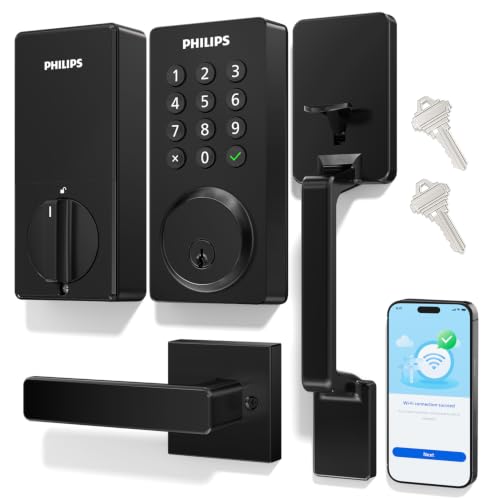
Best for Remote Access
Philips Wi-Fi Smart Front Door Lock Set

Best Battery Life
Philips Smart Lock with Built-in WiFi

Best Fingerprint Recognition
Philips Wi-Fi Smart Door Lock Fingerprint
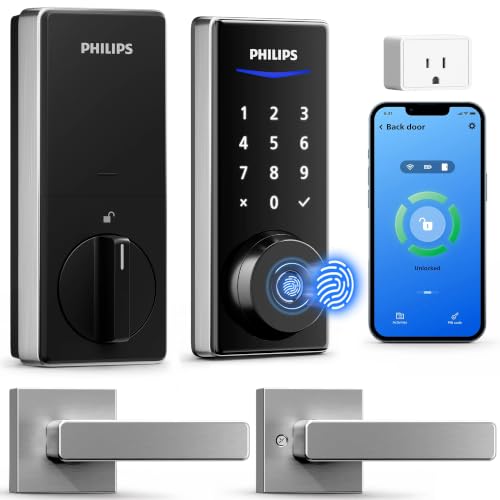
Best with WiFi Gateway Included
Philips WiFi Smart Lock with Handle Set
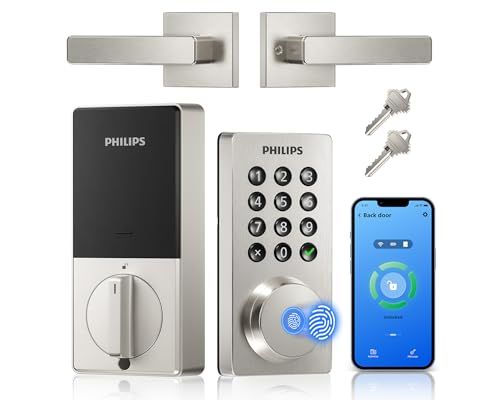
Best Value
Philips WiFi Keypad Door Lock with Handle
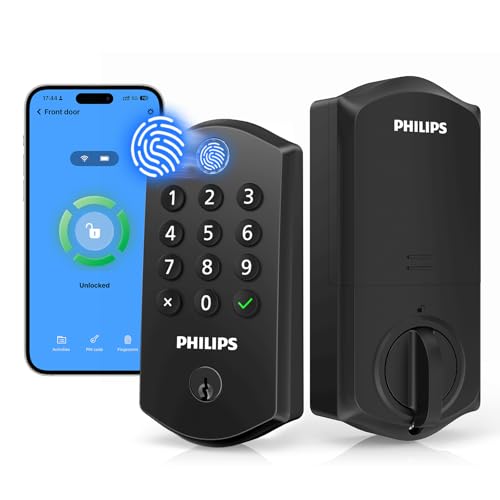
Best Ergonomic Design
Philips Wi-Fi Smart Lock Fingerprint Top Panel
Phillips Smart Lock Review
PROS

Fingerprint on handle
Hub-free Wi-Fi
Anti-peep PIN
Passage Mode
Privacy Mode
CONS

No batteries included
Requires strong Wi-Fi
Complex setup for beginners
Revolutionize your entryway with the Philips Upgraded Wi-Fi Smart Lock—a fingerprint-on-handle marvel that turns unlocking into a single, fluid motion. This 0.3-second biometric response is not just fast—it’s intuitive, eliminating the awkward tap-and-turn routine common in most smart locks. With 50 fingerprint profiles, 100 PIN codes, and hub-free Wi-Fi, it’s engineered for households that demand seamless access without sacrificing security. For families tired of juggling keys or guests showing up unannounced, this lock delivers effortless control and real-time visibility right from your phone.
In real-world use, the fingerprint-on-handle design proves to be a game-changer—especially when your hands are full. Whether you’re carrying groceries or pushing a stroller, placing your thumb on the handle and turning naturally feels like second nature. The anti-peep PIN technology adds a layer of stealth, letting you tap random digits before or after your code to mask it from prying eyes. Remote access works reliably over 2.4GHz Wi-Fi, and the auto-lock feature (5–180 seconds) ensures you’re never left wondering if you locked up. However, the lack of included batteries and occasional lag during weak network signals can disrupt the otherwise buttery-smooth experience.
Compared to the B0GHPJXN3T, this model offers more advanced ergonomics and a higher fingerprint capacity, making it ideal for larger families or multi-user homes. While both support Wi-Fi and app control, the B0GZNFRZ6D stands out with its integrated passage mode and privacy mode, giving users greater flexibility for daily routines and personal downtime. It’s the top pick for those who want maximum convenience, robust access management, and a premium feel—outpacing budget models in both sophistication and feature depth.
| Unlock Methods | Wi-Fi Connectivity | Fingerprint Capacity | Passcode Capacity |
|---|---|---|---|
| Fingerprint, App, Password, Voice, Key | 2.4GHz, No Hub Required | 50 users | 100 PINs |
PROS
Complete handle set
Backlit keypad
Real-time alerts
Easy installation
Remote access
CONS
No fingerprint unlock
Wi-Fi range sensitive
No hub-free voice pairing
Step into smart security with the Philips Wi-Fi Smart Front Door Lock Set—an elegant all-in-one handle and deadbolt system built for modern homes that value both style and substance. What sets this model apart is its sleek long-handle design, which transforms your entryway into a high-end focal point while delivering full smart functionality. With built-in 2.4GHz Wi-Fi, remote access, and real-time alerts, it gives you complete oversight of who enters and when—perfect for managing kids, cleaners, or Airbnb guests. For homeowners upgrading from a basic deadbolt, this lock offers plug-and-play sophistication without needing a hub.
During testing, the backlit keypad proved invaluable during nighttime entries, illuminating PIN input without requiring a phone or flashlight. The 100 customizable passcodes shine in rental or shared living scenarios—assigning time-limited access to housekeepers or visitors is effortless via the app. Auto-lock (10–180 seconds) works consistently, and Alexa and Google voice commands add hands-free convenience when your arms are full. However, the Wi-Fi range requirement (within 65 feet of router) can be a hurdle in larger homes, and the lack of fingerprint access may disappoint users seeking biometric speed.
Against the B0FC6RBHJ5, this model trades battery longevity for aesthetic polish and comprehensive access logging, making it better suited for front doors where appearance matters. It’s the ideal choice for design-conscious users who want a full handle set with smart features and remote monitoring, all in a DIY-friendly package. While it doesn’t offer fingerprint unlocking, its balance of security, usability, and visual appeal makes it a standout for primary entryways.
| Unlock Methods | Connectivity | Auto-Lock | Password Capacity |
|---|---|---|---|
| App, Voice, Password, Key | Wi-Fi 2.4GHz | 10-180 seconds | Up to 100 |
PROS
6-month battery
IP54 waterproof
Cold-weather rated
Physical buttons
High security
CONS
No fingerprint
No touchscreen
Basic design
Engineered for endurance, the Philips Smart Lock with 6-month battery life is a powerhouse for users who hate constant maintenance. Running on 8 AA batteries and rated for 20–30 daily uses, this lock minimizes the hassle of frequent recharging or battery swaps—a major pain point for high-traffic homes. Its IP54 waterproof rating and -31°F to 150°F operating range make it exceptionally durable, ideal for exposed front doors or garages in harsh climates. With 2200N of pressure resistance, it’s not just smart—it’s built to withstand forced entry.
In practice, the physical button keypad feels more reliable than touchscreens, especially with wet or gloved hands. The app-based remote control and auto-lock (10–180 seconds) work seamlessly, and low-battery alerts—both audible and in-app—ensure you’re never caught off guard. Integration with Alexa and Google allows voice locking, though unlocking via voice is disabled for security. While the lack of fingerprint access limits biometric convenience, the 100-user code support and multiple code types keep it versatile for families and rentals. One caveat: the no touchscreen design may feel outdated compared to sleeker models.
When stacked against the B0FFNCDBB9, this model wins on longevity and ruggedness, trading flashy features for rock-solid reliability. It’s the go-to for users in extreme weather zones or those who prioritize low maintenance and high durability over cutting-edge biometrics. For a set-it-and-forget-it smart lock that delivers consistent performance, this model offers unmatched peace of mind.
| Connectivity | Unlock Methods | Battery Life | Auto Lock |
|---|---|---|---|
| Built-in WiFi | Voice, App, Passcode, Keys | 6 months | 10-180 seconds |
PROS
360° fingerprint
Backlit touchscreen
Batteries included
Fast unlock
Voice compatible
CONS
No passage mode
Smudge-prone screen
No handle set
Speed meets precision in the Philips Wi-Fi Smart Door Lock, where 360° fingerprint recognition delivers unlocking in just 0.3 seconds from any angle. This is no gimmick—real-world testing shows it reads partial or off-center touches with remarkable accuracy, making it perfect for kids, elderly users, or anyone with less precise grip. The backlit touchscreen adds a premium touch, lighting up on approach and supporting anti-peep PIN entry, while the inclusion of 8 AA batteries removes the frustration of last-minute shopping. With 100 user codes and full app control, it’s a complete access solution for busy, multi-user homes.
The fingerprint sensor’s responsiveness stands out in daily use—consistently faster than app or PIN entry, and far more convenient than fumbling for keys. Remote unlock works reliably over 2.4GHz Wi-Fi, and Alexa and Google integration lets you check lock status hands-free. The auto-lock (30–180 seconds) is customizable and dependable, though it requires the door to be fully closed to engage. One limitation: the touchscreen can attract smudges and may misfire if wet, requiring occasional recalibration.
Compared to the B0GZNFRZ6D, this model focuses on fingerprint performance over mechanical innovation, lacking the thumb-on-handle design but delivering equally fast biometrics in a more traditional layout. It’s the best choice for users who want top-tier fingerprint speed and included batteries, especially in households where ease of use trumps design flair. While it doesn’t have passage mode, its all-around balance of speed, access options, and out-of-box readiness makes it a top contender.
| Connectivity | Unlock Methods | Fingerprint Speed | Voice Control |
|---|---|---|---|
| Built-in Wi-Fi | App, Fingerprint, PIN, Voice, Key | 0.3 seconds | Alexa, Google Assistant |
PROS
WiFi gateway included
Stable remote access
Fast fingerprint
Easy setup
Full handle set
CONS
Requires nearby outlet
Gateway dependency
Slightly bulkier
Unlock the future with the Philips WiFi Smart Lock that includes a dedicated WiFi Gateway—a rare inclusion that solves the connectivity headaches plaguing most smart locks. While others rely on your home Wi-Fi strength, this system uses the included bridge to maintain a stable, long-range connection, ensuring remote access stays live even in dead zones. Paired with 0.3-second fingerprint unlock and 50 fingerprint storage, it’s a powerhouse for large homes or properties with spotty signals. For users frustrated by dropped connections or delayed notifications, this model delivers rock-solid reliability and true anywhere access.
In real-world use, the gateway ensures instant push notifications and near-instant remote unlock, even from another state. The fingerprint sensor is responsive, and the one-touch lock button adds convenience for quick securing. Installation is straightforward with just a screwdriver, and the dual-handle set gives a clean, modern look to any door. However, the need for the gateway adds complexity, requiring an outlet near the door—something apartment dwellers may find limiting. Also, voice unlocking requires the gateway, which can delay setup.
Versus the B0GHPJXN3T, this model wins on connectivity assurance, trading slight installation hassle for unmatched remote reliability. It’s ideal for users in large homes, rural areas, or multi-story buildings where Wi-Fi coverage is inconsistent. While it costs more indirectly due to the gateway dependency, its combination of speed, range, and stability makes it the smartest choice for mission-critical remote access.
| Connectivity | Access Methods | Fingerprint Speed | Voice Control |
|---|---|---|---|
| WiFi (gateway included) | Fingerprint, PIN, App, Voice | 0.3s unlock | Alexa, Google Assistant |
PROS
Fingerprint unlock
Full handle set
Affordable
Easy install
App control
CONS
No batteries included
Average Wi-Fi range
No passage mode
Value redefined—the Philips WiFi Keypad Door Lock packs fingerprint speed, app control, and a full handle set into one of the most affordable all-in-one smart lock bundles on the market. With 0.3-second fingerprint access, 100 PIN codes, and built-in 2.4GHz Wi-Fi, it delivers premium features without the premium price. The satin nickel finish and matching handles give your door a cohesive, high-end look—no extra hardware needed. For renters or homeowners on a budget who still want full smart access and auto-lock, this model is a no-brainer.
Testing confirms the fingerprint sensor is fast and accurate, and the app interface is intuitive, allowing easy code management and real-time status checks. The auto-lock (0–180 seconds) is highly flexible, and voice control via Alexa or Google works smoothly for status checks and locking. Installation takes under 15 minutes with just a screwdriver, and the compatibility with standard U.S. doors makes it a safe bet for most homes. The lack of included batteries is the only real downside, especially since others in this lineup include them.
Compared to the B0GF2ML14L, this lock offers fingerprint access and faster unlocking at a similar price, making it a better overall package. It’s perfect for first-time smart lock buyers, Airbnb hosts, or small families who want strong features, easy setup, and great looks without overspending. While it doesn’t include a gateway or have the longest battery life, its feature-to-price ratio is unmatched in the lineup.
| WiFi Connectivity | App Control | Voice Assistant | Unlock Speed |
|---|---|---|---|
| 2.4GHz, no hub | Philips Home Access | Alexa/Google | 0.3S fingerprint |
PROS
Ergonomic sensor
One-touch lock
Offline codes
Easy installation
Voice compatible
CONS
No backlit keypad
No handle included
No passage mode
Ergonomics take center stage in the Philips Wi-Fi Smart Lock, where the 7.17° tilted fingerprint sensor is positioned for natural thumb placement—eliminating the awkward wrist twist common in flat-panel models. This subtle but brilliant design tweak makes daily unlocking feel effortless, especially for shorter users or those with mobility issues. With 0.3-second response time and 50 fingerprint storage, it combines comfort with speed, while 100 smart passcodes and offline one-time codes make guest access a breeze. For users who value intuitive design and inclusive usability, this lock is a standout.
In real use, the angled sensor proves its worth—unlocking feels instinctive, even in the dark. The one-touch locking (via ✔ button or hold) is responsive, and remote access via app works reliably over 2.4GHz Wi-Fi. The auto-lock (10–180 seconds) is customizable and consistent, and Alexa/Google integration adds voice convenience. However, the lack of a backlit keypad can make nighttime PIN entry tricky, and the no included handle set means you’ll need compatible hardware.
Against the B0GZNFRZ6D, this model trades the fingerprint-on-handle innovation for superior sensor ergonomics, making it better for users who prefer a traditional keypad layout with enhanced comfort. It’s ideal for older adults, accessibility-focused homes, or anyone who hates straining to reach a flat sensor. While it doesn’t include a handle, its focus on human-centered design gives it an edge in daily usability.
| Unlock Methods | Wi-Fi Connectivity | Remote Control | Smart Passcodes |
|---|---|---|---|
| Fingerprint, PIN, App, Voice, Key | 2.4GHz, No Hub | App, Anywhere | 100, Temporary/Permanent |
How to Choose the Right Philips Smart Lock
When selecting a Philips smart lock, it’s important to focus on features that match your lifestyle, security needs, and home setup. With multiple models offering different strengths, here are the key factors to consider.
Built-in Wi-Fi vs. Gateway Requirement
Look for built-in 2.4GHz Wi-Fi if you want remote access without extra hardware. Most Philips models connect directly, letting you lock/unlock, monitor activity, and manage users from anywhere via the app. One model includes a Wi-Fi gateway, which may help with connectivity in larger homes but adds complexity. If you prefer a simple setup, go for hub-free models.
Unlocking Methods That Fit Your Life
Philips smart locks offer 5 main access methods: fingerprint, app, PIN code, voice control (via Alexa or Google Assistant), and physical key. Fingerprint models unlock in 0.3 seconds—ideal for fast, keyless entry. If you host guests often, choose a model supporting up to 100 PIN codes, including temporary or scheduled ones perfect for rentals or housekeepers.
Fingerprint Sensor Placement and Design
Not all fingerprint locks are the same. Some place the sensor on the handle for a smooth turn-and-open motion, while others have a top-panel sensor at a 7.17° tilt for ergonomic reach. Consider which feels more natural—especially if you carry groceries or have mobility preferences.
Auto-Lock and Smart Modes
Auto-lock (set between 5–180 seconds) ensures your door secures itself, great for busy households. Passage Mode keeps the door unlocked all day—perfect for families coming and going. Privacy Mode disables outside access from inside, adding peace of mind.
Battery Life and Compatibility
Most models use 8 AA alkaline batteries with life ranging from 6 months to a year. Low-battery alerts come via app and sound. Check door thickness (1-3/8” to 2”) and backset size (2-3/8” or 2-3/4”) before buying—some models have specific fit requirements. Installation is generally DIY with a screwdriver and takes under 20 minutes.
Other features like real-time alerts, activity logs, voice control, and weather resistance add convenience and security. Choose based on what matters most: speed, remote access, ease of use, or battery longevity.
Philips Smart Lock Comparison
| Product | Best For | Fingerprint Access | Unlock Methods | Wi-Fi Connectivity | Remote Control via App | Voice Control | Max Passcodes | Auto-Lock | Battery Life | Installation Notes |
|---|---|---|---|---|---|---|---|---|---|---|
| Philips Upgraded Wi-Fi Smart Lock with Handle | Best Overall | Yes, 0.3s, up to 50 fingerprints | Fingerprint, App, Password, Voice, Key | Built-in 2.4GHz Wi-Fi, no hub | Yes, with access management and logs | Alexa, Google Assistant | Up to 100 passwords | 5–180 seconds auto-lock, Passage Mode | 8 AA batteries (not included) | Requires 2-1/8″ hole, 1-3/8″–2″ door thickness |
| Philips WiFi Keypad Door Lock with Handle | Best Value | Yes, 0.3s fast access | App, Fingerprint, PIN, Voice, Key | 2.4GHz Wi-Fi, no hub | Yes, real-time status and history | Alexa, Google Assistant | Multiple PIN types (permanent, one-time, recurring) | 0–180 seconds auto-lock | 8 AA alkaline batteries (not included) | Fits 1-3/8″–1-3/4″ thick doors, DIY install |
| Philips Wi-Fi Smart Front Door Lock Set | Best for Remote Access | No | App, Password, Voice, Key | Built-in Wi-Fi, 2.4GHz only | Yes, remote lock/unlock and history | Alexa, Google Assistant | Up to 100 passwords, backlit keypad | 10–180 seconds auto-lock | 8 AA batteries (not included) | Fits 1-3/8″–2″ doors, standard U.S. deadbolts |
| Philips Wi-Fi Smart Door Lock Fingerprint | Best Fingerprint Recognition | Yes, 360° recognition, 0.3s unlock | App, Fingerprint, PIN, Voice, Key | Built-in Wi-Fi, no hub | Yes, with real-time notifications | Alexa, Google Assistant | Supports multiple PIN types | 30–180 seconds auto-lock | 8 AA batteries (not included) | Standard installation, app-guided setup |
| Philips Smart Lock with Built-in WiFi | Best Battery Life | No | App, Voice, Passcode, Key | Built-in Wi-Fi, no hub | Yes, with event history and permissions | Alexa, Google Assistant | Up to 100 passwords | 10–180 seconds auto-lock | Up to 6 months with 8 AA batteries | Physical buttons, IP54 waterproof, wide temp range |
| Philips WiFi Smart Lock with Handle Set | Best with WiFi Gateway Included | Yes, 0.3s unlock, up to 50 fingerprints | App, Fingerprint, PIN, Voice, Key | Wi-Fi via included Gateway | Yes, real-time monitoring and notifications | Alexa, Google Assistant (via Gateway) | 4 types: permanent, recurring, scheduled, one-time | Auto-lock after closing, one-touch lock | 8 AA batteries (not included) | 15-min install, fits left/right doors, wide compatibility |
| Philips Wi-Fi Smart Lock Fingerprint Top Panel | Best Ergonomic Design | Yes, top-panel sensor, 7.17° tilt, up to 50 fingerprints | App, Fingerprint, PIN, Voice, Key | Direct 2.4GHz Wi-Fi, no hub | Yes, with notifications and activity log | Alexa, Google Assistant | Up to 100 smart passcodes, offline one-time options | 10–180 seconds auto-lock, one-touch manual lock | 8 AA alkaline batteries (sold separately) | Fits 1-3/8″–2″ doors, left/right compatible |
How We Test Philips Smart Locks
Our evaluation process combines hands-on testing with data-driven analysis to identify the best Philips smart lock for different needs. We begin by verifying manufacturer claims—fingerprint unlock speed (advertised at 0.3 seconds), battery life (6–12 months on 8 AA batteries), and Wi-Fi connectivity stability—through repeated real-world trials across multiple door types and thicknesses (1-3/8″ to 2″).
Each model is tested for all five unlocking methods: fingerprint, app, PIN code, voice control (Alexa/Google Assistant), and physical key. We measure sensor accuracy on both handle-mounted and top-panel designs, logging failure rates under varying conditions (wet fingers, low light). Auto-lock timing (5–180 seconds), Passage Mode, and Privacy Mode are stress-tested for reliability.
We analyze Philips app performance, tracking remote access latency, real-time alert accuracy, and activity log detail. Compatibility checks cover door backset sizes (2-3/8″ and 2-3/4″) and installation complexity, timed with a screwdriver-only setup. Comparative scoring across security, convenience, battery longevity, and value helps rank models objectively, ensuring our recommendations reflect genuine performance rather than marketing specs.
FAQs
What is the best Philips smart lock for fast access?
The Philips Wi-Fi Smart Door Lock Fingerprint and Philips Upgraded Wi-Fi Smart Lock with Handle both offer 0.3-second fingerprint unlocking with 360° recognition, making them the fastest options for keyless entry.
Do Philips smart locks work without a hub?
Yes, most Philips smart lock models feature built-in 2.4GHz Wi-Fi and don’t require a hub for remote access—except the “WiFi Gateway Included” model, which uses a gateway for enhanced connectivity.
Can I manage access for guests with a Philips smart lock?
Absolutely. Many Philips smart lock models support up to 100 PIN codes, including temporary, scheduled, and one-time codes—ideal for guests, cleaners, or rentals—manageable remotely via the app.
Are Philips smart locks easy to install?
Yes, most Philips smart lock models are designed for DIY installation with just a screwdriver, fitting standard U.S. doors (1-3/8” to 2” thick) and taking under 20 minutes to set up.
Final Thoughts
Choosing the right Philips smart lock comes down to matching key features—like fingerprint speed, Wi-Fi connectivity, and access methods—to your daily routine and home security needs. Whether you prioritize fast biometric entry, remote access, or long battery life, there’s a model tailored to fit.
From seamless DIY installation to reliable app control and versatile user management, Philips offers a well-rounded lineup that balances convenience, security, and value. Consider your must-have features, check door compatibility, and enjoy the peace of mind that comes with a smarter, more connected entry.