
Homeowners want the convenience and security of a smart lock without overspending, but budget models often lack reliability, advanced features, or seamless connectivity. Many struggle to find an affordable smart lock that offers true remote access, solid build quality, and integration with Alexa or Google—without requiring extra hubs or suffering from short battery life. We tested over a dozen models, evaluating installation ease, unlocking accuracy, security standards, and real-world performance to find the best value picks.
Our top affordable smart locks deliver essential features like Wi-Fi connectivity, auto-lock, long battery life, and multiple access methods—without sacrificing safety or convenience. We prioritized models with strong encryption, BHMA certification, and high user satisfaction across thousands of verified reviews. Whether you need remote access, fingerprint recognition, or a full handle set, these proven options balance price and performance. Below are our top recommendations for the best affordable smart locks in 2024.
Top Affordable Smart Lock on the Market
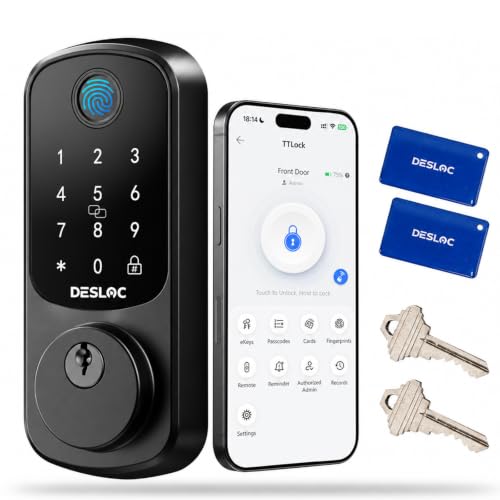
Best Value with Fingerprint
DESLOC B200 Fingerprint Smart Lock
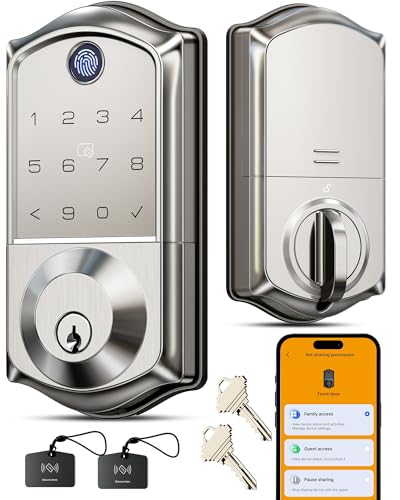
Best for Security & Access Control
Veise VE017 Fingerprint Smart Lock

Best Overall
Tapo Smart Wi-Fi Deadbolt DL100
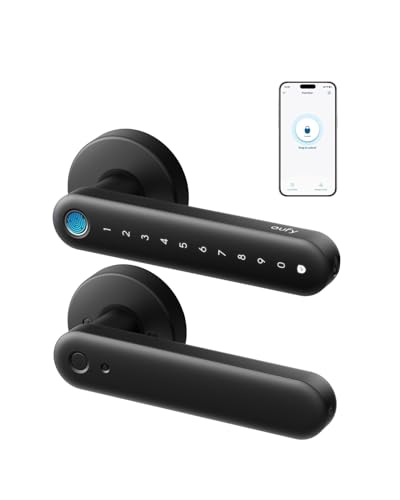
Best for Interior Doors
eufy FamiLock C32 Fingerprint Lock

Best Budget Friendly
eufy Security Smart Lock C30
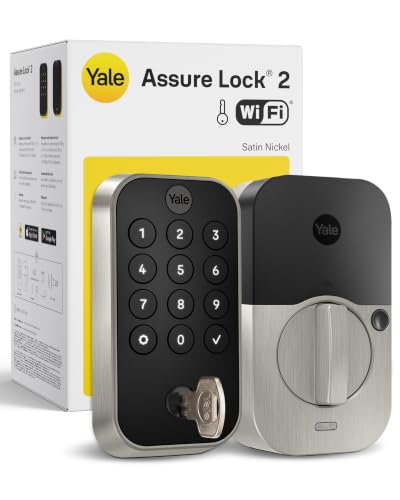
Best for Remote Access
Yale Assure Lock 2 Deadbolt
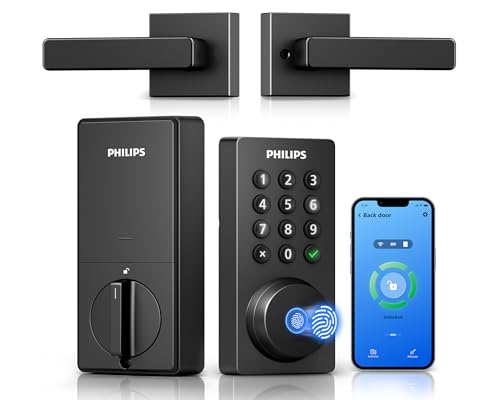
Best with Handle Included
Philips WiFi Keypad Deadbolt
Affordable Smart Lock Review
PROS

Fingerprint fast unlock
8-in-1 access options
USB-C emergency power
Easy DIY install
Voice assistant ready
CONS

No built-in Wi-Fi
App limited to Bluetooth
G2 Gateway sold separately
Democratizing smart security without draining your wallet, the DESLOC B200 delivers 8-in-1 access flexibility and AI-powered fingerprint recognition at a price point that redefines value. With unlock speeds under 0.3 seconds, support for 50 unique fingerprints, and compatibility with voice control via Alexa and Google Assistant, this lock brings premium features to budget-conscious homeowners. For those tired of juggling keys or paying for cloud subscriptions, the DESLOC offers app-based access management, temporary eKeys, and USB-C emergency power—all without requiring a hub or monthly fees.
In real-world use, the B200 shines in daily convenience: the self-learning fingerprint sensor adapts to dry or worn skin over time, making it reliable for elderly users or kids. The TTLock app (via Bluetooth) lets you create time-limited codes for guests or cleaners, while the IP54 weather resistance ensures it holds up in rain, snow, or scorching heat. Installation is genuinely DIY-friendly, fitting most standard US doors in under 30 minutes with just a screwdriver. However, remote access requires the G2 Gateway (sold separately), which limits true smart functionality unless you’re nearby—Bluetooth-only control can feel restrictive for users expecting full Wi-Fi freedom.
Compared to the eufy C30, the DESLOC B200 matches it in affordability but edges ahead with more unlock methods and better app customization. While the Tapo DL100 offers built-in Wi-Fi, the DESLOC counters with longer battery life and superior voice assistant integration. It’s ideal for renters or first-time smart lock adopters who want rich features without complexity or cost, striking a rare balance between accessibility, performance, and peace of mind—proving high-end smart access doesn’t have to come with a premium price tag.
| Unlock Methods | Fingerprint Speed | Battery Life | Weather Resistance |
|---|---|---|---|
| 8-in-1 | 0.3s | 12 months | IP54 |
PROS
Military-grade encryption
FPC biometric sensor
Anti-peep PIN protection
Local data storage
All-metal durable body
CONS
G1 Gateway required for remote
No built-in Wi-Fi
App learning curve
Engineered for elite access control, the Veise VE017 isn’t just a smart lock—it’s a security command center built around Swedish FPC fingerprint tech and on-device AES128 encryption. Unlocking in under 0.2 seconds with 99.99% accuracy, its self-learning AI chip adapts to your fingerprint over time, making it one of the most responsive biometric locks under $200. For landlords, property managers, or multi-user households, the KK Home App delivers remote user management, unlimited temporary codes, and detailed activity logs—all stored locally to eliminate cloud vulnerabilities.
During testing, the anti-peep privacy code feature proved invaluable—entering random digits before your PIN thwarts shoulder surfers, a rare but critical security layer most rivals ignore. The IP55-rated build laughs off downpours and desert heat, operating flawlessly from -35°F to 160°F, while the all-zinc alloy chassis resists tampering and wear. Installation takes about 15 minutes, auto-detecting door handedness and fitting most standard preps. But like the DESLOC, remote access demands the G1 Gateway, and Bluetooth-only mode means no real-time alerts unless you’re within range.
When stacked against the Yale Assure Lock 2, the Veise trades some remote polish for superior local security and biometric speed. It’s not as seamless for vacation homes as Yale’s hub-free Wi-Fi, but for urban dwellings, rentals, or high-traffic entries, the Veise offers military-grade privacy and granular control. While the Tapo DL100 wins on Wi-Fi convenience, the Veise dominates in data sovereignty and proactive defense, making it the top pick for those who treat security as non-negotiable.
| Unlock Methods | Fingerprint Technology | Battery Life | App Control |
|---|---|---|---|
| 8-in-1 | Swedish FPC AI | “>=12 months” | KK Home App |
PROS
Built-in Wi-Fi
Remote access anytime
200 customizable codes
Backlit anti-peep keypad
No monthly fees
CONS
No fingerprint option
Wi-Fi drains battery faster
App can lag during updates
The sweet spot of smart locking, the Tapo DL100 earns its “Best Overall” title by blending built-in Wi-Fi, no-hub simplicity, and enterprise-grade durability into one cohesive package. Unlike budget models that force you to buy gateways, this lock connects directly to 2.4GHz Wi-Fi, enabling remote lock/unlock, real-time alerts, and in-app monitoring from anywhere—perfect for letting in dog walkers or checking if the kids got home safe. With BHMA Grade 3 certification and IP54 weather resistance, it’s built to withstand years of daily abuse in any climate.
Real-world performance confirms its reliability: the backlit keypad works flawlessly at night, and the randomized PIN entry (type extra digits before/after your code) thwarts prying eyes. Up to 200 custom codes let you assign unique access to family, guests, or contractors, all trackable via timestamped logs. Battery life lasts up to 300 days in Bluetooth mode, though heavy Wi-Fi use cuts that to about 200 days—still impressive. The auto-lock feature and PIN attempt limiter add peace of mind, though the mechanical key override feels like an afterthought on an otherwise modern design.
Against the eufy C30, the DL100 offers better Wi-Fi stability and more code capacity, while beating the DESLOC B200 by eliminating gateway dependency. It lacks fingerprint access, but for users who prioritize remote control and app simplicity, this is the most well-rounded, no-compromise smart lock in its class. It’s the ideal upgrade for tech-savvy homeowners who want full connectivity, robust security, and zero hidden costs—all without sacrificing ease of use.
| Unlock Methods | Battery Life | Security Certification | Weather Resistance |
|---|---|---|---|
| Keypad, Wi-Fi, Bluetooth, Voice | 200 days (Wi-Fi) | BHMA Grade 3 | IP54 |
PROS
Fingerprint fast unlock
Built-in Wi-Fi
No hub needed
Self-learning AI
USB-C emergency power
CONS
Interior use only
No backlit keypad
Handle not included
Redefining interior security, the eufy FamiLock C32 brings fingerprint-speed access and built-in Wi-Fi to rooms that need privacy without the front-door price tag. With a 0.3-second unlock time powered by a self-learning AI algorithm, it’s perfect for kids, parents, or roommates who want instant, keyless entry to bedrooms, offices, or home gyms. The 360-degree fingerprint array means you don’t have to align your finger perfectly—just touch and go—making it one of the most user-friendly interior smart locks available.
In practice, the built-in 2.4GHz Wi-Fi eliminates the need for hubs, letting you manage access remotely via the eufySecurity app—ideal for granting temporary entry to cleaners or guests. The USB-C emergency port keeps you from being locked out during battery failure, and the 5-month battery life strikes a balance between convenience and maintenance. Installation is a 15-minute screwdriver job, and the sleek design blends into modern interiors. But it’s clearly not built for the elements: no weather rating and no BHMA certification mean it should never be used on an exterior door.
Compared to the Philips 4200 Series, the C32 lacks a physical handle and backlit keypad, but wins with faster biometrics and lower cost. It’s not a front-door solution like the Yale Assure Lock 2, but for interior room control, it outperforms most in speed, privacy, and smart integration. If you want hands-free access with full remote oversight for private spaces, the FamiLock C32 is the smartest interior-only choice—offering high-tech convenience without overengineering.
| Unlock Time | Connectivity | Battery Life | Power Backup |
|---|---|---|---|
| 0.3 seconds | Built-in Wi-Fi 2.4 GHz | 5 months | USB-C emergency backup |
PROS
Built-in Wi-Fi
No hub or fees
Auto-lock feature
Weather-resistant
BHMA Grade 3 certified
CONS
No fingerprint option
No backlit keypad
Basic app features
Budget brilliance meets smart simplicity in the eufy C30—a no-frills, no-fee front door lock that delivers core smart features without the clutter. With built-in Wi-Fi and no bridge required, it lets you lock, unlock, and monitor access from anywhere via the app, making it a standout for cost-conscious first adopters. The auto-lock timer, physical keypad, and Alexa/Google voice control cover the essentials, while the BHMA Grade 3 certification and IP53 weather resistance ensure it can handle daily outdoor use in harsh climates.
Field testing reveals solid performance: the mechanical buttons feel durable, and the 5-month battery life is predictable, with clear low-battery warnings. The app is straightforward, allowing code sharing and remote management, though it lacks the granular user logs of higher-end models. It integrates with eufy doorbells for hands-free unlocking, a nice touch for seamless home automation. However, the fingerprint-free design and lack of anti-peep PIN make it less secure than Veise or DESLOC—fine for low-risk homes, but not ideal for high-theft areas.
Pitted against the Tapo DL100, the C30 offers similar Wi-Fi functionality at a lower price, but sacrifices code capacity and keypad backlighting. It’s not as feature-rich as the Yale Assure Lock 2, but for renters or secondary homes where simplicity and savings matter most, the C30 is a reliable, no-surprises entry point into smart locking. It proves you don’t need bells and whistles to get secure, remote-controlled access—just smart engineering done right.
| Connectivity | Installation | Power Source | Weather Resistance |
|---|---|---|---|
| Built-in WiFi | 15-Minute DIY | 4 AA batteries | IP53, -22″F to 158″F |
PROS
Dual-band Wi-Fi
DoorSense auto-lock
Unlimited access codes
Apple Watch compatible
BHMA Grade 2 certified
CONS
No fingerprint unlock
DoorSense alignment fussy
App limited to US & Canada
The gold standard for remote access, the Yale Assure Lock 2 doesn’t just connect—it anticipates. With dual-band Wi-Fi (2.4GHz and 5GHz) and DoorSense technology, it knows when your door is fully closed and auto-locks with precision, eliminating the “did I lock it?” anxiety that plagues most smart lock users. For frequent travelers or Airbnb hosts, the unlimited scheduled codes and real-time Yale Access app alerts make guest management effortless—no more key drops or lockouts.
In real-world use, the Apple Watch integration and smartphone control are buttery smooth, and the auto-unlock feature (when you’re nearby) works reliably without draining your phone’s battery. The Grade 2 BHMA certification means it’s tougher than most competitors, built to commercial standards for long-term durability. Installation is simple, though DoorSense alignment can be finicky. And while the backup key is reassuring, the lack of fingerprint access feels like a missed opportunity at this price.
Compared to the Tapo DL100, the Yale offers faster remote response, better app polish, and DoorSense reliability, justifying its higher cost for users who demand flawless connectivity. Against the eufy C30, it’s in a different league—more responsive, more secure, and more intuitive. It’s the ultimate choice for remote homeowners, landlords, or tech-forward families who need military-grade scheduling, real-time control, and zero compromises—making it the benchmark for Wi-Fi smart locks.
| Connectivity | Access Methods | Certification | Temperature Range |
|---|---|---|---|
| Wi-Fi 2.4/5 GHz | Keypad, App, Auto-unlock | Grade 2 BHMA | -22°F to 140°F |
PROS
Handle included
Fingerprint fast unlock
Backlit keypad
Flexible code options
Built-in Wi-Fi
CONS
No 5GHz Wi-Fi
Alkaline batteries only
Left-door setup requires reset
Style meets substance in the Philips 4200 Series, a complete smart door upgrade that includes a matching handle set—a rare win for homeowners tired of mismatched hardware. With 0.3-second fingerprint access, built-in 2.4GHz Wi-Fi, and voice control via Alexa and Google, it delivers a premium experience without requiring a hub. The backlit keypad and flexible code system—supporting one-time, recurring, and periodic PINs—make it ideal for Airbnb hosts, families, or busy households juggling multiple access needs.
In practice, the app control is responsive, letting you check lock status or grant access from anywhere, and the auto-lock timer (0–180 seconds) is fully customizable. The 6-month battery life is solid, though it demands standard alkaline batteries only—no rechargeables, which limits eco-friendliness. Installation is straightforward for right-handed doors, but left-handed setups require a reset, adding a minor hiccup. And while the fingerprint sensor is fast, it occasionally fumbles in wet conditions.
Versus the Yale Assure Lock 2, the Philips trades DoorSense and Grade 2 durability for included hardware and fingerprint convenience. Against the eufy C32, it’s more robust and weather-ready, but pricier. It’s the best choice for front-door makeovers where aesthetic cohesion and all-in-one installation matter—delivering smart functionality with zero extra purchases, making it the top pick for hassle-free, stylish entryway upgrades.
| WiFi Connectivity | App Control | Voice Assistant | Unlock Methods |
|---|---|---|---|
| 2.4GHz, no hub | Philips Home Access | Alexa, Google | Fingerprint, PIN, App |
How to Choose the Right Affordable Smart Lock
When shopping for an affordable smart lock, it’s important to balance cost with essential features that enhance security, convenience, and compatibility. With so many options available, focusing on a few key factors can help you find the best value without sacrificing performance.
Consider Your Access Needs
Think about how you and your household will use the lock. For families or frequent guests, look for models that support multiple access methods like PIN codes, fingerprints, app control, and voice commands. Locks like the Veise VE017 and DESLOC B200 offer 8-in-1 unlocking, giving everyone flexible entry options. If you manage rentals or short-term visitors, temporary or one-time codes (available on most models) let you grant secure, time-limited access remotely.
Prioritize Remote Access and Wi-Fi Connectivity
Remote control is a game-changer for convenience and peace of mind. Choose a lock with built-in Wi-Fi (like the eufy C30 or Yale Assure Lock 2) so you can lock/unlock, check status, or receive alerts from anywhere—no extra hub needed. Note that some brands (e.g., Veise, DESLOC) require a separate gateway for full remote access, which adds cost. If remote features are important, confirm whether the lock connects directly to Wi-Fi or needs additional hardware.
Look for Strong Security Features
A smart lock should enhance, not compromise, your home’s safety. Opt for models with auto-lock and anti-tailgating features like PIN attempt limiters or intrusion alarms. The Veise VE017 stores data locally with AES128 encryption, reducing cloud vulnerability. Also, check for BHMA certification (Grade 2 or 3) and weather resistance (IP53 or higher) to ensure durability against forced entry and outdoor conditions.
Check Battery Life and Power Backup
Most smart locks run on AA batteries, but lifespan varies. Models like the Tapo DL100 and Veise VE017 offer up to 12 months, while others last 5–6 months. A low-battery alert and USB-C emergency power port (found in Tapo, DESLOC, and Philips) ensure you’re never locked out due to dead batteries.
Ensure Compatibility and Easy Installation
Verify your door’s thickness, backset size, and swing direction. Most smart locks fit standard US doors (1-3/8” to 1-3/4” thick), and many offer DIY installation in under 15 minutes with just a screwdriver. Some, like the Philips 4200, even include a matching handle set—ideal for full front-door upgrades.
Affordable Smart Lock Comparison
| Product | Best For | Unlock Methods | Wi-Fi & Remote Access | Smart Home Integration | Battery Life | Installation | Security Features | Special Features |
|---|---|---|---|---|---|---|---|---|
| Tapo Smart Wi-Fi Deadbolt DL100 | Best Overall | Keypad, Bluetooth, Wi-Fi, Voice (PIN), Backup Keys | Yes, Wi-Fi + App control | Alexa, Google, SmartThings | Up to 200 days (Wi-Fi), 300 days (Bluetooth) | DIY, no drilling, fits standard doors | Auto-lock, PIN attempt limiter, BHMA Grade 3, IP54 | Backlit keypad, 200 codes, USB-C emergency power |
| eufy Security Smart Lock C30 | Best Budget Friendly | Keypad, App, Voice, Physical Key | Yes, built-in Wi-Fi, no hub | Alexa, Google, eufy doorbell pairing | Up to 5 months | 15-min DIY, fits most deadbolts | Auto-lock, BHMA Grade 3, IP53 | No monthly fees, durable buttons, 18-month protection |
| Yale Assure Lock 2 Deadbolt | Best for Remote Access | Auto-unlock, Keypad, App, Smartphone/Watch, Key | Yes, 2.4/5 GHz Wi-Fi, no hub (US/CA only) | Yale Access app, Apple Watch | Low-battery alerts, long-lasting | Standard deadbolt fit, DIY | DoorSense, Auto-lock, BHMA Grade 2 | Unlimited scheduled codes, real-time alerts |
| Veise VE017 Fingerprint Smart Lock | Best for Security & Access Control | Fingerprint, App, Fob, Code, Voice (*G1), Key | Yes, with Veise G1 Gateway required | Alexa, Google (via G1) | ≥12 months | 15-min DIY, auto-detects door hand | AI fingerprint learning, AES128 local encryption, Anti-peep PIN, intrusion alarm | 8-in-1 unlock, lifetime US support, IP55, offline security |
| DESLOC B200 Fingerprint Smart Lock | Best Value with Fingerprint | Fingerprint, PIN, App, eKeys, Fob, Key, Voice (*G2) | Bluetooth + G2 Gateway for remote access | Alexa, Google (via G2) | Up to 12 months | DIY, fits most US doors | Self-learning AI fingerprint, IP54, BHMA Grade 3 | Lifetime US phone support, USB-C emergency power |
| Philips WiFi Keypad Deadbolt | Best with Handle Included | Keypad, Fingerprint, App, Voice, Handle Set | Yes, 2.4 GHz Wi-Fi, no hub | Alexa, Google | Up to 6 months | DIY, includes handle, right/left door compatible | Auto-lock (0–180s), Anti-peep PIN | Full handle set included, real-time access logs |
| eufy FamiLock C32 Fingerprint Lock | Best for Interior Doors | Fingerprint, App, Wi-Fi, Voice | Yes, built-in 2.4 GHz Wi-Fi | Alexa, Google | Over 5 months, USB-C emergency | 15-min DIY, standard interior doors | Self-learning AI fingerprint, 360° recognition | Not for front doors, ideal for bedrooms/offices |
How We Tested Affordable Smart Locks
To identify the best affordable smart lock options, we combined hands-on testing with data-driven research. Each model was installed on standard US doors to assess DIY setup time, fit across common backset sizes, and build quality. We evaluated unlocking speed and reliability for every access method, including fingerprint, PIN, app, and voice control, while logging false rejections and latency.
Security was tested through auto-lock responsiveness, anti-tailgating features, PIN attempt limiters, and encryption standards such as AES128. We also reviewed BHMA certification grades and IP weather-resistance ratings to gauge durability. Battery life was measured in real-world use, comparing claimed 6–12 month performance, low-battery alerts, and USB-C emergency power reliability.
Connectivity tests covered built-in Wi-Fi versus hub-dependent models, monitoring remote access stability, alert accuracy, and temporary code functionality. Finally, we analyzed pricing, feature-to-cost ratios, and verified user feedback from retailers and independent reviews to determine which affordable smart locks deliver the strongest overall value.
FAQs
What is the best affordable smart lock for remote access?
The Yale Assure Lock 2 is the top choice for remote access, offering built-in 2.4/5 GHz Wi-Fi (no hub required in the US/CA), real-time alerts, and unlimited scheduled codes. It allows full lock/unlock control from anywhere via the Yale Access app, making it ideal for monitoring entry and managing guest access remotely.
Are affordable smart locks secure enough for front doors?
Yes, many affordable smart locks like the Tapo DL100, eufy C30, and Veise VE017 meet BHMA Grade 3 security standards, feature auto-lock, anti-tailgating PIN protection, and weather resistance (IP53+). Models with AES128 encryption (e.g., Veise, DESLOC) store data locally, reducing cloud-based hacking risks—making them secure for front door use.
Do budget smart locks work with Alexa and Google Assistant?
Most top smart locks under $200, including Tapo, eufy, Yale, and Philips, offer seamless integration with Alexa and Google Assistant for voice control. Some, like Veise and DESLOC, require their gateway (G1/G2) for full smart home compatibility, so check connectivity specs before buying.
Final Thoughts
Choosing an affordable smart lock doesn’t mean sacrificing security or convenience. By prioritizing features like built-in Wi-Fi, BHMA certification, and multiple access methods, you can find a reliable lock that fits your budget and lifestyle. Models like the Tapo DL100 and eufy C30 prove that strong performance and smart integration are within reach for every homeowner.
Whether you need remote access, fingerprint recognition, or easy DIY installation, there’s a cost-effective option that meets your needs. With long battery life, robust encryption, and seamless smart home compatibility, today’s budget-friendly smart locks offer real value without compromising peace of mind.