Being locked out of your home is stressful, especially when you need to know how to unlock a Kwikset lock quickly. Whether you face a forgotten code on a SmartCode 955 or worry about the security of a Smart Key deadbolt, this guide provides clear solutions.
You will learn specific steps to reset codes, use emergency overrides, and address critical security flaws. This article covers safe methods to regain access while helping you decide if your current lock needs immediate replacement.
Expose the Kwikset Smart Key Deadbolt Vulnerability
The Kwikset Smart Key deadbolt was marketed as bump-proof, yet a specific design flaw allows rapid forced entry. Understanding this vulnerability is essential for assessing the real-world safety of your home security system.
How the Side Pin Flaw Works
The weakness lies in the side pin mechanism accessible through a small slot on the cylinder. A specialized tool inserted here combined with rotational force can open the lock in under 10 seconds without a key. This method leaves no visible scratches or dents on the exterior housing.
Steps to Identify Forced Entry
You can often tell if someone exploited this flaw by checking specific signs. Look for these indicators to determine if your lock integrity is compromised:
* The lock opens without using a key.
* No scratches or dents appear on the exterior.
* Your original key still works, but rekeying fails.
* The Smart Key tool no longer functions for resetting.
Immediate Actions After Compromise
If you suspect forced entry, you must replace the lock immediately. Even if your key still turns, the internal mechanism is permanently damaged. The lock can no longer be rekeyed securely, leaving your home at risk.
Use the Emergency Key Override on SmartCode 955

If you forget your code on a Kwikset SmartCode 955, do not panic. This model includes a hidden keyway specifically designed for emergency access situations.
Locate the Hidden Keyway
Find the small keyhole located on the keypad side of the lever. It is often concealed behind a removable cover or integrated discreetly into the design. You must have your physical emergency key stored separately to use this feature.
Execute the Manual Override
Follow these steps to bypass the electronic system and open your door:
1. Insert the physical override key into the hidden keyway.
2. Turn the key clockwise to retract the bolt mechanism.
3. Push or pull the door open to regain entry.
4. Reprogram your access codes from the interior side immediately.
Pro Tip: Store your emergency key in a secure lockbox or with a trusted neighbor. Never leave it near the door where a burglar could find it.
Factory Reset the Kwikset SmartCode 955 System

Lost all access codes or moved into a new home? Performing a factory reset erases all user data and restores the lock to its original settings. You need interior access to complete this process.
Initiate the Reset Sequence
Start by opening your door and locating the interior handle assembly. Lift the latch cover to expose the internal components, including the Program button labeled (P).
Complete the Erasure Process
Execute the following steps carefully to wipe all memory:
1. Press and hold the Program button (P) for 30 seconds.
2. Wait for the initial beep indicating the system is ready.
3. Press the Program button again immediately to confirm.
4. Listen for a long beep signaling the reset is complete.
The default code will revert to 0-0-0-0 until you program new ones. This step is crucial after a security breach or tenant turnover.
Manage User Codes on Your Smart Keypad
Regain full control of your entry system by adding or deleting specific user codes. These actions require you to be inside the door with access to the program button.
Add a New Permanent Code
Creating a new access code allows authorized users to enter safely. Follow this sequence to add a permanent 4 to 8 digit code:
* Press the Program button (P).
* Enter the digit 1 on the keypad.
* Press the Quick Set button.
* Input your desired 4 to 8 digit code.
* Press the Quick Set button again.
A long beep confirms the new code is active. You can now use this code to unlock the door from the outside.
Delete a Specific Compromised Code
If a code is lost or shared improperly, remove it individually without affecting others.
1. Press the Program button (P).
2. Enter the digit 2.
3. Press the Quick Set button.
4. Enter the specific code you wish to delete.
5. Press the Quick Set button.
6. Re-enter the same code exactly.
7. Press the Quick Set button one last time.
The system will emit a long beep to confirm deletion. The removed code will no longer grant access.
Erase All User Codes Simultaneously
Use this bulk deletion method when changing tenants or after a major security event.
* Press the Program button (P).
* Enter the digit 4.
* Press the Quick Set button.
* Press the Quick Set button nine times consecutively.
* Press the Quick Set button nine more times.
This extensive sequence ensures accidental deletion does not occur. A final long beep indicates all codes are cleared.
Generate One-Time Temporary Access Codes
Grant short-term access to guests or service workers without compromising long-term security. The SmartCode 955 allows you to create codes that self-destruct after a single use.
Configure a Single-Use Code
This feature is ideal for dog walkers, cleaners, or delivery personnel.
1. Press the Program button (P).
2. Enter the digit 7.
3. Press the Quick Set button.
4. Enter your chosen temporary code.
5. Press the Quick Set button to save.
The code works exactly once. After the first successful entry, the system automatically erases it from memory.
Disable Keypad Access for Vacation Mode
Enhance your security while away by disabling the keypad entirely. This forces all entry to require the physical key, preventing code guessing or electronic manipulation.
Activate Key-Only Entry
Turn off the electronic interface to ensure only physical keys work.
* Press the Program button (P).
* Enter the digit 6.
* Press the Quick Set button.
The keypad will no longer respond to input. Only your physical key can now open the door.
Restore Keypad Functionality
When you return, simply repeat the same sequence to re-enable electronic access. Press P, enter 6, and hit Quick Set. Your existing user codes will become active again immediately.
Rekey the Physical Lock Cylinder Manually
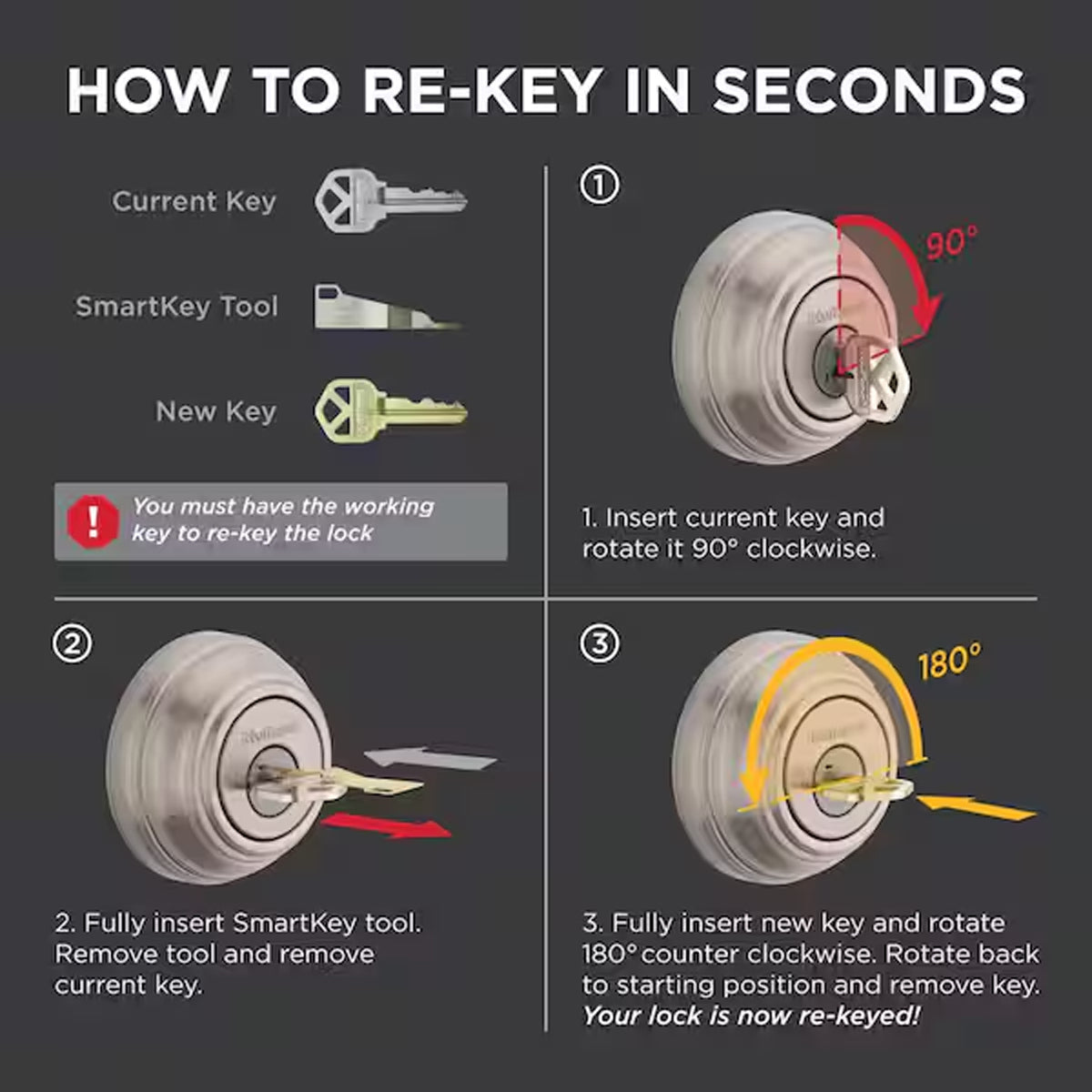
Change the physical key without replacing the entire lock unit. This process is useful if you lost your key or want to match all doors to one key.
Gather Required Tools
You need specific items to perform this mechanical adjustment safely.
* Current working key
* New Kwikset key
* 2.5 mm Allen wrench
* Paperclip or small screwdriver
Execute the Rekeying Steps
Follow this precise order to change the internal tumblers:
1. Remove the interior handle by turning it 90 degrees and pulling it off.
2. Insert the current working key into the cylinder.
3. Turn the key 90 degrees clockwise.
4. Insert a paperclip into the side hole and press the pin firmly.
5. Remove the old key while holding the pin down.
6. Insert the new key into the cylinder.
7. Turn the new key 90 degrees clockwise to set the tumblers.
8. Reattach the handle and tighten the screw with the Allen wrench.
9. Test the new key to ensure smooth locking and unlocking.
If the key does not turn smoothly, repeat the process to ensure the pin was fully engaged.
Upgrade to a More Secure Locking System

Given the proven vulnerability of the Smart Key deadbolt, upgrading your hardware is a wise security investment. Newer models offer better protection against modern forced entry techniques.
Select a Safer Alternative
Consider these recommended replacements for enhanced security:
* Best Security: Kwikset 980 Deadbolt with ANSI Grade 1 rating.
* Keyless Convenience: Kwikset Halo Touch with Wi-Fi and biometric options.
* Budget Option: Kwikset Powerbolt 2 with auto-lock features.
Benefits of Upgrading
Newer locks provide encryption, auto-lock capabilities, and remote access monitoring. Installation typically takes under 30 minutes and significantly improves your home defense. Hiring a professional locksmith ensures optimal alignment and maximum security performance.
Frequently Asked Questions About Kwikset Locks
Can a Kwikset Smart Key lock be opened without a key?
Yes, a specific tool can exploit a side pin flaw to open Smart Key deadbolts in under 10 seconds. This method damages the internal mechanism, requiring immediate lock replacement to restore security.
How do I reset my Kwikset SmartCode 955 if I forget the code?
You must use the physical emergency key to enter the home first. Once inside, press and hold the Program button for 30 seconds, then press it again to factory reset all codes.
What is the default code for a reset Kwikset SmartCode 955?
After a factory reset, the default user code is typically 0-0-0-0. You should change this immediately to a unique 4 to 8 digit code for security.
How do I create a code that only works once?
Press the Program button, enter 7, and press Quick Set. Enter your temporary code and press Quick Set again. This code will erase itself automatically after one successful use.
Is it safe to keep using a Smart Key lock after forced entry?
No, the internal mechanism is permanently compromised even if the key still works. You cannot rekey it securely, so you must replace the unit to ensure home safety.
Key Takeaways for Unlocking and Securing Your Kwikset Lock
Your approach to unlocking a Kwikset lock depends entirely on your specific model. SmartCode 955 users can reset codes, create temporary access, and use emergency keys to maintain control. However, Smart Key deadbolt owners must be aware of critical mechanical vulnerabilities that can compromise home security in seconds.
Prioritize replacing any Smart Key deadbolt that shows signs of tampering or forced entry. For the best protection, upgrade to modern electronic locks with encryption or high-grade mechanical deadbolts. Take action today to ensure your entry points remain secure against evolving threats.