Losing access to your gym locker or bike because you forgot the code is frustrating, but knowing how to reset a combination lock can save your day. Most models from brands like Master Lock and ABUS allow you to program a new code quickly if you follow the specific steps for your device.
This guide provides exact instructions for resetting key safes, padlocks, and lock boxes across various series. You will learn the precise lever movements and shackle rotations needed to secure your belongings again without guessing.
Reset Master Lock Key Safes by Model Number
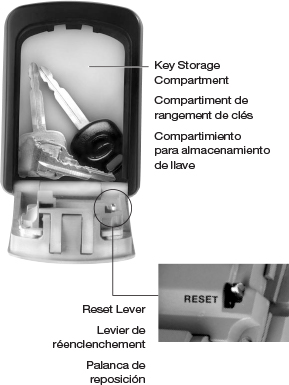
Key safes use internal levers or sliding mechanisms to change codes. You must know the current combination to open the door before attempting any reset procedure.
Steps for 5400D and 5401D Wall Mount Safes
These models utilize a lever that locks in a downward position during reprogramming.
1. Open the compartment using your current code or the default 0-0-0-0.
2. Locate the reset lever inside and push it left and down until it clicks.
3. Turn the dials to your chosen four-digit number.
4. Push the lever back and to the right to lock the new setting.
5. Close the door and scramble the dials to test.
Procedure for 5406D Spare Key Storage
This smaller safe uses a three-digit mechanism with a forward-pulling lever.
1. Enter the current code to open the door.
2. Push the reset lever to the left and pull it forward.
3. Rotate the dials to your new preferred numbers.
4. Return the lever to its original upright position.
5. Shut the door and mix the dials.
Instructions for 5404DHC and Sliding Lever Models
The 5404DHC requires an upward lever motion while the 5424D series needs a pointed tool.
* 5404DHC: Open the door, push the lever up and right, set your code, then move the lever down and left.
* 5424D/5425D: Use a pen to slide the combination set lever in the direction of the arrow, set your code, and close the door immediately.
Pro Tip: Always test your new code two or three times before leaving the safe unattended to ensure the lever fully engaged.
Reprogram Master Lock Padlocks Without Tools
Many standard padlocks allow you to change the combination using only the shackle and dial pressure. These methods work on Series 643D, 643DWD, and 653D models.
Standard Dial Reset for Series 643D
This common model requires aligning notches and applying downward pressure.
1. Open the lock with your current combination.
2. Rotate the shackle 90 degrees so the notch aligns with the body.
3. Press the shackle down firmly and hold it in place.
4. Spin the dials to your new numbers while maintaining pressure.
5. Align the numbers with the red stripe, lift the shackle, and close it.
High Security Reset for Series 653D
This model requires a more complex rotation sequence to engage the reset mode.
1. Open the lock and turn the shackle 90 degrees counterclockwise.
2. Press down and turn another 90 degrees counterclockwise for a total of 180 degrees.
3. Set your new combination while the shackle is fully depressed.
4. Turn the shackle 90 degrees clockwise, then lift and rotate it back to the start.
Word Dial and Backpack Lock Variations
The 643DWD uses letters instead of numbers but follows the same shackle pressure method. The Series 1550 backpack lock simplifies this by using a button on the bottom that you hold while changing the dials.
Warning: If the shackle does not click into the reset position, the new code will not save. Ensure full rotation before setting numbers.
Use Reset Tools for Series 175 and Internal Wheel Locks
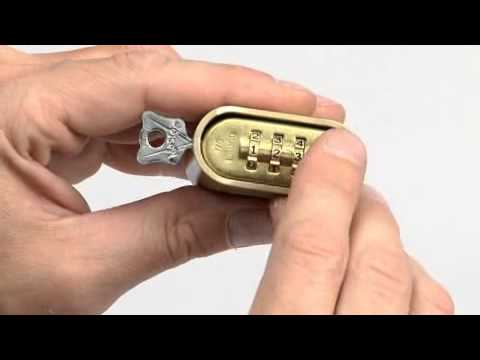
Some locks require a specific plastic tool included in the package or internal wheel reorientation. These methods differ significantly from the shackle pressure technique.
Using the Reset Tool on Series 175 to 178
These “Set-Your-Own” padlocks come with a dedicated key-like tool.
1. Open the lock using the factory or current code.
2. Insert the reset tool into the hole on the side of the lock body.
3. Push the tool in and turn it 90 degrees until it locks.
4. Rotate the wheels to your new combination.
5. Turn the tool back to remove it and test the lock.
Note: If you lose this specific tool, contact Master Lock customer service for a free replacement by providing your model number.
Internal Wheel Adjustment for Series 1520D
This method involves taking apart the side of the lock to rearrange the internal wheels.
1. Open the lock and remove the shackle completely.
2. Pull off the metal end cap on the side of the lock body.
3. Slide all wheels off the internal shaft carefully.
4. Reinstall the wheels so your new desired numbers align with the logo.
5. Ensure red marks stay aligned with the Master Lock logo during reassembly.
6. Snap the cap back on and reinsert the shackle.
Change ABUS 158/50 Codes with a Screwdriver
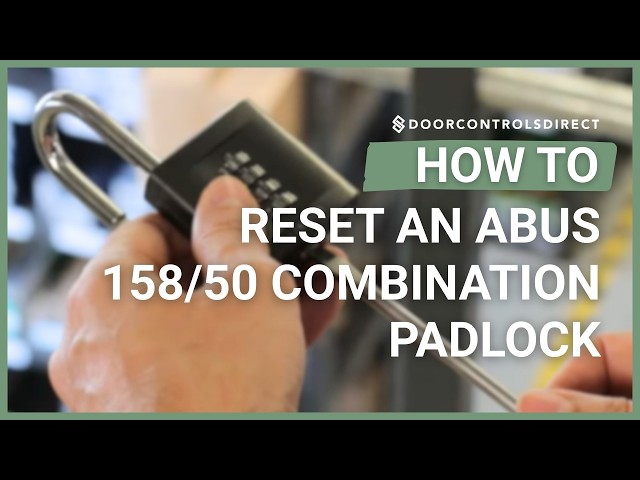
The ABUS 158/50 uses a unique screw-based system that differs from Master Lock mechanisms. You need a small flathead screwdriver to complete this task.
Step-by-Step Screw Reset Method
- Unlock the padlock using the current code.
- Locate the small reset screw on the bottom near where the shackle enters.
- Insert your screwdriver and turn the screw 90 degrees clockwise.
- Hold the screw in place and rotate the dials to your new combination.
- Turn the screw another 90 degrees clockwise to lock the code.
- Close the shackle and scramble the dials to finish.
Critical: You must turn the screw a full 180 degrees total. Stopping at 90 degrees means your new code will not be saved.
Recover Lost Combinations for Master Lock
If you forgot your code, recovery is only possible if your lock has a visible serial number and is not attached to anything.
Retailer Verification Process
You can visit an authorized retailer to retrieve your code if you have the physical lock.
* Bring the unattached lock to a store.
* The retailer will call Master Lock with the serial number.
* US customers can reference line 1-800-308-9244 while Canadian users dial 1-800-227-9599.
* Master Lock provides the code for free, though retailers may charge a fee.
Online Photo Submission Option
You can submit a photo of your unattached lock via the Master Lock website.
1. Take a clear photo showing the entire lock and legible serial number.
2. Ensure the image proves the lock is not attached to any object.
3. Upload the photo via the “Lost Combination” form on the contact page.
4. Wait 7 to 10 days for a response via email.
Limitations for Set-Your-Own Locks
Recovery is impossible for resettable locks if you forget the new code. Master Lock cannot retrieve codes for Series 175 or key safes that were user-programmed. You must cut the lock or replace it entirely if the code is lost.
Avoid These Common Reset Mistakes
Errors during the reset process often lead to locked-out situations or malfunctioning dials. Avoiding these pitfalls ensures your new code works immediately.
Incomplete Shackle Rotation
Failing to rotate the shackle the full 90 or 180 degrees prevents the mechanism from entering reset mode. Listen for a distinct click to confirm proper engagement before changing numbers.
Misaligned Dial Numbers
Numbers must align perfectly with the red stripe or indicator line. Off-center digits will cause the lock to fail even if the rest of the process was correct.
Partial Screw Turns on ABUS Models
Turning the reset screw only halfway on ABUS locks results in data loss. Always complete the full 180-degree rotation to lock the new combination into the memory.
Incorrect Wheel Orientation
When resetting internal wheel locks, installing wheels upside down prevents the cap from snapping back. Double-check that all wheels sit flush before closing the unit.
Frequently Asked Questions About Resetting Combination Locks
Can I reset a Master Lock if I forgot the current code?
No, you cannot reset a lock without the current code unless it has a serial number for recovery. Resettable locks require the existing code to open before reprogramming.
What is the default factory code for most Master Locks?
Most 4-digit Master Lock models come set to 0-0-0-0 while 3-digit models use 0-0-0. Word dial locks typically default to P-L-A-Y.
Do I need a special tool to reset my padlock?
It depends on the model. Series 175 requires an included reset tool, while Series 643D uses only shackle pressure. ABUS locks require a small flathead screwdriver.
Why won’t my new combination work after resetting?
You likely did not complete the final step, such as returning a lever, rotating a shackle back, or turning a screw the full distance. Repeat the process and ensure every click is felt.
How do I get a replacement reset tool for Series 175?
Contact Master Lock customer service with your model number or a photo of the lock. They provide replacement reset tools free of charge for these specific models.
Key Takeaways for Resetting Your Combination Lock
Successfully resetting your lock depends on identifying your specific model and following its unique mechanical steps. Whether you are using a lever on a key safe, a tool on a Series 175, or a screwdriver on an ABUS padlock, precision is essential to save the new code.
Always test your new combination multiple times before relying on it for security. If you ever lose a user-set code on a resettable model, remember that no master override exists, making immediate documentation of your new numbers critical.