Real estate agents and property managers often face panic when a lost code prevents access to a listed home. Knowing how to open a Kidde lock box using verified mechanical methods saves time and prevents costly delays for everyone involved.
This guide details the standard operating procedure, emergency tactile techniques, and reprogramming steps for these units. You will learn to diagnose issues safely while adhering to strict legal and ethical guidelines for authorized access only.
Execute the Standard Opening Procedure
Opening the unit is simple when you possess the correct combination and follow the specific mechanical sequence. These devices rely on precise lever alignment rather than complex electronics.
Reset the Keypad Mechanism
Always press the reset button located at the bottom of the keypad before starting. This action clears residual pressure from previous attempts and returns internal levers to a neutral state. Skipping this step often causes false resistance even with the right code.
Enter Digits in Any Order
Depress each button corresponding to your authorized code. Kidde models utilize non-sequential logic, meaning the order of entry does not matter. You only need to ensure every correct digit is fully engaged before activating the release.
Activate the Release Lever
Slide or press the OPEN lever usually found at the top of the unit. If the door or shackle does not release immediately, release all buttons and press the reset button again. Re-enter the code with firm, deliberate pressure to clear any mechanical binding.
Reprogram the Combination Securely

You should reset the combination immediately if security is compromised or after an emergency entry. This process ensures only authorized personnel retain access to the property.
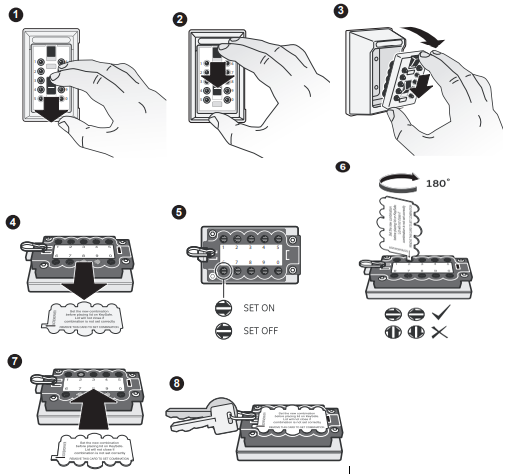
Locate the Internal Switch Panel
Open the lock box to find the internal switch panel hidden behind the keypad or inside the housing. This panel features ten individual sliders or toggles representing digits zero through nine.
Adjust Switches for New Code
Use the included flat-head change tool or a small screwdriver to set your new digits. Move switches down or forward to turn them ON for inclusion in the code. Move switches up or backward to turn them OFF for exclusion.
Verify the New Sequence
Close the box and test your new combination before relying on it. Press the reset button, engage all new code digits, and slide the OPEN lever. If it fails, reopen the unit to verify switch positions against the user diagram immediately.
Utilize the Tactile Feedback Method
Authorized users can open a Kidde lock box without the code by exploiting mechanical feedback differences. This technique requires patience and a steady hand to detect subtle variances.
⚠️ Warning: Use this method only if you have legal rights to access the property. Unauthorized entry constitutes trespassing and may lead to criminal charges.
Apply Constant Tension to Lever
Locate the OPEN lever and apply gentle, continuous pressure without releasing it. This tension engages the internal locking bar against the digit levers to create detectable feedback.
Test Buttons for Resistance Variance
Press each digit from zero to nine individually while maintaining tension on the lever. Incorrect digits feel hard and stop abruptly under pressure. Correct digits feel softer, depress slightly further, or exhibit a mushy resistance.
Use Precision Tools for Detection
Employ a Sharpie marker tip or pen to center pressure on the buttons. The narrow tip enhances sensitivity to tiny movements that fingers might miss during this diagnostic process.
Confirm the Identified Combination
Mark every button that feels different or softer than the others. Release tension, press all suspected digits simultaneously, and reapply pressure to the OPEN lever to release the latch.
Close the Lock Box Properly
Improper closure compromises security and can trap keys inside the mechanism. Follow these steps to ensure the unit latches correctly every time.
Secure the Key Inside Compartment
Place the property key into the internal compartment carefully. Push the bottom tab inward to lock the key in place and prevent it from shifting during the re-latching process.
Slide Assembly and Reset Pins
Slide the key assembly upward into the locked position fully. Enter the correct combination again to reset the internal pins before attempting final closure.
Engage Final Latching Mechanism
Pull down the OPEN lever while closing the unit. Slide the box fully into the wall mount until it clicks securely. Ensure the bottom latch engages before final closure to avoid jamming.
Analyze Model-Specific Behaviors
Different Kidde models exhibit nuanced behaviors during operation. Identifying your specific unit helps in applying the correct technique.
Kidde KeySafe Pro Features
- Round push buttons with strong tactile feedback
- Commonly uses four to six digit codes
- Wall-mounted design with sliding door
- Reprogrammable using a specific tool
GE Push Button Characteristics
- Flat numbered buttons ranging from zero to nine
- Typically uses two to four digit codes
- Order-independent entry logic
- Clear mechanical click on correct digits
Kidde Portable KeySafe Rules
- Requires manual switch setup with no preset code
- Prohibits repeated digits in the combination
- Features distinct CLEAR and OPEN buttons
- Often used for temporary or mobile access
Maintain Reliability Through Care
Routine maintenance keeps your lock box functioning smoothly through various weather conditions. Neglect can lead to jammed buttons or failed access attempts.
Clean Buttons Regularly
Wipe buttons with a dry cloth to remove dirt, sand, or ice. Use compressed air to blow out debris from sticky keys to prevent mechanism jams.
Use Reset Function Frequently
Press the reset button after every single use. This prevents residual pressure buildup and maintains responsiveness for the next user.
Inspect for Physical Damage
Check regularly for cracked casing, misaligned shackles, or worn buttons. Replace damaged units immediately to avoid failure during critical access moments.
Adhere to Safety and Legal Warnings
Opening a lock box without permission is illegal and dangerous. Real estate professionals must uphold strict ethical standards regarding property access.
Never Attempt Unauthorized Access
Opening a lock box without permission is trespassing and may result in criminal charges or license revocation. Unauthorized attempts have even led to violent confrontations with occupants.
Verify Property Status First
Confirm the property is vacant before using any bypass method. Check showing schedules and contact the listing agent if you are unsure about occupancy status.
Uphold Ethical Responsibility
Use bypass methods only when you have lost the code for a box belonging to your listing. This is a tool for convenience and emergency access, not for intrusion.
Troubleshoot Common Access Issues
Quickly diagnose and fix frequent problems to restore functionality without professional help.
Lock Does Not Respond to Code
Cause: Residual pressure or dirty mechanism inside the unit.
Fix: Press the reset button, clean the buttons, and re-enter the code firmly.
OPEN Lever Will Not Slide
Cause: Wrong combination or internal misalignment of pins.
Fix: Do not close the lid. Press CLEAR, recheck internal switches, and retest.
Box Will Not Close or Latch
Cause: Key not secured or bottom tab not engaged properly.
Fix: Re-insert key, push tab inward, slide key up, and re-enter code.
Buttons Feel Sticky or Hard
Cause: Debris accumulation or general wear over time.
Fix: Clean with a dry cloth, use a pen tip for pressure, and inspect for damage.
Frequently Asked Questions About Kidde Lock Boxes
Does the order of numbers matter on a Kidde lock box?
No, the order does not matter for most Kidde models like the KeySafe Pro. You only need to press the correct set of digits simultaneously or in any sequence to unlock the device.
How do I reset my Kidde lock box if I forgot the code?
If you forget the code, you can use the tactile feedback method by applying tension to the open lever and feeling for soft buttons. This works only if you have legal authority to access the property.
What tools do I need to change the combination?
You typically need the included flat-head change tool or a small screwdriver. This tool adjusts the internal switches that define which digits are part of your new combination code.
Why won’t my Kidde lock box open with the right code?
Residual pressure from previous attempts often causes this issue. Press the reset button at the bottom of the keypad to clear the mechanism before re-entering your code.
Can I use the same number twice in my Kidde code?
It depends on the model. The Kidde Portable KeySafe prohibits repeated digits, while other models may allow them. Check your specific user manual for model constraints.
Is the tactile feedback method safe for the lock box?
Yes, when performed gently, this method exploits normal mechanical tolerances without damaging the unit. However, forcing buttons or using excessive pressure can cause permanent damage.
Key Takeaways for Opening Your Kidde Lock Box
Mastering how to open a Kidde lock box ensures you can handle lost codes and mechanical glitches professionally. Remember that the order of digits rarely matters, and the reset button is your first line of defense against access issues.
Always prioritize safety and legality by verifying property status before attempting any entry method. Maintain your units regularly and change combinations after any security concern to protect your listings effectively.