Is your Kwikset lock sticking, refusing the key, or failing to connect? Thousands of homeowners face mechanical jams, re-keying errors, or smart lock connectivity issues every year. Whether it’s an older deadbolt or a high-tech Halo model, most problems can be resolved at home with the right steps. This guide shows you exactly how to fix Kwikset lock issues from cleaning seized mechanisms to resetting electronic codes.
You will learn how to diagnose sticking latches, reprogram a miskeyed cylinder, reset a forgotten user code, and fix common smart lock sync delays. These actionable fixes often take under 30 minutes to complete. Let’s get your Kwikset lock working like new again without expensive replacements.
Diagnose Sticking Latch Mechanism

A common reason a Kwikset lock won’t turn smoothly is a sticking latch mechanism. This issue often feels like the knob is catching or requires excessive force to operate. The problem usually stems from internal buildup rather than broken parts.
Check for Internal Debris Buildup
Dust, old grease, and grime accumulate inside the lock housing over time. This restricts the movement of the latch bolt, spring, and spindle. Pull the lock from the door to inspect the interior for dark residue or dry clumps.
Visual Cues to Confirm:
* The latch doesn’t retract fully
* Knob turns with resistance
* Key jams before completing a full rotation
If the lock works intermittently, debris is likely the culprit instead of a failed cylinder.
Clean Metal Components Thoroughly
- Loosen Residue: Spray WD-40 into the latch assembly to break down old grease.
- Wipe with Q-tips: Use cotton swabs to remove loosened grime from the latch bolt, spring, and spindle shaft.
- Final Alcohol Pass: Dampen a new Q-tip with rubbing alcohol and wipe all metal surfaces to remove oil residue.
Pro Tip: Don’t skip the door edge and strike plate recess. Dirt here can misalign the latch. Use a small brush or compressed air to clear debris.
Lubricate Without Clogging
Use only a light coat of machine oil to lubricate the mechanism. Avoid WD-40 or graphite for final lubrication. Graphite attracts dust and hardens, which worsens the problem over time.
Apply Oil To:
* Latch bolt sliding surface
* Cam pivot point
* Spring ends
* Spindle contact areas
Use a Q-tip to apply one or two drops maximum per point. Wipe away any excess immediately. Over-lubrication traps dirt and causes re-jamming.
Re-Key SmartKey Locks Correctly
Re-keying your Kwikset SmartKey lock lets you switch access without replacing the entire unit. Doing it wrong can lock you out completely. Follow these steps exactly to avoid misprogramming the cylinder.
Prepare Before Re-Keying
Leave the door open before inserting any key. Never attempt this with the door closed. Ensure the deadbolt or knob is in the locked position.
Ensure you have:
* The current working key
* The new key (cut correctly)
* The SmartKey tool included with the lock
Warning: If the door closes during re-keying and fails to unlock, you will need to force entry or call a locksmith.
Follow the Exact Re-Keying Sequence
- Insert old key fully into the cylinder.
- Turn 90° clockwise.
- Insert SmartKey tool all the way into the re-key hole until you feel a click.
- Remove tool, then remove old key.
- Insert new key fully so the edge touches the indent in the cylinder face.
- Rotate 180° counter-clockwise, then immediately 180° clockwise.
- Pull gently to ensure the key does not come out yet.
- Turn 90° counter-clockwise to the neutral position.
- Remove new key. It should now operate the lock.
Success Check: Test the new key multiple times. The old key should no longer work.
Fix a Misprogrammed Cylinder
If neither key works, the cylinder reset without locking in a new key profile. Reinsert the current key even if it doesn’t turn. Repeat the re-keying process from the start.
Consult the Kwikset video guide for “Recovering a Misprogrammed SmartKey Cylinder” if issues persist. Some models require the lock to be removed and reset manually. Contact Kwikset support if recovery fails.
Reset SmartCode Locks & User Codes
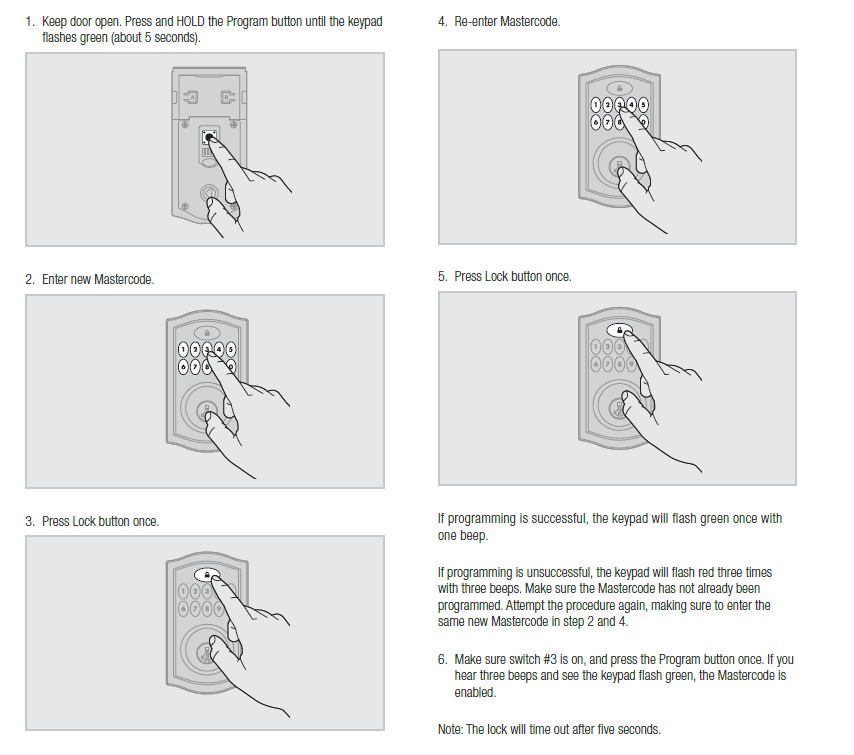
Forgotten codes or unresponsive keypads are common with Kwikset SmartCode models. You can reset or add new codes without replacing the lock.
Program a New Code on SmartCode 913
- Open the door.
- Remove the battery cover.
- Press Program button once.
- Enter new 4–8 digit user code.
- Press Lock button.
Success Confirmation:
* Keypad flashes green once
* One audible beep sounds
If you hear three beeps or see a red flash, the code was rejected. Retry with a valid sequence.
Recover From Forgotten User Code
You have two options if you lose access. Add a new code if you still have one working code or physical key access. Use the Program button method above to add a new user. Delete old codes via the programming menu.
Perform a factory reset if all codes are lost:
1. Remove the battery pack.
2. Press and hold the Program button.
3. Reinsert batteries while holding the button.
4. Wait for two beeps and a red flash.
5. Release the button.
All user codes are erased. You can now program a new master code. This does not affect SmartKey cylinder settings.
Fix Wi-Fi & Smart Lock Connectivity
Kwikset Halo and Home Connect models often fail to stay connected due to network misconfiguration. These issues cause remote access delays or false lock status.
Confirm Network Requirements
Smart locks only work on specific network configurations. Your router must broadcast on the 2.4GHz Wi-Fi band. The SSID must be visible and not hidden. Security must be WPA2 or WPA3.
Disable band steering if your router broadcasts dual bands. Ensure the lock connects to the 2.4GHz network specifically.
Reconnect Halo Select to Wi-Fi
- Open Kwikset App.
- Go to Lock Settings > Wi-Fi Settings.
- Tap CONTINUE to disconnect the current network.
- Select your 2.4GHz network from the list.
- Enter password and wait for confirmation.
Timeout Note: If connection fails, the lock reverts to the previous network after 15 minutes. Try again with a better signal.
Boost Signal with Wi-Fi Extender
Install a Wi-Fi extender or mesh node between your router and lock if the signal is weak. Avoid metal doors or thick walls blocking the signal. Test signal strength using a phone near the lock.
Pro Tip: Use a Wi-Fi analyzer app to confirm your lock’s signal is above -70 dBm.
Resolve Home Connect 620 Sync Delays

Your Kwikset Home Connect 620 may show different status in the Alarm.com app versus your Qolsys panel. The issue is likely outdated panel software rather than the lock itself.
Identify Affected Systems
This affects specific lock models and panel versions. Check if you have Home Connect 620 models 98920-xxx, 98930-xxx, or 98690-xxx.
Affected Panels:
* Qolsys IQ2/IQ2+ with software older than 2.6.0
* Qolsys IQ4 with software 4.0.1 or older
The lock works fine locally. Only remote status updates are delayed or incorrect.
Update Qolsys Panel Software
- Check current version in the Qolsys panel settings.
- Visit the Qolsys Support Site or contact your security provider.
- Upgrade to IQ2/IQ2+ version 2.6.2 or newer.
- Upgrade to IQ4 version 4.0.1 or newer.
Test remote lock commands via the Alarm.com app after the update. Status should sync within seconds. This fix requires professional assistance in most cases.
Align Handleset and Latch Properly
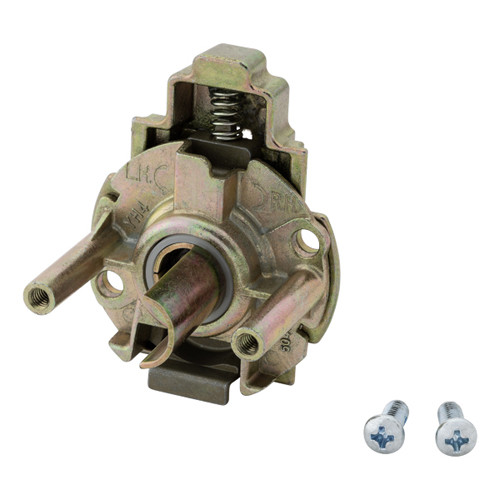
The handleset spindle may not pass through the latch due to incorrect orientation. This is not a size mismatch issue.
Rotate Spindle Correctly
- Hold the exterior handle in place.
- Check the spindle ends. The round edge must face the door edge.
- Pull the spindle out if the flat side is facing the edge.
- Rotate 180 degrees while holding it extended.
- Reinsert with both rounded edges facing the door edge.
- Press the latch bolt to extend it.
- Insert spindle through the latch opening.
Visual Confirmation: The spindle slides in smoothly when aligned. The handle turns without binding.
Prevent Future Lock Problems
Avoid recurring issues with a simple maintenance plan. Regular care extends the life of your lock significantly.
Schedule Bi-Annual Cleaning
Clean and lubricate your lock every 12 to 18 months. Remove and clean internal mechanisms during this time. Re-lubricate with light machine oil. Inspect for wear on the latch and strike plate. Increase frequency in dusty or humid environments.
Check Strike Plate Alignment Annually
A misaligned strike plate forces the latch to drag. This accelerates wear on the mechanism. Close the door slowly to test alignment. Adjust the strike plate with a screwdriver if the latch doesn’t slide in smoothly.
Avoid Harsh Lubricants
Never use graphite powder, heavy grease, or silicone spray. Graphite attracts dust. Heavy grease gums up mechanisms. Silicone spray can degrade plastic parts. Stick to light machine oil for long-term reliability.
Frequently Asked Questions About Fixing Kwikset Locks
Why won’t my Kwikset key turn in the lock?
Debris buildup inside the mechanism often causes this issue. Clean the latch bolt and spindle with WD-40 followed by rubbing alcohol. Apply a light coat of machine oil to restore smooth operation.
How do I reset my Kwikset SmartCode if I forget the code?
Remove the battery pack and hold the Program button. Reinsert the batteries while holding the button until you hear two beeps. This factory resets all user codes so you can program new ones.
What Wi-Fi settings does my Kwikset Halo need?
Your lock requires a 2.4GHz network with a visible SSID. Security must be WPA2 or WPA3. Ensure your router is not hiding the network name and disable band steering if possible.
Why is my Home Connect 620 showing the wrong status?
Outdated Qolsys panel software often causes sync delays. Update IQ2 panels to version 2.6.2 or newer. Update IQ4 panels to version 4.0.1 or newer to resolve status desynchronization.
Can I use graphite to lubricate my Kwikset lock?
No, never use graphite on Kwikset locks. Graphite attracts dust and hardens over time. This leads to clogging and worsens sticking issues. Use light machine oil instead.
How often should I maintain my Kwikset lock?
Clean and lubricate your lock every 12 to 18 months. Increase this frequency if you live in a dusty or humid environment. Check strike plate alignment annually to prevent wear.
Key Takeaways for Fixing Your Kwikset Lock
Most Kwikset lock issues stem from simple causes like debris buildup or incorrect lubrication. Regular cleaning with alcohol and light machine oil prevents sticking latches and extends lock life. Smart lock problems often resolve by checking network settings or updating panel software.
Take action today by inspecting your lock mechanism and testing your smart home connections. Perform a quick cleaning if you notice resistance. Contact Kwikset technical support at 1-800-327-5625 for persistent electronic issues.