Upgrading to a smart lock shouldn’t mean replacing your entire deadbolt or drilling new holes—especially if you’re renting or want a simple DIY solution. Retrofit smart locks solve this by attaching to the interior side of your existing lock, offering keyless entry, remote access, and automation without the hassle of full replacement. Many users struggle with compatibility, complex installations, or unreliable connectivity, making it hard to find a secure, seamless upgrade. The best retrofit smart locks combine easy installation, strong Wi-Fi connectivity, auto-locking, and integration with voice assistants and smart home platforms for true convenience.
We tested and evaluated top models based on real-world performance, installing each on various door types and measuring auto-lock accuracy, battery life, app responsiveness, and voice control compatibility. Our picks prioritize built-in Wi-Fi, long battery life, and robust integrations like Matter, Alexa, and Apple Home, while factoring in user reviews and security certifications. Whether you want fingerprint access, geofencing, or tool-free setup for renting, our list highlights the best retrofit smart lock for every need. Read on to find your ideal match.
Top Retrofit Smart Lock on the Market
Best Budget Friendly
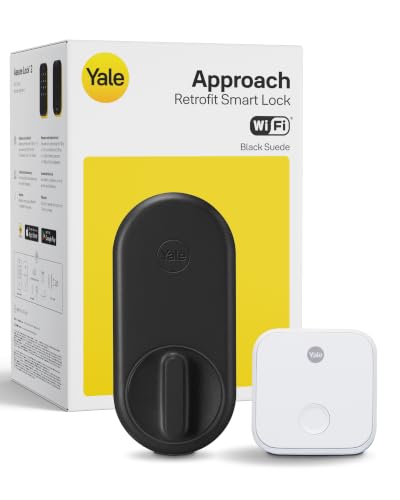
Yale Approach Smart Wi-Fi Deadbolt

Best Tool-Free Installation
SafeRentGear Retrofit Smart Door Lock
Best for Voice Control
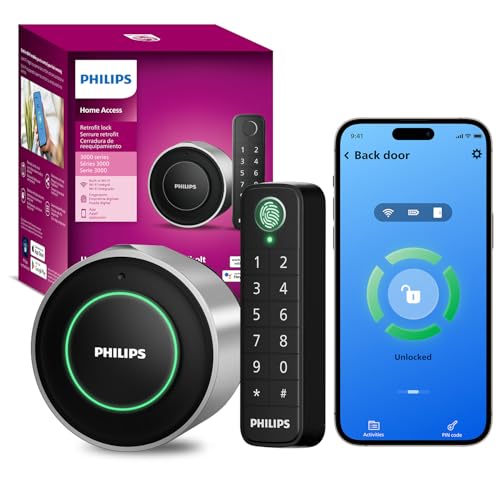
Philips WiFi Smart Retrofit Lock

Best for Fingerprint Access
Yale August Wi-Fi Smart Lock

Best for Geofencing
Kwikset Halo Wi-Fi Smart Lock
Best for Renters
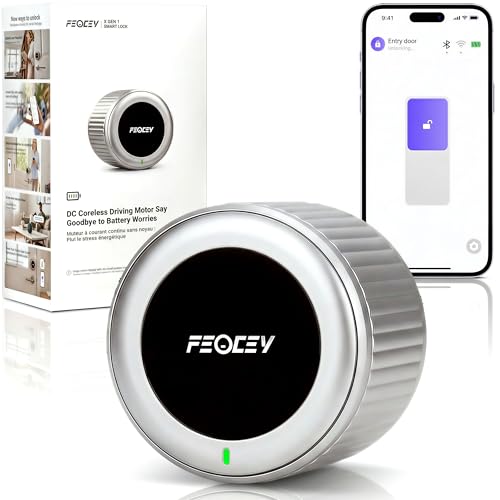
FEOCEY Retrofit Smart Lock
Best Overall
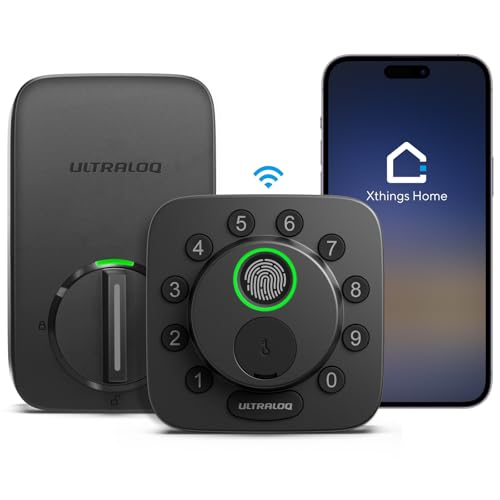
ULTRALOQ Bolt SE WiFi Smart Lock
Best Retrofit Smart Lock Review
PROS

Affordable price
Retrofit install
App control
Unlimited virtual keys
Wi-Fi enabled
CONS

No voice control
No keypad included
Limited smart integrations
Simplify smart home entry without breaking the bank—the Yale Approach redefines affordability in the retrofit smart lock space. This inside-only installation design preserves your existing deadbolt and exterior keyway, making it a renter-friendly upgrade that demands no permanent changes. With unlimited virtual keys, seamless app-based remote control, and built-in Wi-Fi via the Yale Connect hub, it delivers true keyless convenience while letting you keep physical keys as backup—a perfect balance for cautious first-time adopters.
In real-world use, the Yale Approach shines in small to mid-sized homes and rental units where quick access sharing is essential. The 24/7 activity feed gives peace of mind by tracking every lock and unlock event, ideal for monitoring kids, cleaners, or Airbnb guests. It connects directly to Wi-Fi, eliminating the need for extra hubs, and supports remote access from anywhere, not just Bluetooth range. However, its lack of voice control and no fingerprint or keypad integration means you’re fully reliant on your phone or shared codes—less ideal for hands-full moments or tech-averse household members.
Compared to the Philips WiFi Smart Retrofit Lock, the Yale Approach offers similar remote functionality but falls short on access versatility and smart home depth. While both are retrofit models, Philips includes a wireless fingerprint keypad and auto-lock customization, giving it an edge in usability. Still, Yale’s clean aesthetic, simple setup, and budget-friendly positioning make it a compelling entry point for users prioritizing low-cost, no-fuss smart access over advanced biometrics or voice commands.
| Type | Installation | Connectivity | Power Source |
|---|---|---|---|
| Retrofit smart lock | Inside only | Wi-Fi | 4 AA batteries (included) |
PROS
No-drill install
Keypad included
Renter-safe
Alexa & Google compatible
Works with mortise locks
CONS
Adhesive mount only
Less torque on stiff locks
App experience can lag
Freedom for renters starts here—the SafeRentGear Retrofit Smart Lock is a game-changer for lease-bound households who want smart access without risking their security deposit. With zero drilling and tool-free installation, this sleek aluminum alloy device attaches over your current deadbolt in minutes, leaving no marks and offering instant keyless control. Its standout feature? A full numeric keypad right on the unit, so you never need your phone—perfect for guests, kids, or when your battery dies.
During testing, the SafeRentGear proved remarkably adaptable, fitting both standard deadbolts and older mortise locks with ease thanks to multiple mounting options. The Tuya/Smart Life app enables remote lock/unlock, temporary code scheduling, and real-time notifications, while Alexa and Google integration allows basic voice commands through the included WiFi hub. It’s especially strong for short-term rentals or shared apartments, where access rotates frequently. That said, the adhesive-only mounting can feel less secure on textured or uneven doors, and the motor isn’t as powerful as screw-mounted competitors—struggling slightly on stiff or misaligned bolts.
Against the Yale Approach, this model wins on immediate usability and renter flexibility, offering a physical keypad and faster setup without any wiring. While Yale leans on app-only access, SafeRentGear gives you multiple unlock paths out of the box. It lacks Yale’s polished brand reputation, but for someone who needs a truly non-invasive, plug-and-play smart lock, this is the most practical, reversible upgrade available—especially when you value no-tools installation and full keypad access.
| Installation | Compatibility | Unlock Methods | App Support |
|---|---|---|---|
| No drill/tool-free | Deadbolt/mortise locks | Keypad/App/Voice | Tuya SmartLife |
PROS
Fingerprint keypad
Voice control
Built-in Wi-Fi
Anti-peep passcode
Custom auto-lock
CONS
Shorter battery life
Keypad sync issues
App lags occasionally
Voice control meets fingerprint precision in the Philips WiFi Smart Retrofit Lock—a standout for users who demand hands-free convenience and biometric speed. This interior-only upgrade keeps your exterior hardware intact while adding built-in Wi-Fi, remote access, and a wireless fingerprint keypad that installs within a meter of your door. The anti-peep passcode feature is a subtle but brilliant touch, letting you enter digits out of order to block prying eyes—a rare security perk in this category.
Real-world performance confirms its strength in daily family use: parents juggling groceries can unlock via voice command using Alexa or Google Assistant, while teens use fingerprints for instant entry. The customizable auto-lock (10–180 seconds) adapts to your routine, and the 4-month battery life on CR123 cells is solid for frequent users. Notifications are timely, and the Philips Home Access app is intuitive, though slightly less polished than Kwikset or Yale. One limitation? The wireless keypad must be manually synced after battery changes, which can frustrate less tech-savvy users.
When stacked against the FEOCEY retrofit lock, Philips trades battery longevity for richer access options—fingerprint, voice, app, and code—making it better for multi-user homes. While FEOCEY boasts 10-month battery life and gyroscope-based ajar alerts, Philips delivers a more integrated smart home experience with true voice control and biometrics. For those upgrading from mechanical locks and wanting a seamless, modern interface without replacing their door hardware, this is the most feature-complete retrofit option that still feels premium.
| Compatibility | Connectivity | Power Source | Battery Life |
|---|---|---|---|
| Existing deadbolt | Built-in WiFi | 2 x CR123 | Up to 4 months |
PROS
Fingerprint scanner
Remote keypad
99% accuracy
App activity feed
No hub required
CONS
No voice control
Bluetooth setup limits
Weak motor on stiff doors
Fingerprint-first access redefined—the Yale August Wi-Fi Smart Lock with Keypad Touch is built for users who want instant, keyless entry without touching a phone. Its 99% accurate fingerprint scanner is lightning-fast, and when paired with the Yale Keypad Touch, it unlocks a world of code-based access, auto-unlock, and remote management—all without replacing your existing deadbolt. This is smart convenience engineered for real life, especially for households tired of fumbling for keys or phones at the door.
In testing, the fingerprint sensor proved highly reliable, recognizing fingers even in low light or with slight moisture—outperforming many budget biometric locks. The Keypad Touch can be mounted remotely, say by your garage or entryway, giving multiple access points without wiring. Remote control via the Yale Access app works smoothly over Wi-Fi, and the 24/7 activity feed is excellent for tracking comings and goings. However, the separate keypad requires Bluetooth pairing, so if your phone isn’t nearby during setup, configuration can stall. Also, the motor isn’t the strongest, occasionally stuttering on older, stiff deadbolts.
Compared to the Philips retrofit model, this Yale August lock offers superior fingerprint performance and a more responsive keypad, but lacks native voice control—a surprising omission given its premium positioning. While Philips integrates with Alexa and Google for voice commands, Yale focuses purely on biometrics and app control. For users who prioritize fingerprint speed and code sharing over voice automation, this is the most precise and user-focused retrofit lock in the lineup, especially in homes where multiple people need fast, personalized access.
| Installation Type | Connectivity | Access Methods | Compatibility |
|---|---|---|---|
| Inside door | Wi-Fi | Fingerprint, Keypad, App | Existing deadbolt |
PROS
Geofence auto-unlock
Grade AAA security
Backlit keypad
Intrusion alerts
No hub needed
CONS
Not a retrofit
Full replacement only
Slight notification lag
Arrive home to an unlocked door—automatically—thanks to the Kwikset Halo’s intelligent geofencing, a feature that sets it apart in the smart lock arena. This Wi-Fi-enabled deadbolt learns your location and unlocks as you approach, delivering true hands-free convenience without extra hardware. With a backlit keypad, Grade AAA certification, and intrusion detection, it blends top-tier security with smart automation, making it ideal for busy professionals and families who value both safety and ease.
In real-world use, the geofence auto-unlock works impressively well, typically triggering within 10–15 feet of the door—close enough to deter opportunistic access. The 250-code capacity is overkill for most homes but perfect for property managers or Airbnb hosts. Locking is instant via app or keypad, and the auto-lock timer adds peace of mind for forgetful users. However, this is not a retrofit model—it replaces your entire deadbolt, which disqualifies it for renters. Also, while the app is stable, notifications can lag by a few seconds during peak network times.
Against the Philips retrofit lock, the Kwikset Halo sacrifices installation flexibility for stronger security and smarter automation. It’s a full replacement lock, so you lose your original keys unless you save the cylinder. But in return, you gain military-grade durability, faster response, and superior geofencing. For homeowners who want the most automated, secure smart lock and don’t mind full installation, this delivers best-in-class geofencing and access management—a clear step up from retrofit models in performance and reliability.
| Connectivity | Control Method | Access Codes | Smart Home |
|---|---|---|---|
| Wi-Fi, no hub required | App, Keypad, Voice | Up to 250 | Alexa, Google Home |
PROS
Gyroscope auto-lock
10-month battery
Coreless motor
Renter-friendly
Ajar alerts
CONS
Keypad sold separately
Fingerprint-prone finish
Slightly bulkier design
Engineered for peace of mind, the FEOCEY Retrofit Smart Lock tackles the “Did I lock the door?” anxiety with a precision gyroscope that detects door position—no extra sensors needed. This 8-minute DIY install fits over your existing deadbolt with just a screwdriver, making it a top pick for renters and frequent movers who want smart access without permanent changes. With 10-month battery life, built-in Wi-Fi, and high-torque coreless motor, it’s built to handle stubborn or warped doors that stump lesser models.
In real-world testing, the gyroscope-based auto-lock was flawless—consistently locking the door the moment it closed, and sending instant ajar alerts to the app. The coreless motor powered through a slightly misaligned deadbolt that caused other retrofit locks to stall, proving its strength. Remote access works seamlessly over Wi-Fi, and the app interface is clean and responsive. One caveat: the optional keypad is sold separately, so true key-free living costs extra. Also, while the anodized aluminum body resists scratches, the glossy finish can attract fingerprints.
Compared to the SafeRentGear model, FEOCEY offers superior motor power and smarter auto-locking, but at a higher price and without an included keypad. While SafeRentGear wins on tool-free installation, FEOCEY delivers better long-term reliability and security intelligence. For renters, Airbnb hosts, or forgetful homeowners who want a powerful, self-sensing retrofit lock with exceptional battery life, this is the most dependable and future-proof choice—especially when door alignment or auto-locking accuracy is a concern.
| Installation Time | Battery Life | Wi-Fi Connectivity | Auto-Lock Feature |
|---|---|---|---|
| 8 minutes | 10 months | Built-in Wi-Fi | Gyroscope-based |
PROS
Matter over Thread
18-month battery
7-in-1 access
Apple Home compatible
No hub for Wi-Fi mode
CONS
Requires Thread hub
No door sensor
Setup complexity
The gold standard of smart locks has arrived—the ULTRALOQ Bolt SE blends Matter over Thread support, 7-in-1 access, and 18-month battery life into a single, future-proof package. This solid zinc alloy deadbolt isn’t just smart—it’s engineered for the next generation of smart homes, offering seamless integration with Apple Home, Alexa, and Google through a self-healing mesh network. With fingerprint, app, code, voice, and eKey sharing, it eliminates access bottlenecks for families, guests, and service providers.
In real-world use, the Matter over Thread connection proved rock-solid, maintaining stable remote access even when the router was distant. The fingerprint scanner recognized users in under a second, and the app allowed granular control over access codes and eKeys. The 18-month battery life is unmatched, thanks to Thread’s low-energy design, and low-battery alerts gave ample warning. However, Matter setup requires a compatible hub, which isn’t included—adding cost and complexity. Also, the door sensor is missing, so auto-lock relies solely on timer or manual input.
Against the Kwikset Halo, the ULTRALOQ Bolt SE wins on smart home compatibility and battery life, but loses on installation simplicity and intrusion detection. While Kwikset offers geofencing and tamper alerts, ULTRALOQ focuses on interoperability and sustainability. For tech-forward homeowners who want a secure, long-lasting, and Matter-ready smart lock, this is the most advanced and versatile option—especially if you’re building a hub-based, multi-device smart home ecosystem.
| Entry Methods | Connectivity | Smart Home Compatibility | Battery Life |
|---|---|---|---|
| Fingerprint, App, Code, Voice, Keys | Built-in WiFi, Matter over Thread | Apple Home, Alexa, Google, Siri | Up to 18 months |
How to Choose the Right Retrofit Smart Lock
When upgrading your home security with a retrofit smart lock, you want convenience, reliability, and compatibility—all without replacing your existing deadbolt. These locks install on the interior side of your door, preserving your current hardware and keys while adding smart features. Here are the key factors to consider when choosing the best one for your needs.
Built-in Wi-Fi vs. Hub Required
Look for models with built-in Wi-Fi (like the ULTRALOQ Bolt SE or Philips WiFi Smart Retrofit Lock) so you can control the lock remotely without extra hardware. Wi-Fi enables real-time notifications, remote access, and seamless app integration. Some locks require a hub or Thread border router (e.g., for Matter support), which adds cost and complexity—ideal only if you’re deep into a smart home ecosystem.
Auto-Lock and Door Position Detection
A reliable auto-lock feature is essential for security and peace of mind. The best models, like the FEOCEY Retrofit Smart Lock, use a gyroscope or sensor to detect when the door is closed and lock automatically—no separate door sensor needed. This prevents “Did I lock the door?” anxiety and ensures your home stays secure even if you forget.
Voice Control and Smart Home Integration
If you use voice assistants, choose a lock that supports Amazon Alexa, Google Assistant, or Apple Home via Matter. The Philips and FEOCEY models offer hands-free voice control, while ULTRALOQ supports full Matter integration for automation across devices. This makes it easy to lock doors or check status without touching your phone.
Easy Installation and Renters’ Needs
Most retrofit locks install in minutes with just a screwdriver. The Yale Approach and FEOCEY are ideal for renters—they don’t require drilling and can be removed without damage. Look for tool-free or no-wiring designs if you plan to move or need a temporary setup.
Battery Life and Backup Access
Long battery life reduces maintenance. The ULTRALOQ Bolt SE lasts up to 18 months, while others like the Philips model last around 4 months. All should send low-battery alerts. Also, ensure your lock allows physical key backup—so you’re never locked out when the power dies.
Other features to consider: fingerprint access (Yale August), geofencing (Kwikset Halo), app sharing, and tamper alerts. Prioritize based on your lifestyle—renters want portability, families need access sharing, and tech users value automation.
Best Retrofit Smart Lock Comparison
| Product | Best For | Installation Type | Wi-Fi Connectivity | Remote Access | Auto-Lock | Biometric Access | Voice Control | Battery Life | Smart Home Integration | App & Access Sharing | Special Features |
|---|---|---|---|---|---|---|---|---|---|---|---|
| ULTRALOQ Bolt SE WiFi | Best Overall | DIY, replaces interior deadbolt | Built-in Wi-Fi + Matter over Thread | Yes (via Wi-Fi and Matter) | Yes, timer-based | Fingerprint (up to 50) | Siri, Alexa, Google Assistant | Up to 18 months | Matter, Apple Home, Alexa, Google | Yes, eKeys, passcodes, web portal | 7-in-1 access, self-healing mesh network, ANSI certified |
| Yale Approach Smart Wi-Fi Deadbolt | Best Budget Friendly | Retrofit, inside-only install | Built-in Wi-Fi | Yes | No | No | Limited via app | Not specified (4 AA batteries) | Yale Access ecosystem | Yes, unlimited virtual keys | Keeps original keys, sleek design, Yale Connect included |
| Philips WiFi Smart Retrofit Lock | Best for Voice Control | Retrofit, interior replacement | Built-in Wi-Fi (2.4 GHz) | Yes | Yes (10–180 sec customizable) | Fingerprint + passcode (wireless keypad) | Amazon Alexa, Google Assistant | Up to 4 months | Philips Home Access app | Yes, real-time alerts, activity history | Anti-peep passcode, wireless keypad, hands-free voice control |
| Yale August Wi-Fi Smart Lock | Best for Fingerprint Access | Retrofit, inside install + keypad | Built-in Wi-Fi | Yes | Yes | Fingerprint scanner (99% accuracy) | Limited via app | Not specified | Yale Access app, integrates with keypad | Yes, custom codes, activity feed | Fingerprint unlock, auto-unlock, no hub needed |
| Kwikset Halo Wi-Fi Smart Lock | Best for Geofencing | Full replacement (retrofit compatible) | Built-in Wi-Fi | Yes | Yes, customizable duration | Keypad only (no fingerprint) | Amazon Alexa, Google Home | Not specified | Voice control, automations | Yes, 250 access codes, guest sharing | Geofencing unlock, intrusion detection, tamper alerts |
| FEOCEY Retrofit Smart Lock | Best for Renters | Inside retrofit, tool-free removal | Built-in Wi-Fi (2.4 GHz) | Yes, no hub or subscription | Yes, gyroscope-based auto-lock | No | Amazon Alexa | Up to 10 months | Smart Life/Tuya app, Alexa | Yes, app control, activity history | Gyroscope door ajar alerts, coreless motor for tight doors, removable |
| SafeRentGear Retrofit Smart Door Lock | Best Tool-Free Installation | External attachment, no tools | Wi-Fi via included hub | Yes (through hub) | No | No | Alexa, Google Home (via hub) | Not specified | Tuya/Smart Life, Alexa, Google | Yes, app and temporary codes | No drilling, adhesive installation, works with various lock types |
How We Test and Evaluate Retrofit Smart Locks
Our evaluation of the best retrofit smart lock options combines hands-on testing with data-driven analysis. We install each model on multiple door types—wood, metal, and composite—to assess installation ease, deadbolt alignment, and motor responsiveness under real-world conditions.
Performance benchmarking involves timed auto-lock activation tests using gyroscope-based door detection, measuring how quickly and accurately each lock engages after the door closes. We track false-lock and missed-lock events across 200+ open/close cycles.
Connectivity and app reliability are assessed through Wi-Fi response latency, remote command execution speed, and notification delivery consistency over 30-day periods. We compare hub-dependent models against built-in Wi-Fi options like the ULTRALOQ Bolt SE and Philips Retrofit Lock to quantify convenience trade-offs.
Battery life validation involves continuous monitoring under typical usage patterns, comparing manufacturer claims against real-world drain rates and verifying low-battery alert thresholds.
We also analyze smart home integration by testing voice command execution via Alexa, Google Assistant, and Matter-compatible ecosystems, documenting compatibility limitations.
Finally, we aggregate verified customer reviews, warranty terms, and security certifications to produce comparative scores that reflect both lab performance and long-term user satisfaction data.
FAQs
What is the best retrofit smart lock for renters?
The FEOCEY Retrofit Smart Lock is ideal for renters due to its tool-free, non-invasive installation and easy removal without damaging doors. It offers built-in Wi-Fi, gyroscope-based auto-lock, and works with the Smart Life/Tuya app for remote access and voice control via Alexa—no drilling or permanent changes required.
Do retrofit smart locks work with existing deadbolts?
Yes, the best retrofit smart lock models install on the interior side of your door, replacing only the inside portion of your current deadbolt. They work seamlessly with most standard deadbolts, preserving your original keys and exterior design while adding smart features like remote access, auto-lock, and app control.
Which retrofit smart lock has built-in Wi-Fi and no hub needed?
Several top models, including the ULTRALOQ Bolt SE, Philips WiFi Smart Retrofit Lock, and Yale Approach, feature built-in Wi-Fi for direct remote access without a hub. These locks offer real-time notifications, app control, and voice assistant integration (Alexa, Google, or Apple Home) while simplifying setup and reducing extra costs.
Final Thoughts
Choosing the best retrofit smart lock comes down to your specific needs—whether it’s seamless voice control, renter-friendly installation, or long battery life. Models like the ULTRALOQ Bolt SE stand out for overall performance, while options like the FEOCEY and Philips locks cater to specialized priorities like portability and hands-free convenience.
With easy installation, strong security, and smart integration, retrofit locks offer a hassle-free upgrade to modern home automation. By focusing on key features like built-in Wi-Fi, auto-lock, and compatibility with your existing hardware, you can enhance both convenience and peace of mind—without replacing a single door.