Is your Securam safe refusing to open or have you lost track of your access combination? A precise Securam lock reset is the most effective way to restore full control when standard entry methods fail. This guide provides exact steps for SafeLogic, Topet, and TopLit series locks found in many Liberty Safes.
You will learn how to perform a mechanical factory reset and update your recovery code without error. Follow these specific instructions to bypass forgotten codes and secure your valuables again today.
Access the Interior Lock Mechanism
You must reach the internal components to begin a Securam lock reset using the mechanical method. This process requires you to remove the interior door panel of your safe.
Remove the Interior Panel
Start by opening your safe door completely. Look at the inside face of the door to find the panel covering the lock assembly.
• Use a screwdriver to remove screws if your model has them visible.
• Lift clip-based panels from the bottom edge and pull down gently to release them.
Once the panel is removed, you will see the electronic lock housing behind the keypad.
Locate the Reset Interface
Inspect the back of the keypad or the lock body for a small white sticker. The word reset is usually printed below or embossed above this label.
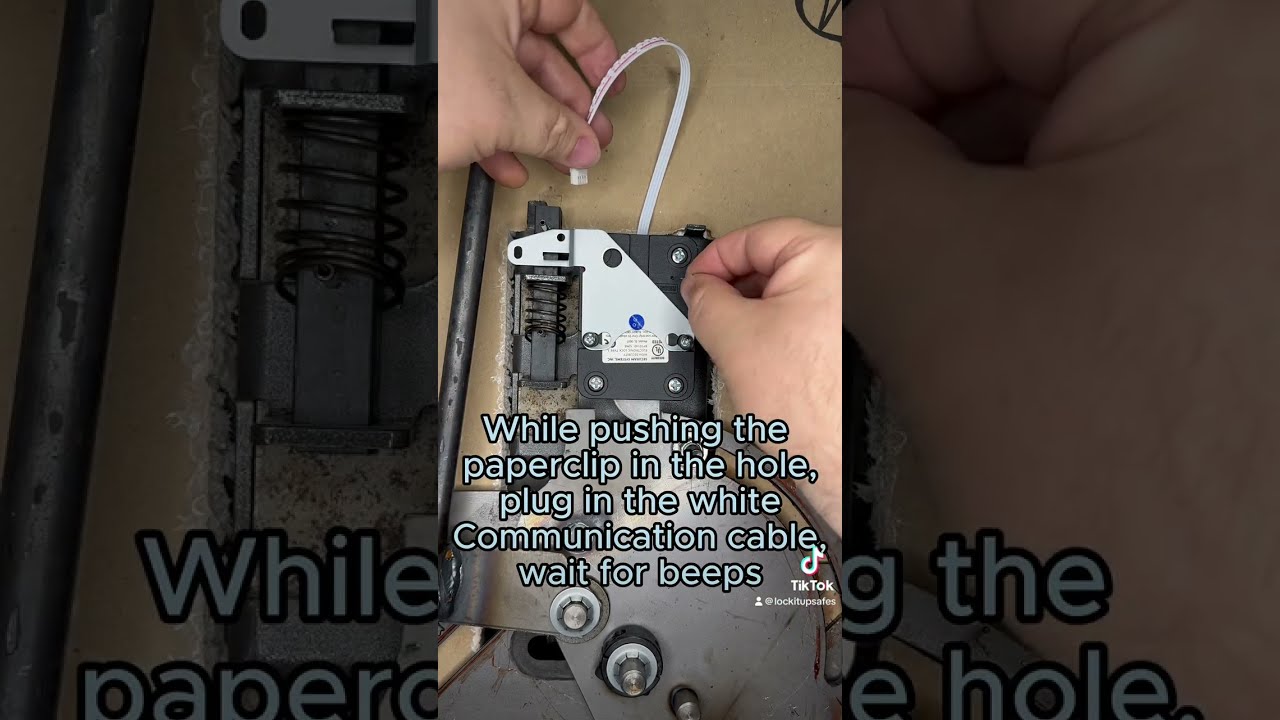
A tiny recessed hole sits directly behind this sticker. You will need a straightened paper clip to reach the button hidden underneath.
Execute the Mechanical Reset Sequence

This specific sequence clears all user data and restores the lock to its original factory state. Precision is vital for the Securam lock reset to succeed.
Discharge Internal Capacitors
Insert your straightened paper clip into the reset hole. Press the internal button three times in quick succession.
This action clears residual power stored in the capacitors. It wipes temporary memory data to prepare the system for a fresh start.
Reconnect Power While Holding Button
Press and hold the reset button down firmly with your paper clip. Do not release pressure at any point during this step.
While holding the button, reconnect the lock cable to the keypad. Ensure the cable clicks fully into place to restore power.
Wait for Audio Confirmation
Keep pressing the button after reconnecting the cable. Listen closely for a distinct beep from the keypad.
• The beep confirms the reset sequence has initiated successfully.
• Release the paper clip only after you hear this sound.
Your lock now operates on factory default settings with all custom codes erased.
Verify Default Access Codes

A successful Securam lock reset reinstates specific default combinations. You must use these codes to enter the safe immediately after resetting.
| Code Type | Default Value | Primary Function |
|---|---|---|
| User Code | 666666 | Daily safe access |
| Manager Code | 123456 | Programming mode entry |
| Alternate Manager | 111111 | Backup admin access |
Try 123456 first for manager functions. If that fails, attempt 111111 as some models use this alternative. The user code remains 666666 across all SafeLogic variants.
Test the Factory Settings
Close the locking bolts manually to simulate a locked state. Enter 666666 and turn the handle to ensure the door opens smoothly.
Repeat this test with the manager code to confirm you can access programming modes. Do not proceed until both codes work reliably.
Reprogram Your Access Credentials
Leaving default codes active creates a significant security risk. Change them immediately after confirming your Securam lock reset worked.
Enter Programming Mode
Press the 0 key six times to display 000000. Enter the current manager code (123456 or 111111).
The lock will beep or flash to indicate it is ready for new input.
Set New Manager and User Codes
Input your desired 6-digit manager code and enter it again to confirm. The system will beep to save this change.
Repeat the process for the user code:
1. Press 000000 to re-enter programming mode.
2. Enter the current user code (666666).
3. Type your new 6-digit code and confirm it by entering it again.
Validate Your New Combination
Lock the bolts manually and test your new user code. Turn the handle to verify the door opens without issue.
Warning: Never close the safe door permanently until you have tested both new codes multiple times. If they fail, repeat the reset procedure.
Update Recovery Code for Liberty Safes
Owners of Securam TopLit models in Liberty Safes can update their recovery code without a full wipe. This keeps your current user settings intact.
Retrieve Your Existing Recovery Code
Visit the Liberty Safe website and navigate to the Support section. Fill out the Combination Key Request form with your serial number.
Liberty Safe will provide your existing recovery code. They cannot open the safe if you lose both your main code and recovery code.
Program the New Recovery Code
Ensure the safe door is fully open before starting. Press 000000 and enter your current recovery code when prompted.
Type your new 6-digit recovery code and confirm it by entering it again. The lock will beep to validate the update.
Test the Backup Credential
Engage the locking bolts while the door remains open. Enter your new recovery code and turn the handle.
The bolts should retract smoothly. Store this new code in a secure location separate from your safe immediately.
Troubleshoot Common Reset Failures
Even careful users encounter issues during a Securam lock reset. Here is how to resolve the most frequent problems.
No Beep During Reset
Cause: Capacitors were not fully discharged or the cable was not connected while holding the button.
Fix:
• Disconnect the cable completely.
• Press the reset button three times rapidly.
• Hold on the fourth press and reconnect the cable.
• Wait up to 5 seconds for the confirmation beep.
Default Codes Do Not Work
Cause: You may be using the wrong manager default variation.
Solution: If 123456 fails, try 111111. If neither works, the reset likely failed. Repeat the mechanical reset ensuring you press the button three times before holding it.
Recovery Code Request Denied
Cause: Missing proof of ownership or an incorrect serial number submission.
Fix: Locate your serial number on the door frame or back of the safe. Resubmit your request with clear purchase documentation.
Required Tools and Compatibility

You do not need complex equipment to perform a Securam lock reset. Simple household items are usually sufficient.
Essential Tools List
• Straightened paper clip: Must be stiff enough to press the recessed button firmly.
• Screwdriver: Required only if your interior panel uses screws.
Model Compatibility Check
| Model Series | Mechanical Reset | Recovery Code Update |
|---|---|---|
| SafeLogic Basic | Yes | Yes |
| SafeLogic Backlit | Yes | Yes |
| Topet / TopLit | Yes | Yes |
| Legacy Non-SafeLogic | Variable | Check Sticker |
Look for the white reset sticker on your lock body. If present, the paper clip method applies to your unit.
Security Best Practices for Safe Owners
A successful reset is only the first step in securing your valuables. Adopt these habits to maintain long-term safety.
Store Codes Securely
Write down your new codes and place them in a locked drawer or password manager. Never save them in phone notes or email drafts.
Avoid obvious patterns like birthdays or sequential numbers. Unique combinations offer the best protection against guessing.
Maintain Your Reset Access Point
The white reset sticker is critical for future emergencies. If it gets damaged, mark the hole location with a permanent marker.
Take a photo of the interior mechanism for your records. Avoid peeling the sticker off completely as it helps identify the reset point later.
Final Steps After Completing Reset
Your Securam lock reset is nearly complete. Perform these final actions to ensure everything functions correctly.
- Reattach the interior panel securely using screws or clips.
- Test the lock and unlock cycle 3 to 5 times with your new codes.
- Check for low battery warnings and replace batteries if needed.
- Store your recovery code in an off-site secure location.
Frequently Asked Questions About Securam Lock Reset
What happens if I forget my new code after a reset?
If you forget your new code, you must perform the mechanical Securam lock reset again. This restores the factory defaults (666666 and 123456) so you can regain access.
Can I reset my Securam lock without opening the door?
No. A mechanical factory reset requires interior access to press the hidden button. You must be able to remove the interior panel to proceed.
How do I know if my Securam lock reset was successful?
You will hear a distinct beep after reconnecting the cable while holding the reset button. Additionally, the default code 666666 will open the safe.
Does resetting the lock erase my recovery code?
A mechanical factory reset erases all codes including the recovery code. However, updating the recovery code via the keypad does not erase your user or manager codes.
What if the default manager code 123456 does not work?
Try the alternate default code 111111. Some SafeLogic models use this variation. If neither works, repeat the reset procedure to ensure it completed fully.
Can Liberty Safe open my safe if I lose all codes?
No. Liberty Safe cannot open your safe if both the main combination and recovery code are lost. The mechanical reset is your only option if you have interior access.
Key Takeaways for Your Securam Lock Reset
Performing a Securam lock reset restores access when codes are lost but requires interior panel removal. Always change default codes immediately and test them before closing the door.
Keep your recovery code in a separate secure location to avoid future lockouts. With these steps completed, your safe is ready for secure daily use.